How Defender Actually Works
Introduction
At Ingehack, I spent way too long blindly throwing obfuscated tools at a target. Change a string here, re-encode there, try a different obfuscator, run it again. Sometimes something worked. Most of the time it didn’t. And the frustrating part was that I had no real idea why, I was just guessing and hoping that enough random changes would eventually get me through.
That’s completely the wrong way to approach this.
Defender, and EDRs in general, don’t work as one big scanner that either catches you or doesn’t. They operate across three distinct layers, each catching different things at different points in execution. If you don’t know which layer is catching you, you’ll keep fixing the wrong problem. You’ll patch AMSI when the memory scanner is what’s killing you. You’ll spend hours hunting signatures when the issue is behavioral. You’ll waste time on the wrong layer while the right one sits untouched.
AMSI, In-Memory Script Scanner
AMSI, the Antimalware Scan Interface, is a Windows API that sits between scripted content and execution. Before PowerShell, VBScript, VBA macros, mshta, or the .NET CLR runs anything, they pass the content to AMSI, which hands it off to whatever AV provider is registered, usually Defender. The result comes back before a single instruction of your content executes. Clean: execution proceeds. Dirty: blocked.
One thing worth understanding early: AMSI is an interface, not a product. Microsoft defined it, AV vendors implement it. Defender is just the default registered provider. In enterprise environments, CrowdStrike, SentinelOne, or others might be registered alongside it. This matters when thinking about bypasses, patching Defender’s AMSI implementation doesn’t touch anyone else’s.
How AmsiScanBuffer Gets Patched
The classic bypass targets AmsiScanBuffer, the core scanning function inside amsi.dll. The approach is: use VirtualProtect to make that function’s memory region writable, then overwrite the first few bytes with xor eax, eax followed by ret.
Here’s why that works: AmsiScanBuffer is supposed to scan whatever content you pass it and return a result code. xor eax, eax zeroes out the eax register, which holds the return value on x64 Windows, and ret immediately exits the function. The caller gets back 0, which maps to AMSI_RESULT_CLEAN. The scan never actually runs. The function just lies about what it found.
Simple, and it worked for years. It doesn’t anymore, at least not at the entry point.
Why Entry Point Patching Is No Longer Safe
Defender now detects this using a memory scan triggered by kernel ETW events. The moment VirtualProtect is called on a region inside amsi.dll and data gets written to it, an event is emitted at the kernel level. Defender picks that up, checks the AmsiScanBuffer function bytes, sees the patch, and kills your process. You can’t suppress these kernel events from userland, they happen below the level you can reach.
The community’s answer to this has been to get creative with where and how the patch lands.
One approach: patch at a different offset. Instead of hitting the entry point, patch at +0x14, after the initial register setup, pop the already-pushed registers off the stack and return. Same result, different location, different bytes. Defender’s memory scan is anchored to the entry point specifically, so it misses this.
Another approach: zero out the buffer length argument. AmsiScanBuffer takes a length parameter for how many bytes to scan. Replace the instruction that loads that argument with sub edi, edi. The scan now processes zero bytes. Nothing gets seen.
A cleaner option altogether: hardware breakpoints via a Vectored Exception Handler. Set a hardware breakpoint on AmsiScanBuffer, catch it in your exception handler, and manipulate the return value there. No VirtualProtect, no write to amsi.dll, no memory modification at all. The function bytes stay untouched. Vendors are starting to build ETW-based detections around SetThreadContext for this reason, but in practice it’s still relatively clean against most vendors right now.
The deepest option, and the cleanest from a detection standpoint, is preventing amsi.dll from loading at all. In native processes or newly spawned processes where the CLR hasn’t initialized yet, you can hook the DLL load process so amsi.dll never gets mapped. No initialization, no scan surface. Tools like SharpBlock and Ruy-Lopez work this way. No known behavioral detections for this currently.
DLL Preloading Through Module Cache Collision
Windows maintains a per-process cache of loaded modules. It doesn’t allow multiple DLLs with the same name to be loaded simultaneously. Once amsi.dll is loaded and cached, any subsequent LoadLibrary("amsi.dll") call returns the already-loaded instance. You can exploit this by loading a benign amsi.dll of your own before the legitimate AMSI gets a chance to initialize. When the CLR or PowerShell later tries to set up AMSI, they get your version, which has a harmless AmsiScanBuffer that always returns clean.
It’s functionally equivalent to other DLL prevention techniques like SharpBlock, but it works differently: instead of hooking the load process to block AMSI, you’re racing to load first. The surprising part is that this isn’t being detected. It should be straightforward from a behavioral standpoint, loading amsi.dll from an unexpected location, or loading it before system initialization completes. The fact that Defender isn’t flagging this is an interesting gap, probably because it has to balance accurate detection against false positives in legitimate scenarios (system updates, software installations, compatibility layers all involve unusual DLL loads). Perfect detection is hard when context matters.
The Core Concept: Creativity Over Technique Count
At this point I could list another twenty different AMSI bypass techniques, and they all exist. Each one approaches the problem from a different angle: patching at different offsets, zeroing out arguments, using hardware breakpoints, preventing DLL loads entirely, DLL preloading, hooking the load process, intercepting provider callbacks. And that’s not even getting into the variations within each approach.
The important thing to understand is that this is the concept being used here: each solution is more creative than the previous one. The field moves because people stop asking “how do I bypass AMSI with the known technique” and start asking “what assumption is AMSI making that I can break?” Once Defender detects entry point patching, the question becomes “what if I patch somewhere else?” or “what if I don’t patch at all?” And then “what if the DLL never loads?”
The r-tec blog linked below has a comprehensive breakdown of 20+ AMSI bypass techniques and their current effectiveness.
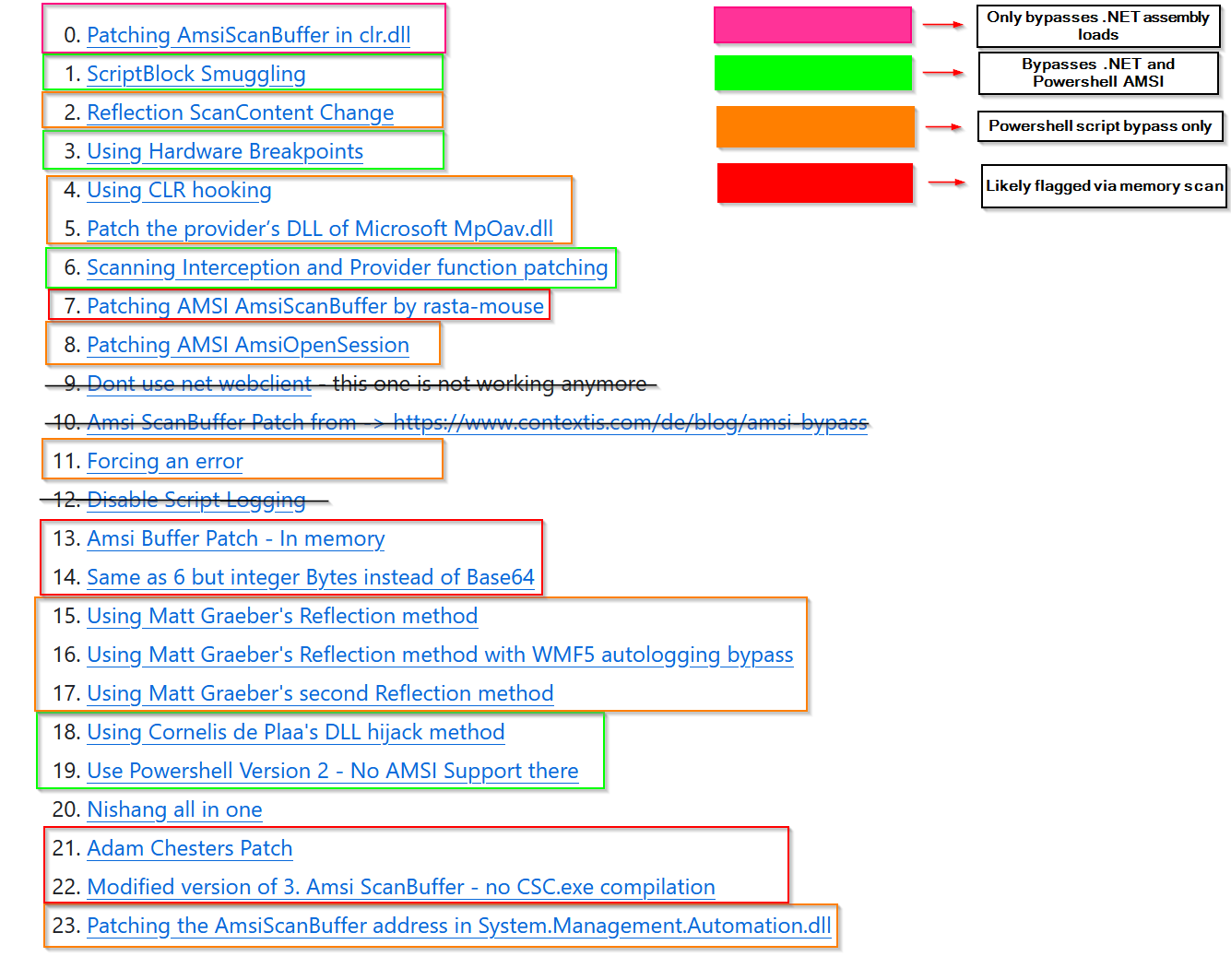
The code for all of these techniques is collected in this repo.
The specific technique matters less than understanding the underlying principle: every detection has a gap, and the gaps keep moving.
Honestly, and this is just my personal experience after going through several lab environments, I’m still skeptical about how relevant AMSI actually is in real production environments. I haven’t run into it as a genuine obstacle outside of lab contexts, and I think that step gets included in most lab scenarios specifically to teach you the concept. Real hardened environments have bigger problems than AMSI. EDRs with their own provider implementations, kernel-level telemetry, behavioral analysis that operates well below the AMSI layer.
Static On-Disk Scanner
The static scanner catches you before execution even starts. When a binary touches disk, or gets mapped into memory, Defender runs signatures over it and compares against its database. This layer doesn’t care what your code does. Only what it looks like.
What Signatures Actually Are
A signature isn’t always a simple sequence of bytes. Modern static detection is a mix of: exact byte pattern matching, string matching (the string Invoke-Mimikatz appearing anywhere is enough on its own), Yara-style rules that match structural patterns, and heuristics that flag suspicious combinations of characteristics. The practical implication is that you can’t always find and null out a single flagged region. Sometimes the detection is composite, triggered by the combination of several things that individually look fine.
The IAT, Your Binary’s Intent Declaration
One of the most overlooked static detection surfaces is the Import Address Table. Every PE binary carries an IAT, a data structure that lists every external function the binary imports, resolved before your code runs a single instruction. It’s essentially a declaration of your binary’s intentions, and Defender reads it that way.
VirtualAlloc + WriteProcessMemory + CreateRemoteThread appearing together in the IAT is a classic process injection pattern. Defender sees that combination before your code executes anything. The binary has already declared what it plans to do.
This is part of why direct syscalls matter from a static evasion angle. Instead of importing Win32 API functions, which show up in the IAT, you issue the syscall instruction directly with the correct Syscall Service Number (SSN), talking to the kernel without going through any API layer. No import means no IAT entry. No IAT entry means nothing to match against statically. Your binary no longer announces its intentions.
The Gocheck Workflow
When you need to find exactly what’s flagged in a payload, the process is basically a binary search against Defender:
- Submit the binary, it gets flagged
- Split it in half, test each half
- The half that triggers → split again
- Repeat until you’ve isolated the flagged byte range
Tools like gocheck automate this.
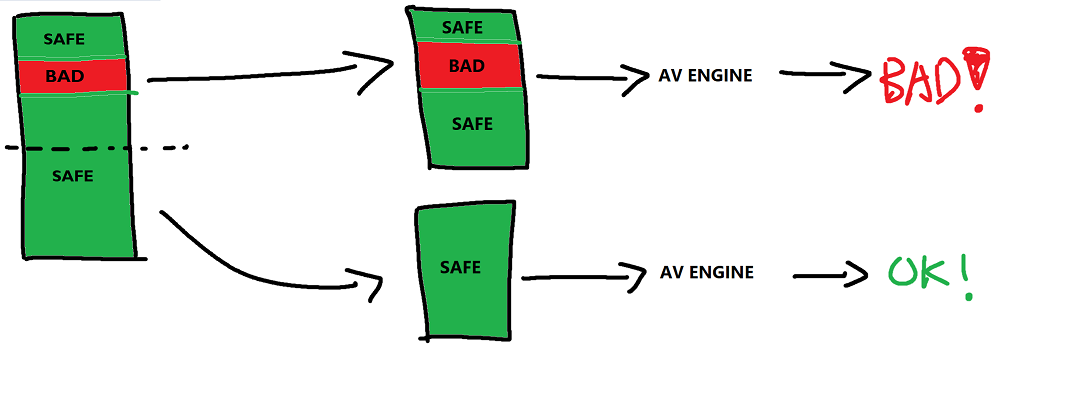
Once you’ve found the region, you null it, encrypt it, or restructure around it.
Don’t test your payloads on VirusTotal. Every engine that scans your binary can potentially feed that signature back into their databases. You burn your payload before you’ve used it once, and you might be signing it for every other operator running a similar setup. Test locally against Defender in an isolated VM. Use ThreatCheck or gocheck. Keep VT for analyzing samples you didn’t write.
Behavioral Scanner, Runtime Detection
This is the layer that catches you after your code is already running. It doesn’t care about signatures, doesn’t care about AMSI, it watches what your code does at runtime and flags patterns that look malicious regardless of what the binary looked like on disk.
Userland Hooks
The EDR injects a DLL into your process early in its lifecycle and patches the first bytes of sensitive NTAPI stubs, NtAllocateVirtualMemory, NtCreateThreadEx, NtWriteVirtualMemory, NtOpenProcess among others. The patch redirects execution through the EDR’s inspection code before the real kernel call goes through. Every sensitive API call you make gets examined and potentially blocked.
This is also where direct syscalls help at the behavioral layer, not just statically. If you issue the syscall instruction directly with the right SSN, you never touch the patched stub. The hook is in the stub. You skipped it. It never fires.
ETW, Event Tracing for Windows
ETW is kernel-level telemetry that logs API call sequences, memory operations, process and thread creation events. It runs independently of userland hooks. Even if you’ve cleanly bypassed every hook in your process, ETW is still building a picture of what you’re doing and feeding it to Defender’s engine. You can’t suppress this from userland. It operates below the level you can reach.
Kernel Callbacks
The EDR driver registers callbacks like PsSetLoadImageNotifyRoutine and PsSetCreateProcessNotifyRoutine at the kernel level, notifications for image loads, process creation, thread creation. Completely independent of anything in userland. You can’t hook your way out of kernel callbacks from a userland process.
The Process Initialization Window
To understand why these mechanisms sit where they do, it helps to look at how Windows actually initializes a process. When a new process starts, the kernel maps the executable and ntdll.dll into memory and creates a thread. That thread starts at ntdll!LdrInitializeThunk, which calls LdrpInitializeProcess to set up the PEB, resolve imports, and load required DLLs. At the end of initialization, ZwTestAlert flushes the thread’s APC queue. This is where EDR drivers that inject via NtQueueApcThread get their code to run. Only after all of this does execution reach the actual process entrypoint.
That window, between process creation and entrypoint, is what the EDR has to work within. Load too early and the process crashes. Load too late and malicious code could have already run. Most EDRs have settled on loading as late as possible in that window while still getting hooks in before the entrypoint. Understanding this timeline is what makes techniques like EDR Preload possible, finding an execution point earlier in that chain than the EDR expects. More on that in the next post.
ML-Based Behavioral Analysis
This is worth calling out explicitly because it changes the nature of behavioral evasion in a real way. Modern EDRs are increasingly running ML models over behavioral telemetry. It’s no longer purely rule-based. A sequence of API calls that individually look completely normal can get flagged because the model has seen that exact sequence in training data associated with known malware. There’s no fixed signature to find. There’s no rule to identify and work around. The detection comes from the aggregate behavior pattern.
This is the direction the field is moving, and it makes behavioral evasion meaningfully harder than it was a few years ago. The problem has shifted from “don’t match this signature” to “don’t look like malware to a model trained on millions of samples.” That’s a different problem entirely.
Why VirtualAlloc RWX + CreateThread Always Dies
VirtualAlloc with PAGE_EXECUTE_READWRITE followed immediately by CreateThread on that region is a textbook behavioral flag. Not because of any specific byte pattern, because of what it is: allocate memory, make it executable, run it immediately. The sequence is flagged at the kernel level through ETW regardless of what AMSI thought and regardless of what the binary looked like on disk. This is the naive loader pattern, and it gets caught every time.
Diagnosing Which Layer Is Catching You
Before changing anything, figure out which layer is the actual problem:
- Binary flagged on disk before execution → static scanner. Start with gocheck or ThreatCheck.
- Script blocked before your code runs → AMSI. Check whether the patch landed, whether a secondary provider is still active, whether script block logging is capturing you anyway.
- Code ran briefly then died → behavioral scanner. Not about appearance anymore, it’s about what your code did.
Getting this right changes everything. The layers are distinct. Treat them that way.
Two Distinct Problems
Something I think is worth being explicit about, and that I haven’t seen addressed cleanly in most writeups, is that there are two fundamentally different situations when working against Defender, and they each come with their own struggles. That’s how I see it at least.
Problem 1, Getting a Foothold and Persistence
You’re coming in from outside, completely blind. Your entry point, a phishing payload, an HTA, whatever, gives you no output. You don’t know if it ran. You don’t know if it got caught. You don’t know which layer stopped it. You’re troubleshooting in the dark.
And on top of that, getting a foothold almost always means establishing an outbound connection, a beacon, a C2 callback. That connection pattern itself is a behavioral signal. A process spawning, reaching out to an unknown IP, and maintaining persistent communication is exactly what behavioral analysis and network monitoring are built to flag. You’re fighting the three endpoint layers and network-level detection at the same time.
Persistence makes it worse. Whatever you plant has to survive reboots, AV rescans, and potentially someone actively looking for it.
Problem 2, Running Tools Post-Access
You’re already on the machine with a session. Now you want to run Mimikatz or Rubeus, and Defender kills it immediately.
This is a different problem. It’s not just static detection, though that’s very much present, Mimikatz has some of the most widely signatured bytes around. The real issue is at the syscall level. Credential dumping is a specific chain of operations: open a handle to LSASS, read its memory, pull credential buffers. Each individual syscall might look fine on its own. The sequence doesn’t. And with ML-based behavioral analysis running over that sequence, there’s no fixed rule to bypass. The model just knows what credential dumping looks like.
You have more control in this scenario since you’re already on the machine. But what you’re trying to do is inherently suspicious at the syscall level in a way that’s harder to hide than a delivery payload.
These two problems need different approaches. What gets you the foothold is largely irrelevant post-access, and vice versa.
Where This Leaves Us
This post covered the three defense mechanisms and how they’ve evolved. The classic AmsiScanBuffer entry point patch isn’t safe anymore. Static detection has grown beyond simple byte patterns into composite heuristics and IAT analysis. Behavioral analysis now includes ML models that don’t rely on fixed rules.
Next post, we’ll get into how to actually approach each of the two problems above, the techniques, the reasoning, and where thinking outside the box starts to matter a lot. Read it here.
References
https://www.hackmosphere.fr/bypass-windows-defender-antivirus-2025-part-2/
https://www.r-tec.net/r-tec-blog-bypass-amsi-in-2025.html
https://malwaretech.com/2024/02/bypassing-edrs-with-edr-preload.html